Table of Contents >> Show >> Hide
- What a TI 99/4A Weather Station Really Is
- Why the TI-99/4A Is Such an Entertaining Choice
- How the Better-Known TI 99/4A Weather Station Worked
- Why This Project Feels So Right for the TI-99/4A
- What the TI Brings That a Modern Microcontroller Does Not
- Lessons for Modern Makers and Collectors
- Hands-On Experience: What Living With a TI 99/4A Weather Station Feels Like
- Conclusion
If ever there were a project designed to make retro-computing fans grin like kids in an arcade, it is a TI 99/4A weather station. Not because it is the easiest way to check the forecast. Obviously it is not. Your phone can do that before your coffee cools. But that misses the whole point. A TI 99/4A weather station is charming precisely because it takes a famously quirky early-1980s home computer and asks it to do something practical, nerdy, and a little bit ridiculous: monitor the sky.
That idea has real roots in the TI community. In modern retro-hobby circles, the phrase TI 99/4A weather station most often refers to a wireless maker project that used a vintage TI-99/4A as the display and control brain for a network of sensors. The TI did not magically become a cloud-connected meteorological beast overnight. Instead, the project cleverly paired the old machine with newer helper hardware, then let the TI do what old machines do best: turn raw data into something human, visible, and weirdly satisfying.
And honestly, that is the magic of the whole thing. A weather station is just data with a jacket on. Temperature, pressure, humidity, rainfall, wind speed, wind direction, time stamps. A retro computer loves that kind of work. It can log it, label it, graph it, print it, and make you feel like you are operating a suburban version of mission control.
What a TI 99/4A Weather Station Really Is
Let’s clear up one possible misunderstanding right away. The TI 99/4A weather station was not a mass-market Texas Instruments product from the original 1980s lineup. You did not stroll into a mall in 1983 and pick up a boxed cartridge labeled Weather Wizard 9000 next to Parsec and a joystick. What people usually mean today is a custom or hobbyist-built station that uses the TI-99/4A as the interface computer.
That matters, because the best-known version of the idea is a modern retro build. In that setup, a TI-99/4A communicated with an Arduino-based remote sensor package through XBee wireless modules. The sensor side handled the dirty work of reading the environment. The TI side handled the display, commands, and the sort of gloriously hands-on computing experience that modern gadgets work very hard to hide from you.
So the TI was not doing every single low-level measurement on its own. That would have been heroic, but also a fast route to a workbench full of adapters and colorful language. Instead, the project used the TI exactly where it shines: as a manager, presenter, and operator-facing computer. In modern engineering terms, it was the front end with vintage swagger.
Why the TI-99/4A Is Such an Entertaining Choice
The TI-99/4A came out in 1981 and built a reputation as one of the more unusual home computers of its era. It used Texas Instruments’ TMS9900 processor, a 16-bit CPU at a time when many home machines were still living happily in 8-bit neighborhoods. That headline made it sound futuristic, and in some respects it really was. The machine also had a memorable expansion philosophy, its own TI BASIC environment, and a hardware personality that still inspires unusually loyal fans.
But the TI was never a simple machine. It mixed ambition with eccentricity. The architecture included memory-mapped devices, a Communications Register Unit, or CRU, for bit-level I/O, and an ecosystem of sidecar devices and later expansion-box cards. In plain English, the system could talk to peripherals in ways that made it genuinely interesting for hardware tinkerers. That is one reason a weather station makes so much sense for it. A weather station is, at heart, a conversation between sensors and software.
The serial side of the TI world also helps. With the appropriate interface hardware, the TI-99/4A could work with RS-232 serial ports and other external devices. For hobbyists, that opens the door to bridging old and new technology. Once you can move data in and out reliably, the old computer stops being a museum piece and starts behaving like a working node in a larger system.
How the Better-Known TI 99/4A Weather Station Worked
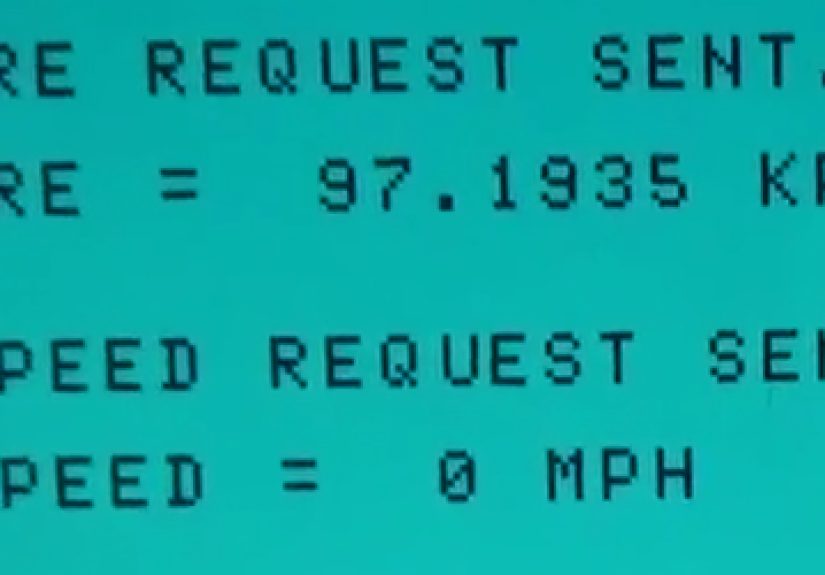
The modern project most commonly associated with the phrase used an Arduino-compatible board on the sensor side and a TI-99/4A on the display side. Two XBee modules created a wireless serial link at 9600 bps. The basic idea was elegant: the TI would send a command, the remote station would read the relevant sensor, and the result would come back over the air.
That may sound modest now, but it is exactly the kind of clean design that makes a retro build sing. The TI did not need to pretend it was a twenty-first-century microcontroller. It just needed to ask intelligent questions and display useful answers.
The Sensor Stack
The sensor package evolved over time, which is exactly how real maker projects behave when they are built by human beings instead of Hollywood prop departments. Early experiments included temperature sensing, then the system expanded to cover a broader environmental picture. The build documented pressure and humidity sensors on a SparkFun weather shield, plus a digital temperature sensor, wind speed, wind direction, and rainfall measurement. There was also discussion of using a light sensor for logging sunrise and sunset behavior if the enclosure allowed it.
That sensor mix is what turns a “cute project” into an actual weather station. Temperature alone is a thermometer with ambition. Add barometric pressure, humidity, rain, and wind, and suddenly you have a machine that can tell a story about changing conditions instead of merely announcing that it feels warm outside.
Data Handling
One especially clever detail was the way temperature data was handled in the communication chain. Analog readings on the Arduino side were converted to a floating-point temperature value, turned into a string, then sent byte by byte to the TI. The TI rebuilt the value on its end. That is a very retro-modern solution: use the newer board to smooth out the messy sensor details, but let the older computer remain fully involved in the final logic and presentation.
The same pattern applied to other measurements. Humidity, pressure, and clock values were requested by command. The Arduino responded with data. The TI, meanwhile, could display the output, organize it, and potentially log it for later use. It is less “smart appliance” and more “small scientific instrument with keyboard sounds.”
Wireless and Solar Power
The wireless link added a lot of style points, but it also made practical sense. Running a cable across a yard to a weather station is not exactly glamorous. The build therefore used XBee modules for communication and attempted solar power for the remote unit. A solar charger, panel, and rechargeable batteries were tested so the station could operate without a permanent power cord.
This is where the project became wonderfully real. Solar power sounded great, but battery life, charging time, panel output, and voltage requirements created headaches. In other words, the weather station became a weather station and a power-management puzzle at the same time. That is not failure. That is engineering wearing muddy boots.
Why This Project Feels So Right for the TI-99/4A
The TI-99/4A has always inspired a certain type of loyalty because it rewards people who enjoy understanding systems. It is not a lazy computer. You do not casually stumble into mastering it while half-watching television. It asks you to learn how the machine thinks: how its memory works, how its peripherals connect, how TI BASIC behaves, how expansion hardware changes what is possible.
A weather station plays directly into that culture. It turns the computer into an instrument panel. The keyboard is not just for typing a game loader. It becomes the way you query the world. Request the temperature. Check the barometric pressure. Look at wind data. Log the day’s rainfall. It is wonderfully tangible.
There is also something deliciously poetic about using a machine from the Reagan era to monitor the weather in near real time. The TI-99/4A was once sold as a home computer with educational, practical, and family-friendly ambitions. A weather station reconnects it with that spirit. Instead of sitting on a shelf and collecting admiration dust, it is back to being useful.
What the TI Brings That a Modern Microcontroller Does Not
To be fair, an Arduino or Raspberry Pi can run a weather station more cheaply, more easily, and with far less drama. But efficiency is not the point here. The TI-99/4A brings theater.
It brings a full keyboard and screen-centered interaction model. It brings the tactile delight of issuing commands on a vintage machine that still feels like a computer rather than a hidden board taped into a plastic box. It brings historical context. It brings constraints, and constraints are often where creativity starts throwing punches.
It also invites software personality. A TI-based station does not have to look sterile. It can use color, text modes, menus, maybe even a little old-school flair in the interface. On a machine known for graphics tricks and a devoted programming culture, that matters. A weather station becomes not just a measurement system, but a piece of living retro software.
Lessons for Modern Makers and Collectors
If you are a collector, the TI 99/4A weather station idea is a reminder that vintage hardware does not have to remain frozen in nostalgia. You can keep the aesthetic and the computing experience while outsourcing the hardest parts to modern helper devices. That is not cheating. That is survival with style.
If you are a maker, the project is a master class in division of labor. Let the contemporary hardware handle the sensor protocols, voltage quirks, and wireless communication details. Let the vintage computer handle user interaction, logging logic, and presentation. When each part does what it is best at, the whole system stops being a gimmick and starts being genuinely fun.
And if you are somewhere in the middle, just trying to decide whether a forty-year-old computer deserves bench space in your workshop, this project answers with a cheerful yes. It may not be the cheapest way to build a home weather station, but it is certainly one of the most memorable.
Hands-On Experience: What Living With a TI 99/4A Weather Station Feels Like
Using a TI 99/4A weather station is not like using modern smart-home gear, and that is exactly why people fall for it. A modern weather dashboard tries to disappear. It wants to be frictionless, silent, automatic, invisible. The TI does the opposite. It makes the experience feel deliberate. You turn on the console, wait for the familiar startup ritual, and suddenly checking the weather feels less like glancing at an app and more like opening a small laboratory.
There is something unexpectedly satisfying about asking an old machine for current conditions and watching it respond in plain text. Temperature is no longer just a number floating in a phone notification. It becomes a result. A reading. A tiny event. When the TI asks the remote unit for pressure or humidity, the process feels mechanical in the best possible way, like the system is doing actual work instead of pretending nothing interesting is happening behind the glass.
The keyboard changes the mood too. Typing commands, selecting menu items, or triggering logging routines gives the weather station personality. It feels like operating equipment instead of consuming a service. That difference sounds small until you sit in front of it for a while. Then it clicks. The machine is not merely informing you that the wind picked up. It is inviting you to investigate why.
Of course, the romance comes with quirks. Vintage systems are wonderfully cooperative right up until they are not. Maybe the serial link needs another test. Maybe the remote sensors need recalibration. Maybe the power arrangement behaves like a drama club on cloudy days. Maybe you discover, once again, that old hardware was built in an era when user patience was considered a standard accessory. A TI weather station does not eliminate those frustrations. It turns them into part of the hobby.
But that is also where the experience becomes rewarding. Every improvement feels earned. Getting clean temperature readings feels good. Adding rainfall feels better. Getting the wireless side stable feels like you have personally negotiated peace between two centuries of electronics. Even the problems become stories. “I spent the afternoon chasing voltage issues in a solar-powered weather station controlled by a TI-99/4A” is a much more entertaining sentence than “my app updated automatically.”
There is also a strange emotional quality to the whole setup. The TI-99/4A was built for kitchens, dens, and family rooms at a time when home computing still had a frontier smell. Turning it into a weather station gives it a job that feels both practical and nostalgic. It is no longer just a collectible object from the early microcomputer era. It is part of the house again. It has duties. It has a reason to be powered on other than showing off to visitors who say, “Wow, I haven’t seen one of those in forever.”
And yes, visitors absolutely do say that. Then they see the live environmental readings and their expression changes from polite nostalgia to genuine curiosity. Suddenly the machine is not just old. It is useful. It has become one of those rare retro projects that can charm non-enthusiasts too. People understand weather. They understand wind and rain and temperature. Once the TI is attached to something familiar, it stops being an obscure relic and starts feeling like a very cool, very opinionated appliance from an alternate timeline.
That is probably the best way to describe the experience overall: a TI 99/4A weather station feels like a practical device from a timeline where home computers became more hands-on, more visible, and a lot more fun. It is slower than modern gear, fussier than modern gear, and undeniably less convenient. But convenience is cheap. Character is rare. This project has character for days.
Conclusion
The TI 99/4A weather station is not memorable because it is the fastest route to a forecast. It is memorable because it proves something delightfully stubborn: a vintage home computer can still do meaningful work when paired with smart design. The TI-99/4A brings the personality, interface, and historical charm. Modern helper hardware brings the sensors, wireless link, and low-level data handling. Together they create a project that is educational, functional, and wildly more interesting than another anonymous plastic gadget blinking on a shelf.
In the end, that is why the idea sticks. It is a celebration of retro computing without turning the machine into a museum fossil. It honors the TI’s strengths, respects its limits, and gives it a job worthy of its strange little legacy. Plenty of devices can tell you whether rain is coming. Very few can do it while making you feel like the neighborhood’s most stylish weather nerd.