Table of Contents >> Show >> Hide
- Why Repairability Matters (Beyond Saving Your Wallet’s Feelings)
- The T14’s Repairability Reputation: What Changed?
- What’s Actually Easy to Replace in a Lenovo ThinkPad T14?
- The Secret Sauce: Design Choices That Make the T14 Easier to Fix
- A Realistic “Fix-It” Toolkit for T14 Owners
- 5 Common Repairs and Upgrades the ThinkPad T14 Makes Refreshingly Simple
- 1) SSD upgrade (a quick way to make an older laptop feel new)
- 2) RAM upgrade (because browsers are basically operating systems now)
- 3) Battery replacement (the “my laptop used to last all day” fix)
- 4) Keyboard replacement (especially after a spill)
- 5) Fan cleaning and thermal servicing (the “why does it sound like a drone?” fix)
- Why It’s Not a Perfect 10/10: The Honest Tradeoffs
- Buying (or Spec’ing) a T14 for Maximum Repairability
- Repairability = Sustainability (Without the Lecture)
- FAQ: Lenovo T14 Repairability and Fixing Basics
- Conclusion: The T14 Makes “Fix It” Feel Normal Again
- Bonus: of Real-World Repair Experiences with the Lenovo T14
Most laptops today are built like sleek little mystery boxes: gorgeous on the outside, and on the inside…
let’s just say they don’t exactly want you in there. The Lenovo ThinkPad T14 flips that script.
Instead of treating repairs like forbidden magic, the T14especially the newer, repair-focused generationsleans into
something wonderfully practical: repairability.
Translation: you can replace the parts that actually wear out (battery, keyboard, storage, memory) without needing a
microscope, a heat gun, or a very patient relationship counselor. If you’ve ever watched a laptop repair video and thought,
“Wow, that looks like open-heart surgery,” the T14 is the rare machine that makes you think, “Wait… I can do this.”
Why Repairability Matters (Beyond Saving Your Wallet’s Feelings)
Repairability isn’t just a buzzword for people who own tiny screwdrivers and call them “my babies.” It’s a practical advantage
for normal humans and for businesses running fleets of laptops.
- Lower total cost of ownership: Replacing a battery or SSD is cheaper than replacing an entire laptop.
- Less downtime: A quick part swap can get you back to work the same day instead of waiting on a repair depot.
- Longer usable life: Upgrading RAM and storage keeps an older laptop fast enough for modern workloads.
- Less e-waste: Fixing one part beats tossing a whole device because a single component failed.
The ThinkPad line has long been associated with durability, but Lenovo’s newer push is about something even more empowering:
making repairs and upgrades realistic for end users and IT teams.
The T14’s Repairability Reputation: What Changed?
A big reason the Lenovo T14 has been getting attention is the modern repairability approachespecially in the ThinkPad T14 Gen 5 era,
which was designed with repairability in mind and scored extremely high in independent repairability grading.
In plain terms, Lenovo leaned into a friendlier internal layout: more modular parts, clearer markings, and easier access to the
components you’re most likely to replace. That includes moves like using socketed memory (DIMM/SODIMM slots) rather
than soldered RAM on certain configurations, plus easier battery removal and straightforward access to storage. The goal is simple:
repairs that feel like “maintenance” instead of “a crime scene investigation.”
What’s Actually Easy to Replace in a Lenovo ThinkPad T14?
“Repairable” can mean anything from “two screws and you’re in” to “hope you enjoy micro-soldering at 2 a.m.”
The ThinkPad T14 lands much closer to the first category for the parts that matter most day to day.
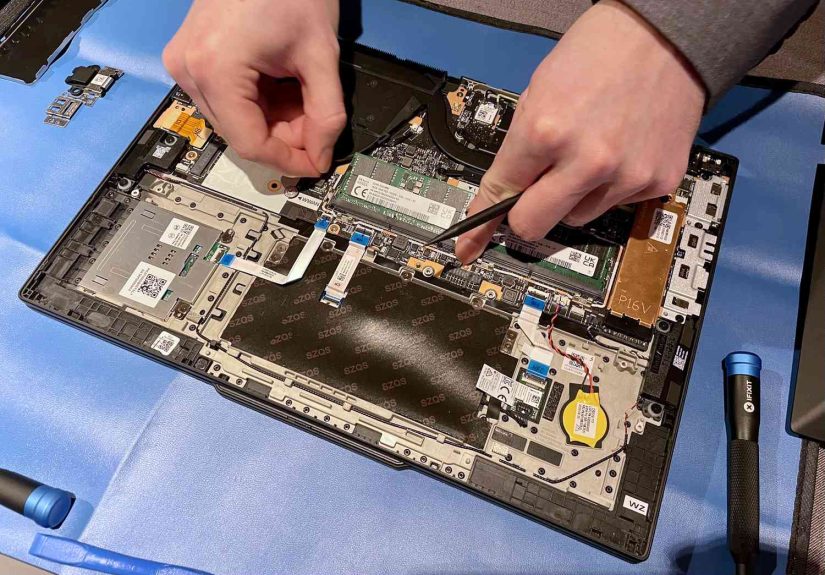
| Part | Why You’d Replace It | Typical Difficulty | What Makes It T14-Friendly |
|---|---|---|---|
| SSD (Storage) | More space, faster drive, failed SSD | Easy | Accessible slot; swap-and-go design in many models |
| RAM (Memory) | Better multitasking, longer usable life | Easy to Moderate | Socketed DIMM/SODIMM in repair-focused designs |
| Battery | Short runtime, battery health decline | Easy | Screw-in, service-friendly approach; fewer “gotcha” steps |
| Keyboard | Sticky keys, spills, worn legends | Easy | Designed for quick replacement with minimal disassembly |
| Display assembly | Cracks, flicker, dim backlight | Moderate | Replaceable assembly approach supported by guides |
| Fan / Thermal system | Overheating, noise, dust buildup | Moderate | Serviceable, though sometimes paired with heat sink work |
Important note: “Lenovo T14” covers multiple generations and Intel/AMD variants. Repairability can vary by year and configuration.
If you’re shopping or planning a repair, always confirm your exact model and generation (usually shown in Lenovo Vantage,
BIOS/UEFI info, or the machine type/model on the bottom label).
The Secret Sauce: Design Choices That Make the T14 Easier to Fix
1) Clear labeling and “you can’t miss it” repair cues
One of the underrated repairability wins is clarity. On repair-focused T14 designs, key components are labeled,
and Lenovo has used internal indicators (including QR-code style guidance in some generations) so you’re not playing
“guess which screw releases the keyboard” for the fifth time.
2) Socketed memory (where it applies)
Soldered RAM is the villain of long-term ownership: once it’s chosen at purchase, that’s your forever memory situation.
Repair-friendly T14 designs moved back toward socketed DIMM/SODIMM memory in order to make upgrades and replacements
far more realistic for real people.
3) Battery replacement that doesn’t require a pep talk
Batteries are consumables. They degrade. That’s not your fault; it’s chemistry.
The T14’s repairability focus treats the battery like a normal replacement item instead of a permanent internal organ.
4) Keyboard replacement that feels like it was designed by someone who has actually used a laptop
Keyboards take a beating: crumbs, travel, coffee near deadlines (we’ve all made questionable choices).
The ThinkPad T14’s keyboard replacement procedure is often singled out as particularly well-considered, with designs that let you
replace the keyboard without dismantling half the machine.
A Realistic “Fix-It” Toolkit for T14 Owners
You don’t need a NASA clean room. You need a calm table, decent lighting, and a little patience.
For many T14 repairs, a basic kit is enough:
- Small Phillips screwdriver (the “do most things” hero)
- Plastic pry tool/spudger (so you don’t use a butter knife like a horror movie character)
- ESD precautions (optional but smart: touch grounded metal, avoid carpet gymnastics)
- A screw tray or magnetic mat (because screws love freedom and will escape)
- If you’re touching thermals: quality thermal compound and cleaning wipes
Always power down fully, unplug the charger, and follow official service steps for your specific model. “It still had 3% battery”
is not a safety plan.
5 Common Repairs and Upgrades the ThinkPad T14 Makes Refreshingly Simple
1) SSD upgrade (a quick way to make an older laptop feel new)
Running out of storage? Want faster performance? SSD upgrades are one of the highest-impact improvements you can make.
On many ThinkPad T14 configurations, storage is in a standard, accessible slotremove the bottom cover, locate the drive,
swap it, and reinstall. Then restore from backup or reinstall your OS.
2) RAM upgrade (because browsers are basically operating systems now)
If your T14 supports socketed memory, RAM upgrades are a classic: pop in compatible modules and enjoy smoother multitasking.
This is one of the biggest reasons repairability mattersRAM is cheap compared to a whole new laptop, and it can extend usable life
by years for office work and productivity.
3) Battery replacement (the “my laptop used to last all day” fix)
Battery health declines over time. When you notice rapid drain or sudden shutdowns at reasonable charge levels, a battery replacement
can restore the laptop’s “portable” part. On repair-friendly designs, it’s typically a straightforward remove-and-replace procedure.
4) Keyboard replacement (especially after a spill)
Some ThinkPad T14 repairability-focused designs allow keyboard removal with minimal effort and limited disassembly steps.
That’s huge: keyboards are one of the most frequently damaged components. Fixing it shouldn’t require rebuilding the laptop from scratch.
5) Fan cleaning and thermal servicing (the “why does it sound like a drone?” fix)
Dust buildup can raise temps, trigger throttling, and turn your laptop into a tiny, stressed-out wind tunnel.
The T14 is serviceable herebut some designs bundle fan removal with heat sink handling, which means you’ll need to re-apply thermal compound
if you separate the heat sink from the CPU. That’s not hard, but it’s a step where careful work matters.
Why It’s Not a Perfect 10/10: The Honest Tradeoffs
Even very repairable laptops have limits. In repairability scoring and real-world teardown notes, a few recurring “almost” points show up:
- Some ports may be soldered (notably certain USB-C / Thunderbolt implementations), meaning a damaged port can require a mainboard replacement.
- Some modules can be soldered or tightly integrated depending on the exact variant, reducing swap simplicity for that part.
- Thermal system servicing can require re-pasting when the fan and heat sink are treated as a combined service step.
None of that cancels the T14’s repair-friendly directionit just means repairability is a spectrum, and the T14 sits far closer to “fixable”
than “sealed forever.”
Buying (or Spec’ing) a T14 for Maximum Repairability
Pick socketed RAM when possible
If your workload might growmore tabs, heavier spreadsheets, bigger creative appssocketed memory keeps your options open.
It’s the difference between a $60 upgrade and “guess I’m shopping for a new laptop.”
Prioritize standard parts and documented service paths
Repairability isn’t only about what can be removedit’s also about what you can replace with readily available parts,
and whether official documentation and videos exist for the steps.
Think like IT (even if you’re not IT)
Corporate-friendly laptops tend to have better service ecosystems: parts catalogs, repair guides, and consistent internal layouts.
The T14 lives in that world, and owners benefit from it.
Repairability = Sustainability (Without the Lecture)
Sustainability gets more convincing when it saves you money and time. Repairability is the practical version of “reduce, reuse, recycle”:
keep the laptop you already own running longer. Replacing a battery or upgrading storage is a small action with a big impact,
especially at scale in businesses.
FAQ: Lenovo T14 Repairability and Fixing Basics
Is every Lenovo ThinkPad T14 equally repairable?
No. “T14” covers multiple generations and configurations. Repairability has improved notably in newer, repair-focused designs,
but older models may have more soldered components or different internal layouts.
Do I need special tools to open a ThinkPad T14?
For common upgrades (SSD/RAM/battery), usually nojust a small Phillips screwdriver and a plastic pry tool are often enough.
Thermal work may require thermal compound and cleaning supplies.
Can replacing parts void my warranty?
Warranty rules vary by region and policy. Many manufacturers allow user-replaceable components, but damage caused during repair may not be covered.
When in doubt, follow official guides and keep the original parts.
What’s the easiest upgrade that makes the biggest difference?
SSD upgrades and RAM upgrades (when socketed) are usually the biggest performance-per-dollar wins for productivity users.
What’s the most common “oops” during laptop repair?
Losing screws, mixing screw lengths, and forcing clips. Go slow, keep screws organized, and never use “strength” as a primary tool.
Conclusion: The T14 Makes “Fix It” Feel Normal Again
The Lenovo ThinkPad T14 is proof that a modern, thin, professional laptop doesn’t have to be a sealed appliance.
When repairability makes it simple to fix the Lenovo T14 laptop, it changes ownership from “hope nothing breaks” to “if something breaks,
I have options.”
Whether you’re an everyday user trying to stretch a purchase, a student keeping a laptop alive through finals, or an IT team managing hundreds
of machines, the T14’s service-friendly design choicessocketed memory (in key variants), accessible storage, replaceable batteries,
and a repair-first mindsetmake a real difference. Fixing your laptop shouldn’t feel like defusing a bomb. On the T14, it usually doesn’t.
Bonus: of Real-World Repair Experiences with the Lenovo T14
Here’s what repairability looks like in the real worldnot in a lab, not in a marketing slide deck, but in the moments when your laptop
decides to misbehave right before something important.
The most common “first repair” story is the slow-motion battery decline. At first, you blame your workload: too many video calls,
too many Chrome tabs, too many “just five more minutes” moments. Then the pattern becomes obviousyour T14 drops from 60% to 12% like it
spotted a spider. On a repair-friendly T14, a battery replacement feels like a practical maintenance job. You set aside 30–60 minutes,
you keep screws organized, you follow the model-specific guide, and you end the day with a laptop that behaves like it remembers why
it was called portable in the first place.
The second most common story is the “I swear I didn’t spill anything” keyboard incident. Sticky keys, repeating letters, or a trackpoint
that suddenly acts like it’s auditioning for interpretive dance. On many laptops, a keyboard replacement is a deep disassembly adventure.
On the repair-focused ThinkPad T14 designs, the keyboard is treated like a component that might reasonably need replacement. The experience
tends to be more like changing a part than “rebuilding the world.” That alone changes how people treat damage: instead of giving up, they fix it.
Then there’s the performance upgrade storythe one that starts with storage anxiety. Your SSD fills up with a mix of work files,
photos, videos, and the mysterious “Downloads” folder that grows like a science experiment. On a serviceable T14, an SSD upgrade is a
satisfying repair because it’s measurable. You feel it immediately: faster file access, fewer “disk full” warnings, and that calming sense
of having room to breathe again. RAM upgrades (when socketed) can feel even more dramatic for multitaskerssuddenly the laptop stops
stuttering when you run a meeting, a spreadsheet, a browser, and a dozen background apps that all swear they’re “essential.”
Repairability also changes how people handle small problems. When a fan gets loud, owners are more likely to open the machine, clean dust,
and restore airflow instead of suffering through the noise. And when they learn that some thermal servicing requires re-applying compound,
they approach it with the right mindset: careful, clean, and patientnot rushed and improvisational. That’s the big hidden benefit of good
repairability design: it encourages responsible maintenance.
Finally, there’s the “port panic” scenario. A loose USB-C port can make anyone sweat, because modern laptops route power and docks through it.
Repairability doesn’t always mean every port is a simple swapsome ports can be soldered and tied to the mainboard, depending on the exact build.
But even then, repair-friendly design still helps: documentation is clearer, diagnostics are easier, and you can make an informed decision
about what to repair versus what to protect. In short, the T14 turns laptop ownership into something closer to car ownership:
you don’t replace the whole vehicle because the tires wore downyou service the parts that wear out.