Table of Contents >> Show >> Hide
- Why Remove a Phone Number from Discord?
- Things to Know Before Removing Your Phone Number
- How to Remove Phone Number from Discord on Desktop or Browser
- How to Remove Phone Number from Discord on Mobile
- How to Remove a Phone Number from an Accidental Discord Account
- What If Discord Says “Phone Number Already Registered”?
- What If Discord Says Your Phone Number Is Invalid?
- Can You Remove a Phone Number Without Logging In?
- Will Removing Your Phone Number Affect Discord Verification?
- How to Keep Your Discord Account Secure After Removing Your Number
- Common Mistakes to Avoid
- Real-World Experiences: What Removing a Discord Phone Number Actually Feels Like
- Conclusion
There are many reasons you might want to remove a phone number from Discord. Maybe you are changing numbers, cleaning up old accounts, improving privacy, or trying to fix the classic “this phone number is already being used” problem. Whatever brought you here, the good news is that Discord does let users remove a phone number from an accountas long as you can access the account or provide enough information to Discord Support.
This guide walks you through exactly how to remove your phone number from Discord on desktop, browser, iPhone, Android, and even from an accidental account. We will also cover common errors, what happens after removal, how it affects verification, and how to keep your account secure without relying too heavily on SMS. Think of this as account housekeeping: not glamorous, but your future self will thank you.
Note: Discord’s interface may change slightly over time, but the core process is the same: open account settings, find the phone field, remove the number, and confirm with your password when required.
Why Remove a Phone Number from Discord?
Before jumping into the steps, it helps to understand why Discord asks for a phone number in the first place. Discord may use phone verification to reduce spam, protect servers from abuse, confirm account ownership, or support certain security features such as SMS authentication. Server owners can also set verification levels that require users to have a verified phone number before chatting.
Still, not everyone wants a phone number attached forever. A phone number is personal information, and many users prefer to limit where it appears. Others remove it because they need to add the same number to a different Discord account. Since one phone number can only be linked to one Discord account at a time, removing it from the old account is often necessary before using it elsewhere.
Things to Know Before Removing Your Phone Number
Removing a phone number from Discord is simple, but there are a few important details to consider first. If your phone number is being used as part of your multi-factor authentication setup, make sure you have another login method ready. An authenticator app, passkey, security key, and backup codes are better long-term options than relying only on SMS. SMS can be convenient, but it is not the strongest security method on the menu. It is more like a plastic fork at a steakhouse: useful, but not your best tool.
You should also make sure your email address is verified and accessible. If you cannot log in to your Discord account, removing the number becomes much harder. If the phone number is tied to an account you cannot access, Discord Support may be able to help only if you contact them from the email address connected to that account. If you do not know the email address attached to the account, support may not be able to disclose it or remove the number for you.
How to Remove Phone Number from Discord on Desktop or Browser
The desktop and browser method is the most straightforward. Use this if you are logged in on the Discord desktop app or at Discord in your web browser.
Step 1: Open User Settings
Launch Discord and look at the bottom-left corner of the screen, near your username. Click the small gear icon. This opens User Settings, which is where Discord keeps the buttons that can save your sanity.
Step 2: Go to My Account
In the left-side menu, select My Account. This section contains your username, email address, phone number, password options, and account security settings.
Step 3: Find Your Phone Number
Look for the phone number field. If a number is linked to your account, Discord should show it in this area. Next to the phone number, you should see a Remove option.
Step 4: Click Remove
Click Remove. Discord may ask you to confirm your password. This is normal. Discord wants to make sure the person removing the phone number is actually the account owner and not a raccoon with access to your keyboard.
Step 5: Confirm with Your Password
Enter your Discord account password and confirm the action. Once complete, your phone number should disappear from the account page. If you no longer see a phone number listed, the removal worked.
How to Remove Phone Number from Discord on Mobile
If you mostly use Discord on your phone, you can remove your number directly from the mobile app. The steps are similar on iPhone and Android, though button placement can look slightly different depending on app updates.
Step 1: Open the Discord App
Open Discord and make sure you are logged into the account that currently has the phone number attached.
Step 2: Tap Your Avatar
Tap your avatar or profile icon in the bottom-right corner of the screen. This opens your personal account area.
Step 3: Open Settings
Tap the gear icon in the top-right corner to open Settings.
Step 4: Tap Account
In the settings menu, tap Account. This is where Discord stores your email, phone number, username, and security-related account options.
Step 5: Tap the Phone Field
Find and tap the Phone field. If a phone number is linked, Discord should show an option to manage or remove it.
Step 6: Select Remove Phone Number
Tap Remove Phone Number. Follow any confirmation prompts. You may need to enter your password before Discord removes the number.
After that, return to your account settings and check the phone field. If the number is gone, congratulations: your Discord account just got a tiny privacy haircut.
How to Remove a Phone Number from an Accidental Discord Account
This is one of the most frustrating Discord phone number problems. Sometimes users accidentally create a new Discord account using their phone number, then later discover their number is stuck on that accidental account. When they try to add the number to their real account, Discord says the phone number is already registered.
Here is the practical way to fix it.
Step 1: Open an Incognito or Private Browser Window
Use an incognito or private browsing window so Discord does not automatically log you into your main account. This makes it easier to access the accidental account.
Step 2: Go to the Discord Login Page
At the login screen, enter your phone number instead of an email address.
Step 3: Use Forgot Password
Click or tap Forgot your password?. Discord should send an SMS code to the phone number if it is connected to an account.
Step 4: Reset the Password
Enter the SMS code and create a new password for that accidental account. Once you reset the password, log in using the phone number and the new password.
Step 5: Add an Email Address
After logging in, go to User Settings and add an email address that is not already connected to another Discord account. Verify that email address through the confirmation message Discord sends you.
Step 6: Remove the Phone Number
Once the accidental account has a verified email address, go back to the account settings and remove the phone number. After removal, you can add the number to your correct Discord account.
What If Discord Says “Phone Number Already Registered”?
If Discord says your phone number is already registered, it means the number is attached to another Discord account. Discord allows one phone number per account, and one number cannot be shared across multiple accounts at the same time.
The solution is to remove the number from the account where it is currently attached. If you recognize the other account, log in and remove the number using the steps above. If you do not recognize the account, try the accidental account recovery method using your phone number at login. If that does not work, contact Discord Support from the email address associated with the account if you know it.
What If Discord Says Your Phone Number Is Invalid?
An invalid phone number error usually means Discord does not accept the number format or type. Check that the number is entered correctly for your country, including the proper country code. Also, make sure the number is a real mobile number. Discord may reject landlines, VoIP numbers, temporary numbers, or numbers from services that are commonly used for throwaway verification.
Avoid using random online SMS websites. They may look convenient, but they can create bigger problems. Someone else might access the same temporary number later, which can put your account at risk. Saving two minutes is not worth turning your Discord login into a community garden.
Can You Remove a Phone Number Without Logging In?
Usually, you need access to the Discord account to remove the phone number yourself. This is because removing account information requires proof that you own the account. If you cannot log in, your next option is Discord Support. However, support generally needs you to contact them from the email address connected to the account. If you do not remember that email address, they may not be able to identify the account or remove the number.
This is why keeping your email address updated matters. Your email is not just a login detail; it is your emergency exit door. If that door is locked, account recovery becomes much less pleasant.
Will Removing Your Phone Number Affect Discord Verification?
It can. Some Discord servers use verification settings that may require a verified phone number before you can participate. If you remove your phone number, you might lose access to chatting in certain high-verification servers until you meet their requirements another way or add a phone number again.
Removing your phone number may also affect SMS-based authentication if you had it enabled. Before removing your number, set up stronger login protection such as an authenticator app, passkey, or security key. Download backup codes and store them somewhere safe, preferably in a password manager or another secure place you can access later.
How to Keep Your Discord Account Secure After Removing Your Number
Privacy and security should work together. Removing your phone number can reduce the personal information attached to your account, but you should not leave your account protected by password alone. A strong Discord account setup includes a unique password, multi-factor authentication, backup codes, and careful review of connected apps.
Use a Strong, Unique Password
Your Discord password should not be reused from email, gaming accounts, school accounts, or that old forum you joined in 2013 to ask one question about a graphics card. Use a password manager to create and store a long, unique password.
Enable an Authenticator App
An authenticator app generates time-based codes for login. This is generally safer than SMS because the code is not tied to your phone number. After enabling an authenticator app, save your backup codes immediately.
Consider Passkeys or Security Keys
Discord supports newer login methods such as passkeys and security keys. These can make signing in easier and more resistant to phishing. If you are serious about account security, especially if you manage a large server, this is worth exploring.
Review Authorized Apps
Go to your Discord settings and review authorized apps. Remove anything you do not recognize. Suspicious third-party apps can create account problems, especially if you previously clicked a fake “free Nitro” link. Spoiler: free Nitro from a stranger is almost never free.
Common Mistakes to Avoid
The first mistake is removing your phone number before checking your login security. If you depend on SMS for account recovery or authentication, set up another method first. The second mistake is using temporary phone numbers. They may fail verification, and even if they work briefly, they can create long-term access problems. The third mistake is trying to guess which account has your number without using the phone-number login recovery method. If the number is attached somewhere, logging in with the number is often the fastest clue.
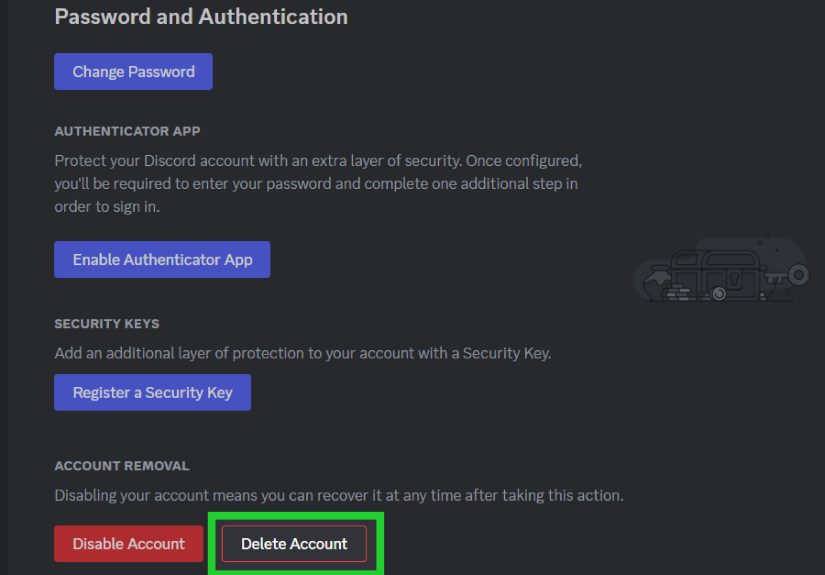
Another common mistake is deleting an account before removing the phone number. If you can still access the account, remove the number first, then decide whether to disable or delete the account. Deleting first can make troubleshooting more complicated.
Real-World Experiences: What Removing a Discord Phone Number Actually Feels Like
For many users, removing a phone number from Discord is not difficult; finding the right account is the annoying part. A common experience goes like this: someone creates a Discord account years ago, verifies a phone number, forgets the account exists, and later tries to use that same number on a newer account. Discord refuses, the user blames the app, and the app silently points at the forgotten account like, “This is between you two.”
One practical lesson is to treat phone numbers like keys. Before adding your number to any platform, know which account you are using. This is especially important if you manage multiple Discord accounts for gaming, school communities, workspaces, creator servers, or testing. A phone number linked to the wrong account can block you from verifying the right one later.
Another experience users often report is confusion between phone verification and two-factor authentication. These are related, but they are not the same thing. A phone number can help verify an account or support SMS authentication, but removing it does not automatically mean your account is unsafe. What matters is whether you have a better security method ready. Many users remove SMS and switch to an authenticator app or passkey because they want both privacy and stronger protection. That is the sweet spot: fewer personal details attached, more control over login security.
There is also the server-access surprise. Someone removes their phone number, then suddenly cannot chat in a server with strict verification settings. The account is not broken; the server simply requires a verified phone number. If that happens, you can either add a number again, wait until you meet the server’s other verification requirements if available, or contact the server moderators. Server rules are set by server owners, not random keyboard gremlins hiding in Discord headquarters.
A smart workflow is to do a five-minute account check before removing your number. Confirm your email works. Confirm your password is current. Download backup codes. Add an authenticator app or passkey. Then remove the number. This turns a potentially stressful process into a simple cleanup task.
The biggest takeaway from real user experiences is this: do not rush. Most Discord phone number problems are solvable, but they become more complicated when users panic, create more accounts, reuse temporary numbers, or delete accounts too soon. Move slowly, verify which account you are editing, and keep your recovery options organized. Your Discord account may be full of memes, game clips, study groups, and server chaos, but the security settings deserve a calm adult moment.
Conclusion
Removing a phone number from Discord is easy when you can access the account: open User Settings, go to Account or My Account, select the phone field, remove the number, and confirm when prompted. On mobile, the path is your avatar, settings, account, phone, and remove phone number. If your number is stuck on an accidental account, use the phone number login and password reset process to access that account, add an email, verify it, and then remove the number.
The key is to protect your account before and after removal. Make sure your email is verified, your password is strong, and your multi-factor authentication does not depend only on SMS. With the right setup, you can unlink your phone number from Discord while keeping your account secure, private, and ready for your next server debate about whether pineapple belongs on pizza. It does, but we can remain civil.