Table of Contents >> Show >> Hide
- Why Crimping Tool Adjustment Matters
- First: Know What Kind of Crimping Tool You Have
- What You Need Before You Start
- How to Adjust a Crimping Tool: Step by Step
- Step 1: Read the tool itself before reading the room
- Step 2: Fully open the crimping tool
- Step 3: Locate the adjustment mechanism
- Step 4: Make a very small adjustment
- Step 5: Lock the setting back in place
- Step 6: Make a test crimp on scrap wire
- Step 7: Inspect the test crimp carefully
- Step 8: Repeat until the crimp is right
- How to Tell If the Crimp Is Too Loose or Too Tight
- Common Adjustment Scenarios
- When You Should Not Adjust the Tool Yourself
- Maintenance Tips That Help the Adjustment Stay Correct
- Quick Troubleshooting Guide
- Real-World Experiences and Lessons From the Workbench
- Final Thoughts
If you have ever made a crimp that looked fine at first glance and then fell apart the moment you gave the wire a tiny tug, congratulations: you have joined a very large club. Crimping tools are wonderful little problem-solvers, but only when they are adjusted correctly and matched to the right connector. When they are not, they become expensive pliers with commitment issues.
This guide explains how to adjust a crimping tool step by step, how to tell whether your tool should be adjusted at all, and how to test the result before you trust it in a real project. Whether you are working with insulated terminals, ferrules, butt splices, or modular plugs, the basic idea is the same: use the correct tool, make small adjustments, and verify the crimp instead of hoping for the best.
Why Crimping Tool Adjustment Matters
A properly adjusted crimping tool creates a secure mechanical and electrical connection. Too little force and the wire can pull out, the conductor may not seat correctly, or the connection may heat up under load. Too much force and you can crush the terminal, damage the conductor strands, distort the insulation support, or wear out the tool faster than necessary.
That is why learning how to adjust a crimping tool is so useful. The goal is not “maximum squeeze.” The goal is a repeatable, correct crimp.
First: Know What Kind of Crimping Tool You Have
Before you touch a screw, knob, ring, or adjustment pin, identify the tool type. This matters because not every crimper is meant to be user-adjusted.
1. Adjustable ratcheting hand crimpers
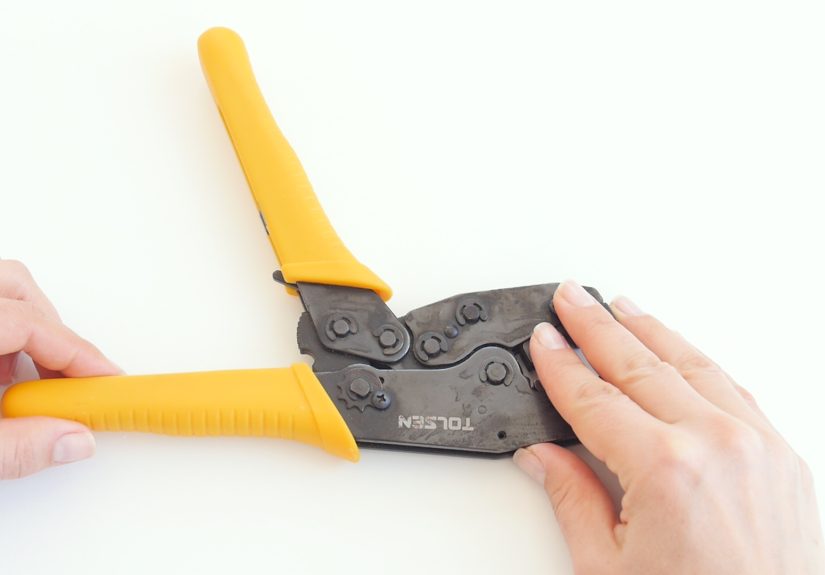
These are common for insulated terminals, ferrules, and some specialty connectors. They often have a force-adjustment wheel, ring, pin, or screw that increases or decreases crimping pressure.
2. Factory-set ratcheting crimpers
Some tools are calibrated at the factory and are intended to be checked with gauges rather than freely re-adjusted in the field. In plain English: your screwdriver is not automatically the hero of this story.
3. Modular plug crimpers
RJ11 and RJ45 crimpers often rely more on correct connector fit, wire arrangement, and full cycle closure than on frequent force adjustment. Some are fixed, some are adjustable, and some mainly include a release mechanism rather than a calibration feature.
4. Hydraulic or dieless crimping tools
These are a different beast. Pressure relief or certified crimp dimensions are often service-level settings, not casual DIY adjustments. If the tool is out of spec, it may need formal inspection or factory-authorized service.
What You Need Before You Start
- The crimping tool
- The exact terminals or connectors you plan to use
- Correct wire gauge
- A screwdriver or adjustment wrench if your tool requires one
- Scrap wire for test crimps
- Good lighting
- Optional but smart: a magnifier, pull tester, or GO/NO-GO gauge
Also, check the tool markings. Many crimpers use color-coded or size-coded nests such as red for 22–18 AWG, blue for 16–14 AWG, and yellow for 12–10 AWG. If your wire, terminal, and die cavity are mismatched, no amount of “adjustment” will save the crimp.
How to Adjust a Crimping Tool: Step by Step
Step 1: Read the tool itself before reading the room
Look for labels, arrows, plus and minus symbols, detents, cavity markings, and part numbers. Many adjustable crimpers mark the direction clearly: clockwise usually increases force, while counterclockwise reduces it. Others use “T” and “L,” numbered positions, or notched pins.
If the tool manual says not to re-adjust the ratchet, believe it. That is not a suggestion. That is your cue to inspect, test, or service the tool instead of improvising.
Step 2: Fully open the crimping tool
Most adjustable hand crimpers should be fully open before you make changes. This matters because the ratchet mechanism and die alignment can shift slightly under load. If you adjust the tool half-closed, you are basically measuring while the furniture is still moving.
Step 3: Locate the adjustment mechanism
Depending on the model, the adjustment may be:
- A side knob locked by a screw
- An adjustment ring under a washer
- A stud and locknut on the handle
- A notched pin for die closure
- A micro-setting dial on precision contact crimpers
Take a moment to understand what you are moving. Some systems change handle preload, some change die closure, and some change crimping force. They all affect the result, but not always in exactly the same way.
Step 4: Make a very small adjustment
This is where patience beats ego. Adjust in tiny increments. One notch. One click. A small fraction of a turn. Do not crank the setting like you are opening a pickle jar that insulted your family.
Use these general rules:
- Increase force if the crimp is loose, under-compressed, or fails a pull check.
- Decrease force if the terminal barrel is crushed, the insulation support is flattened too aggressively, or the wire strands are being damaged.
Step 5: Lock the setting back in place
If your tool uses a retaining screw, washer, lock pin, or nut, secure it before testing. An unsecured adjustment is like writing your homework in pencil during a rainstorm. It may look fine for a minute, but the ending will disappoint you.
Step 6: Make a test crimp on scrap wire
Never use the first post-adjustment crimp on the real job. Use scrap wire of the same gauge and insulation type. Strip the wire to the correct length, insert it fully, and run the crimping tool through the complete cycle until the ratchet releases.
For ratcheting tools, always complete the cycle unless you intentionally use the release lever to back out a bad setup. Partial crimps are a great way to create unreliable connections and new vocabulary words.
Step 7: Inspect the test crimp carefully
This is the part many people skip, then blame the connector, the wire, the moon phase, and modern society. Inspect the crimp closely:
- Is the terminal centered in the proper die nest?
- Is the conductor fully inserted?
- Are any strands cut or pushed out?
- Is the insulation support snug without being crushed flat?
- Is the crimp shape even and consistent?
- Does the wire pull out with moderate force?
On many quality crimps, you want to see a clean compression, proper wire position, and no obvious distortion. For some open-barrel or specialty terminals, visual cues such as bell mouth, wire brush, and crimp location also matter.
Step 8: Repeat until the crimp is right
If the test crimp is still off, repeat the process with another very small adjustment. Good crimping is closer to calibration than brute force. You are tuning an outcome, not arm-wrestling the tool.
How to Tell If the Crimp Is Too Loose or Too Tight
Signs the crimp is too loose
- The wire slips or pulls out too easily
- The terminal rotates on the wire
- The crimp impression looks shallow or incomplete
- The ratchet feels like it releases too early
Signs the crimp is too tight
- The barrel is visibly crushed or misshapen
- Strands are cut or pinched
- The insulation support is mangled
- The connector no longer fits properly in its housing
The best adjustment is the one that gives a secure hold, proper shape, and consistent results across multiple test crimps.
Common Adjustment Scenarios
Adjusting a ferrule crimping tool
Ferrule crimpers often use a dial, star wheel, or screw-based mechanism. If the ferrule comes out loose or the square or hex crimp looks under-formed, increase force slightly. If the ferrule becomes distorted enough to resist insertion into a terminal block, back off a little.
Adjusting an insulated terminal crimper
These usually rely on color-coded wire ranges and consistent full-cycle ratcheting. First verify the correct cavity. Only then adjust the force if the tool design allows it. Many “bad adjustments” are actually bad size matches.
Adjusting an RJ45 crimping tool
With modular plug crimpers, the bigger issue is often connector compatibility, conductor arrangement, and full-cycle closure. If your plugs are inconsistent, make sure the tool is meant for that plug style, especially pass-through versus non-pass-through connectors. In some cases, replacing a dull blade or using the correct plug brand matters more than changing force.
Adjusting a hydraulic crimper
Proceed carefully. Many hydraulic and dieless crimpers are built around certified dimensions or relief settings. If pressure, distance, or closure is out of spec, the correct move may be testing and authorized service rather than field adjustment.
When You Should Not Adjust the Tool Yourself
Stop and reassess if any of these are true:
- The manufacturer says the ratchet should not be re-adjusted
- The dies do not pass GO/NO-GO inspection
- The tool jaws are chipped, cracked, or badly worn
- The ratchet sticks or fails to release consistently
- The tool is hydraulic and requires pressure or distance verification
- You are working on safety-critical, high-current, or certified assemblies
At that point, inspection, repair, or professional service is smarter than “just one more turn.”
Maintenance Tips That Help the Adjustment Stay Correct
- Clean dirt, grease, and metal debris from the dies regularly
- Lightly lubricate pivots and moving joints as recommended
- Keep oil off the actual crimping area
- Store the tool dry and protected
- Inspect for jaw wear, loose screws, and alignment problems
- Use the proper die set for the connector family
A well-maintained crimping tool holds its settings better and produces more consistent crimps. A neglected one turns every project into a mystery novel, and not the fun kind.
Quick Troubleshooting Guide
The wire pulls out after crimping
Check wire size, connector size, die cavity, strip length, and crimp force. Then increase force slightly only if the tool is designed to be adjusted.
The terminal barrel looks crushed
Reduce force slightly, confirm the correct die cavity, and verify that the connector is the right type for the tool.
The ratchet will not release
Complete the cycle if possible. If the connector was loaded incorrectly, use the safety release mechanism according to the tool design. Do not force the jaws apart like a cartoon mechanic.
The crimp varies from one try to the next
Look for loose hardware, worn dies, incorrect wire stripping, wrong connector brand, or inconsistent wire insertion depth. Adjustment alone may not be the real issue.
Real-World Experiences and Lessons From the Workbench
In real projects, the biggest surprise is how often the problem is not the adjustment screw at all. A lot of bad crimps come from using bargain-bin terminals with a decent tool, or a decent connector with the wrong die cavity, or an RJ45 plug that “sort of” fits the crimper the same way a flip-flop “sort of” fits a snowstorm. The tool gets blamed because it is easy to blame the thing in your hand.
One common experience is the overcorrection spiral. A person gets one loose crimp, decides the tool must be weak, increases the force too much, and suddenly every terminal looks like it lost a fight with a small hydraulic press. Then they lower the setting too far, then raise it again, and eventually the crimper becomes a mood ring with handles. The cure is boring but effective: adjust a tiny amount, test on scrap wire, inspect, repeat.
Another lesson shows up with insulated terminals. People often assume the red, blue, and yellow colors are decorative, as if the connector woke up and chose fashion. They are not. Those colors usually correspond to wire size ranges. Match them correctly and life gets easier. Ignore them and even a premium ratcheting crimp tool can produce mediocre results because it is compressing the wrong barrel around the wrong conductor.
Ferrule crimpers teach a slightly different lesson. When the force is too low, the ferrule may feel okay at first, but it can loosen in a terminal block or fail to hold fine strands neatly. When the force is too high, the ferrule can deform just enough to make insertion awkward. This leads many users to assume the terminal block is poorly made, when really the ferrule was overworked before it even arrived there. Tiny adjustments matter more than people expect.
RJ45 work adds its own comedy. Plenty of users swear the crimper is broken when the real issue is that the conductors were not fully seated, the wiring order drifted, or the plug style did not match the tool. A pass-through plug and a non-pass-through crimper are not a dream team. Neither is a dull trimming blade paired with optimism. With network connectors, consistency, proper cable prep, and the correct plug format often matter as much as the crimp itself.
Professionals also learn that maintenance is underrated. A crimper that has been cleaned, lightly lubricated at the pivots, and checked for loose hardware behaves differently from one that lives in a damp toolbox next to mystery screws and ancient wire nuts. Even a quality tool gets inconsistent when dirt builds up in the dies or the mechanism starts to bind.
The best habit, by far, is making a test crimp before the real run. It feels slow for about thirty seconds, then saves you from redoing an entire panel, harness, or cable batch. In other words, a test crimp is the small salad of tool work: not always exciting, but usually the decision your future self will thank you for.
Final Thoughts
Learning how to adjust a crimping tool is really about learning how to control consistency. Start by confirming that your tool is actually adjustable. Use the correct wire, terminal, and die cavity. Make tiny changes. Test the result. Inspect closely. And remember that the right crimp is not the one that feels strongest in your hand. It is the one that performs correctly once the job is finished and no one wants surprises.
Do that, and your crimps will be secure, repeatable, and wonderfully uneventful. In the world of electrical connections, “uneventful” is a compliment.