Table of Contents >> Show >> Hide
- Why International WhatsApp Contacts Sometimes Go Wrong
- What You Need Before You Add an International Contact
- How to Add Someone from Another Country on WhatsApp on Android
- The Correct International Number Format for WhatsApp
- How to Start a WhatsApp Chat Without Saving the Contact
- What to Do If the International Contact Does Not Show Up on WhatsApp
- Common Mistakes to Avoid
- Tips for Better Contact Management on Android
- Will It Cost Money to Message Someone Internationally on WhatsApp?
- Privacy and Safety When Adding Overseas Contacts
- Real-Life Examples
- Best Practices for Smooth International WhatsApp Communication
- Experience: What Adding Someone from Another Country on WhatsApp on Android Is Really Like
- Conclusion
Adding an international contact on WhatsApp sounds like one of those tasks that should take 10 seconds, but somehow manages to trigger a tiny identity crisis. You open WhatsApp, tap around with confidence, type in the number, and then boom: nothing. No profile. No chat. No magical green button. Just you, your Android phone, and a growing suspicion that the plus sign has become your mortal enemy.
The good news is that adding someone from another country on WhatsApp on Android is actually simple once you know the rules. The trick is not “doing WhatsApp magic.” It is saving the phone number in the correct international format, making sure your Android contacts and WhatsApp permissions are behaving themselves, and avoiding a few painfully common mistakes. Once those pieces line up, the whole process becomes much less dramatic.
In this guide, you will learn exactly how to add an overseas contact on WhatsApp using an Android phone, how to format the number correctly, what to do if the person does not appear in WhatsApp, and how to message someone internationally without turning the process into a side quest.
Why International WhatsApp Contacts Sometimes Go Wrong
Most problems happen before WhatsApp even enters the room. The issue usually starts with the phone number itself. People often save an international number the same way they would save a local one, which is like trying to mail a letter with half the address missing and then acting surprised when it never shows up.
When you add someone from another country on WhatsApp on Android, you usually need:
- The person’s correct country code
- The full mobile number in international format
- A plus sign before the country code
- No extra leading zero, area shortcut, or formatting clutter that does not belong
- WhatsApp access to your contacts on Android
If even one of those ingredients is off, WhatsApp may not recognize the contact. That does not mean the app hates you. It just means the number is saved in a format WhatsApp cannot match properly.
What You Need Before You Add an International Contact
1. The person’s full phone number
Ask for the complete mobile number, not just “it starts with 07” or “try this one, I think.” Partial confidence is not enough here. You need the full number they actually use for WhatsApp.
2. The correct country code
Every country has a country calling code, such as +1 for the United States and Canada, +44 for the United Kingdom, +61 for Australia, and +91 for India. If you do not include the right code, Android may save the contact, but WhatsApp may not match it correctly.
3. A basic understanding of local number quirks
This is where people get tripped up. In many countries, local numbers are written with a leading zero when dialed domestically. But when saving the same number in international format for WhatsApp, that zero is often dropped. In plain English: the number your friend sends you in a text may not be the number you should save exactly as written.
4. Contact permission for WhatsApp
If WhatsApp cannot access your Android contacts, the app may not show new contacts or updated names. So before blaming the internet, your SIM card, or the moon cycle, check permissions.
How to Add Someone from Another Country on WhatsApp on Android
There are two easy methods. You can add the person inside WhatsApp or save them through your Android Contacts app. Both work.
Method 1: Add the Contact Directly in WhatsApp
- Open WhatsApp on your Android phone.
- Go to the Chats tab.
- Tap the new chat icon.
- Select New contact.
- Enter the person’s name.
- In the phone number field, type the number in full international format.
- Tap Save.
- Return to WhatsApp and search for the contact.
That is it. If the number is valid and the person uses WhatsApp with that number, you should be able to start a chat, place a voice call, or launch a video call.
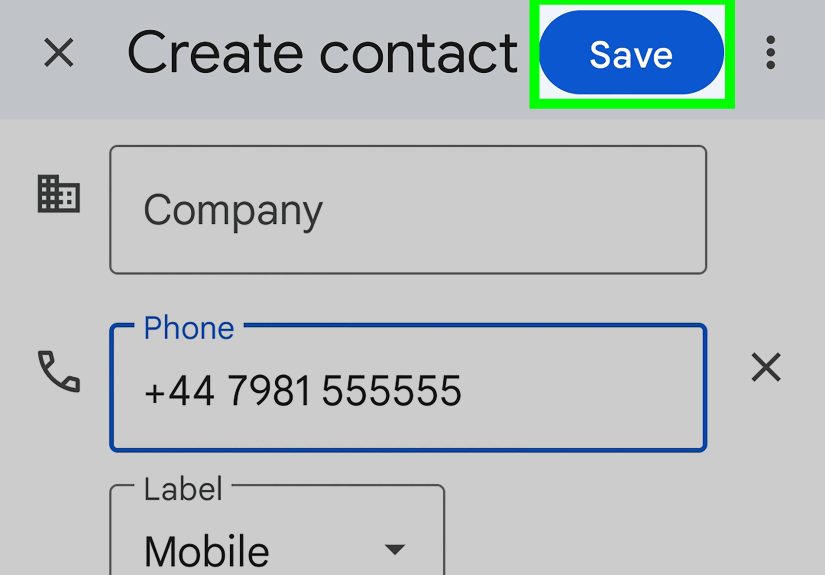
Method 2: Add the Contact Through Android Contacts
- Open the Contacts app on your Android phone.
- Tap Add or the plus icon.
- Enter the contact’s name.
- Type the phone number in international format with the plus sign and country code.
- Tap Save.
- Open WhatsApp again.
- Tap new chat and look for the saved contact.
This method is great if you want to store the person as a regular Android contact first and use that same entry across calls, messages, Google Contacts, and WhatsApp.
The Correct International Number Format for WhatsApp
Here is the format you want:
+ [country code] [full mobile number]
Examples:
- U.S. number: +1 5551234567
- U.K. number: +44 7700 900123
- India number: +91 9876543210
- Australia number: +61 412345678
Notice what is missing? No decorative punctuation party. You do not need parentheses, strange spacing habits, or extra zeros that only make sense locally.
A simple rule to remember
If the number begins with a domestic zero, check whether that zero should be removed when converting to international format. In many cases, it should. This is one of the most common reasons an international WhatsApp contact does not appear correctly.
How to Start a WhatsApp Chat Without Saving the Contact
Sometimes you do not want to save the person permanently. Maybe it is a hotel in another country, a freelancer overseas, a tour guide, or someone you need to message once and possibly never again after the luggage arrives.
In that case, you can use WhatsApp’s click-to-chat format. This lets you open a chat with a full number in international format without saving it to your address book first.
The number must still be correct, and it must still be in international format. So while this method skips contact saving, it does not let you skip basic accuracy. Nice try.
What to Do If the International Contact Does Not Show Up on WhatsApp
If the person is not appearing after you save the contact, do not panic. This is usually fixable in a minute or two.
Check the number format again
This is the first place to look. Make sure:
- The number starts with a plus sign
- The country code is correct
- You did not include the wrong leading zero
- You saved the mobile number, not an old landline or office line
Refresh your contacts in WhatsApp
Close and reopen WhatsApp, then open the new chat screen and search again. In many cases, the contact appears after the app refreshes its contact list.
Check Android permissions
If WhatsApp cannot read your contacts, it cannot show them properly. On Android, go to:
Settings > Apps > WhatsApp > Permissions > Contacts
Make sure contact access is allowed.
Update the saved contact
If the person gave you a corrected number, edit the contact instead of creating three nearly identical versions and hoping WhatsApp becomes a detective. Open the contact, tap edit, update the number, and save.
Confirm they actually use WhatsApp with that number
This sounds obvious, but it catches a lot of people. Someone may use WhatsApp with a different number than the one they normally share, especially if they changed countries, switched SIMs, or use a business number for messaging.
Common Mistakes to Avoid
Saving the number like a local contact
If you save an overseas number the way you would save your cousin who lives two blocks away, WhatsApp may not match it correctly.
Leaving out the plus sign
The plus sign matters. It tells the app and your phone that the number is stored in international format.
Keeping a domestic trunk zero
This is a classic mistake with international WhatsApp contacts. Some countries use a leading zero for local dialing, but not for international format. If you leave it in, the number can fail.
Using a non-WhatsApp number
Just because you have someone’s number does not mean it is the number connected to their WhatsApp account.
Ignoring permissions
If WhatsApp is not allowed to access contacts, your brand-new international contact may sit invisibly in your phone while you wonder why reality is broken.
Tips for Better Contact Management on Android
If you frequently message people from different countries, a little organization goes a long way.
Use clear names
Instead of saving someone as “Maria New,” try something more useful like Maria Spain PR Team or Daniel UK Supplier. Future you will be grateful and slightly more organized than present you.
Add notes in your contacts app
If your Android Contacts app allows notes or extra fields, add context such as time zone, company, country, or how you know the person. This is especially helpful if you have several international clients or travel contacts.
Store contacts in your Google account
Saving contacts to your Google account instead of only on the device can make syncing easier if you switch Android phones later.
Will It Cost Money to Message Someone Internationally on WhatsApp?
WhatsApp messages and calls use the internet, not standard international SMS rates. That is one reason the app is so popular for cross-border communication. If you are on Wi-Fi, you can usually message and call internationally without carrier texting charges. If you use mobile data, however, your carrier’s data or roaming fees may still apply.
Translation: WhatsApp can save you from traditional international texting charges, but it cannot save you from a reckless roaming plan. Wi-Fi is your frugal best friend here.
Privacy and Safety When Adding Overseas Contacts
Adding someone from another country is easy. Trusting everyone with your number is not. Before you start chatting, consider a few privacy basics:
- Only add and message people you recognize or expect to hear from
- Be careful with unknown international numbers claiming urgency
- Review your WhatsApp privacy settings for profile photo, status, and last seen
- Block or report spammy contacts if needed
International communication is wonderful. International scams are also very international. Keep both truths in mind.
Real-Life Examples
Example 1: Adding a friend in the U.K.
Your friend sends you 07700 900123. That is how it may be written locally. On WhatsApp, you may need to save it as +44 7700 900123. If you keep the local zero, the contact may not work correctly.
Example 2: Messaging a hotel in Italy
You only need to confirm an airport pickup. Instead of saving the number permanently, use WhatsApp’s click-to-chat style with the full international number and send your message directly.
Example 3: Adding a client in India
You save the contact in Android as +91 plus the full mobile number, then open WhatsApp and search for the name. If the client does not appear, you double-check the digits, confirm permissions, and ask whether that is the number they actually use on WhatsApp.
Best Practices for Smooth International WhatsApp Communication
- Always save international contacts in full international format
- Confirm the number before assuming WhatsApp is broken
- Use Wi-Fi when possible to avoid roaming surprises
- Keep your WhatsApp and Android apps updated
- Use click-to-chat for one-time conversations
- Organize frequent international contacts with clear labels and notes
Experience: What Adding Someone from Another Country on WhatsApp on Android Is Really Like
Let’s be honest: the first time you add someone from another country on WhatsApp on Android, it feels way more mysterious than it should. You assume it will work like adding any local contact. Then the person does not appear, the chat button mocks you in silence, and suddenly you are googling country codes like you are preparing for a geography exam you did not sign up for.
A common experience goes like this: you meet someone online, maybe a client, a cousin abroad, a travel host, or a seller from another country. They send you a number exactly as they know it at home. You copy it, save it, open WhatsApp, and nothing happens. That is usually the moment people think the app is failing, when in reality the issue is almost always formatting. Once you learn that international numbers need the plus sign, the country code, and often the local zero removed, everything suddenly becomes embarrassingly easy.
Another very real experience is the “I saved the contact, but WhatsApp still won’t show it” problem. On Android, this can feel especially annoying because you know the contact exists. You can see it in your Contacts app. You can tap it. You can admire it. But WhatsApp acts like the person is invisible. In many cases, the fix is simple: allow contact permissions, refresh the app, or edit the number into the proper international format. The solution is usually not dramatic, but the confusion beforehand definitely can be.
People who regularly communicate across borders often get much faster at this process. After you add a few overseas contacts, you start recognizing patterns. You learn that local formatting is not always WhatsApp formatting. You learn to ask, “Is this the number you actually use on WhatsApp?” before wasting 15 minutes blaming your phone. You also start saving contacts more strategically, especially if you work with international customers, remote teams, or family members living abroad.
There is also a surprisingly human side to this topic. Adding an international contact is not just about digits and settings. Sometimes it is the first message to a new long-distance friend, a relative you have not spoken to in years, a landlord before a move overseas, or a tour guide who is about to rescue your vacation plans. The technical step is small, but the conversation that follows can matter a lot. That is why getting the setup right is useful. It removes friction from something that is often personal, urgent, or meaningful.
In practical day-to-day life, the best experience comes from building one simple habit: always save the number in international format from the beginning. That one step prevents most headaches. Once you do that, adding someone from another country on WhatsApp on Android becomes routine. No confusion. No mystery. No dramatic staring contest with your contact list. Just save, search, message, and move on with your day like the globally connected Android wizard you were always meant to be.
Conclusion
If you want to add someone from another country on WhatsApp on Android, the key is not luck. It is formatting. Save the number with a plus sign, use the correct country code, remove any unnecessary local zero when needed, and make sure WhatsApp has permission to access your contacts. From there, the process is usually quick and painless.
Whether you are messaging family overseas, contacting a client in another time zone, or trying to coordinate travel without paying old-school international texting rates, WhatsApp makes global communication simple once the contact is saved correctly. Learn the format once, and you can use it again and again without the usual frustration.