Table of Contents >> Show >> Hide
- Why Support Material Has Always Been the Necessary Annoyance
- What an Additional Axis Actually Changes
- How Support-Free Printing Becomes Possible
- Where This Approach Shines
- The Benefits Are Real, but So Are the Tradeoffs
- Why the Software Side May Matter More Than the Hardware Side
- What This Means for the Future of 3D Printing
- Practical Advice for Designers, Engineers, and Makers
- Experience Notes: What Working Around an Extra Axis Really Feels Like
- Conclusion
In ordinary 3D printing, gravity is the unpaid supervisor. It never takes a day off, and it never stops reminding your printer that molten plastic, wet resin, and soft deposited material are not famous for hovering politely in midair. That is why support material exists in the first place. It props up overhangs, catches tricky curves, and helps a print survive long enough to become a real object instead of a dramatic little collapse.
But what happens when the printer gets one more move to play with? Add an extra axis, and the whole conversation changes. Suddenly, the machine does not have to print every layer in the same old flat, vertical stack. It can rotate the part, tilt the bed, steer the nozzle, or follow curved paths that keep the material better supported by the geometry itself. In plain English: instead of forcing the object to obey the printer, the printer starts adapting to the object.
That is the big idea behind support-free 3D printing with an additional axis. It is not magic, and it is definitely not a free lunch. But it is one of the most exciting shifts in additive manufacturing because it attacks one of the oldest annoyances in the business: wasted material, rough undersides, extra cleanup, and design compromises that exist only because a standard three-axis setup is a bit too stubborn.
Why Support Material Has Always Been the Necessary Annoyance
Support structures solve a real problem. In conventional three-axis printing, the nozzle deposits material layer by layer in a fixed direction. When a feature sticks out too far, or when a surface angles downward too aggressively, the next layer no longer has enough underneath it to hold shape cleanly. The printer can bridge some gaps and cheat a little with cooling, but there is a limit. Past that point, the machine needs scaffolding.
The trouble is that support material is rarely elegant. It adds print time. It consumes extra feedstock. It leaves marks on surfaces that were supposed to look smooth and impressive. It creates a post-processing chore that ranges from mildly annoying to “why am I spending my Saturday with pliers and regret?” On industrial systems, supports can be breakaway, soluble, gel-like, or highly engineered. On desktop systems, they are often just more material that must be trimmed away carefully and hopefully without damaging the part.
The design consequences are just as important. Engineers and product designers often change geometry to avoid supports before a print even begins. That means flattening ambitious ideas, thickening features, splitting parts apart, or reorienting models in ways that are good for printability but bad for performance, appearance, or assembly. In other words, support material does not just add waste after the design is finished. It also quietly limits creativity before the design is born.
What an Additional Axis Actually Changes
When people hear “extra axis,” they sometimes imagine a wildly futuristic robot pirouetting around a nozzle like it is auditioning for a manufacturing ballet. The reality is simpler and more useful. An additional axis usually means the printer can rotate or tilt either the build platform, the print head, or both. A four-axis system might add one rotary movement. A five-axis system typically adds two more degrees of freedom, such as tilt and rotation. Robotic-arm systems can go even further.
This matters because the printer is no longer locked into stacking flat layers in one direction. It can change the part’s orientation during the build so that an overhang becomes less severe, a curved section becomes more naturally supported, or a previously impossible underside becomes printable without a scaffolding forest underneath it.
Think of it this way: a traditional printer asks, “How do I build this shape while always moving upward?” A multi-axis printer asks, “Why am I forcing myself to move upward the whole time?” That small philosophical improvement turns into a very big manufacturing improvement.
3+2-Axis vs. Continuous Multi-Axis Printing
Not all extra-axis printing works the same way. One common approach is called 3+2-axis printing. The printer reorients the part into a new position, then prints a section using familiar planar layers, then reorients again for another section. This can dramatically reduce supports because different regions of the part get their own more favorable build direction.
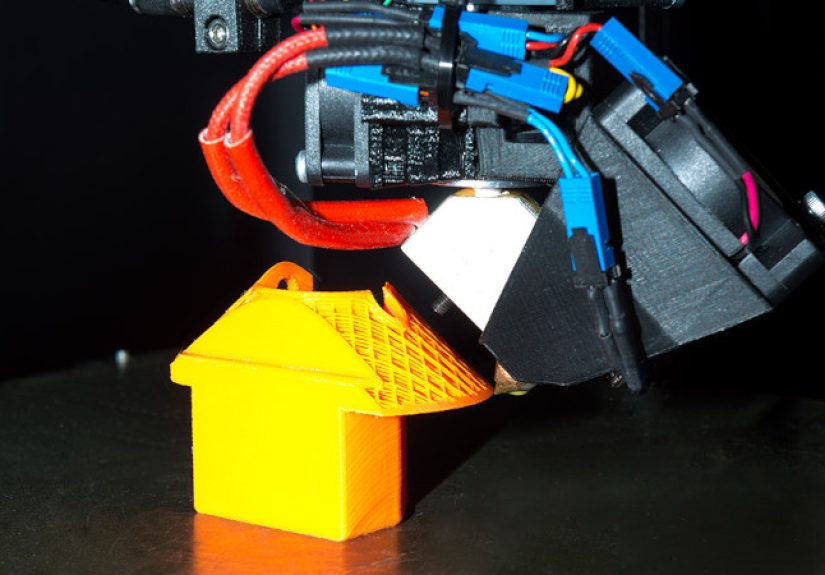
The more advanced approach is continuous multi-axis printing. Here, the orientation can change as the toolpath progresses, and the printer may generate curved or non-planar layers that follow the shape more naturally. That opens the door to printing freeform surfaces, improving surface finish, reducing staircase effects, and making support-free fabrication possible for shapes that would defeat ordinary slicing.
So yes, one more axis helps. But when software, mechanics, and toolpath planning mature enough to use that axis intelligently, the extra motion becomes much more than a neat hardware upgrade. It becomes a new manufacturing strategy.
How Support-Free Printing Becomes Possible
1. Reorienting the Part Instead of Fighting Gravity
The first trick is the most intuitive one: rotate the model so the dangerous overhang is no longer dangerous. If a feature would droop badly in one orientation, a tilted bed or rotating table can present it to the nozzle in a friendlier direction. That alone can eliminate a surprising amount of support material.
This is especially useful for complex parts with multiple arms, angled shells, ducts, brackets, and sculptural forms. Instead of printing the whole object in a single build direction, the printer treats the part more like a series of local regions, each with its own best angle of attack.
2. Slicing Along Curved Layers
Traditional slicing chops the model into flat pancakes. Multi-axis systems can do better by producing curved layers or non-planar slices that follow the geometry. This reduces the classic stair-step look on sloped surfaces and helps maintain more consistent support beneath each newly deposited path.
That is one of the most important reasons an additional axis is such a big deal. Support-free printing is not only about avoiding collapse. It is also about improving surface quality. If the nozzle can stay aligned with local surface normals or favorable deposition directions, the printed part can come out cleaner, smoother, and more faithful to the intended geometry.
3. Decomposing the Model into Printable Regions
A lot of research in this space focuses on splitting a complex model into subparts or subregions that can each be printed with fewer or no supports. In practical terms, that means software analyzes the geometry, identifies risky overhangs, and assigns alternative build directions to different zones.
This decomposition strategy is powerful because it does not require the entire part to be printable in one perfect posture. It only requires each region to be printable in some good posture. Once you add an axis that lets the machine rotate or tilt between regions, the impossible begins to look merely annoying, which is real progress.
4. Designing Self-Supporting Boundaries and Infill
The most advanced support-free methods go beyond external surfaces. They also rethink internal infill and shell geometry so the inside of the part supports itself as well. That means the boundary, the interior lattice, and the print order all work together. Now the extra axis is not just a hardware feature. It becomes part of a full design-to-toolpath ecosystem.
This matters for lightweight parts, freeform shells, architectural components, and complex internal channels. If the outer skin is support-free but the inside still needs heroic rescue operations, the problem is only half solved. The best multi-axis workflows aim to solve both at once.
Where This Approach Shines
Support-free multi-axis printing is particularly attractive for parts with sweeping curves, angled ribs, lattice interiors, undercuts, and complex shell geometries. Aerospace components, architectural prototypes, robotic end-use parts, medical forms, large-scale concrete prints, and experimental freeform structures all benefit from the extra flexibility.
It also shines when post-processing is expensive or risky. If removing supports could scar a visible surface, clog an internal passage, damage a thin wall, or require too much labor, support-free printing becomes more than a convenience. It becomes a business case.
Even better, an additional axis can make additive manufacturing feel less like a compromise. Instead of saying, “We can print it, but the ugly side will be underneath the supports,” teams can start asking, “How should we print it so the final geometry actually looks intentional?”
The Benefits Are Real, but So Are the Tradeoffs
This is the part where the article resists becoming a sales brochure.
Printing without support material thanks to an additional axis is promising, but it is not automatically easier. In many cases, it is harder. Much harder. The software challenge alone is serious. Standard slicers were built for flat layers and fixed orientations. Multi-axis printing needs smarter path planning, collision detection, sequencing logic, machine kinematics, and simulation. If the nozzle or toolhead crashes into the part because the path looked clever on screen but foolish in reality, the print is over and everyone becomes philosophical.
Calibration is also more demanding. A printer with more motion has more opportunities for small errors to become visible defects. Material flow must stay consistent while the build direction changes. Cooling behavior can change with orientation. Large-scale systems, especially robotic or construction-style ones, add challenges in stiffness, control accuracy, shielding, process monitoring, and path verification.
Then there is throughput. In theory, fewer supports can reduce material usage and cleanup time. In practice, advanced process planning, slower or more cautious toolpaths, extra setup, and manual inspection can eat into those savings. That does not erase the benefit, but it does mean support-free printing is not just “press print, now with more axis.”
Why the Software Side May Matter More Than the Hardware Side
Here is the sneaky truth: adding an axis is important, but adding intelligence is what makes it valuable. A tilting bed without capable slicing is mostly a nice mechanical conversation starter. The real leap happens when design software can create non-planar slices, assign local build directions, control tool orientation, optimize infill, and simulate the result well enough that the printer does not improvise disaster in real time.
That is why the current moment is so interesting. Hardware platforms are becoming more capable, and software tools are starting to catch up. Research labs, industrial software vendors, and universities are all pushing toward the same goal: let geometry drive the process instead of forcing the process to flatten geometry.
What This Means for the Future of 3D Printing
Multi-axis, support-free printing will not replace every ordinary desktop printer. Nor should it. Three-axis machines are affordable, reliable, and beautifully straightforward. For simple parts, they remain the sensible choice. Nobody needs a robotic ballet troupe to print a cable clip.
But for complex geometry, higher-value parts, architectural fabrication, metal deposition, and applications where surface quality and material efficiency matter, the extra axis feels less like a luxury and more like the next logical step. As tools improve, the distinction between “printable geometry” and “ideal geometry” should keep shrinking.
That is the real promise here. Support-free printing with an additional axis is not only about using less support material. It is about using less compromise.
Practical Advice for Designers, Engineers, and Makers
If you are designing for multi-axis additive manufacturing, start by identifying which parts of the geometry are only difficult because of build direction. Those are your biggest opportunities. Look for long overhangs, exposed undersides, curved shells, thin angled fins, and internal features that are painful to support and painful to clean.
Next, think region by region rather than part by part. Ask whether one area needs a different build direction from another. That mindset is often the bridge between conventional printing and true support-free strategy.
Also, be realistic. Some parts become support-free with one extra axis. Some merely become support-lighter, which is still a win. Reducing supports by half, improving undersurface quality, and cutting cleanup time may be more commercially meaningful than chasing total support elimination on every print.
Finally, remember that design for additive manufacturing is evolving. Support-free geometry, local optimization, curved slicing, robotic path control, and multi-directional deposition are moving from research language into practical workflow language. The shops that learn this early will not just print cleaner parts. They will think differently about what a printable part can be.
Experience Notes: What Working Around an Extra Axis Really Feels Like
Spend enough time around multi-axis printing, and you start to notice that the biggest change is psychological before it is mechanical. On a standard three-axis machine, your brain learns to fear certain features. Deep overhang? Trouble. Smooth underside? Trouble. Fancy freeform curve that looks gorgeous in CAD? Also trouble. You begin designing like someone who has been emotionally shaped by support removal pliers.
Add an extra axis, and the design review changes tone. Instead of asking, “Can this be printed at all?” the team starts asking, “What orientation does this region want?” That is a much more productive question. The geometry stops feeling like a problem child and starts feeling like something the machine can negotiate with.
In practice, the first pleasant surprise is how many ugly support situations are really orientation problems in disguise. A feature that looked impossible in a fixed vertical build suddenly becomes calm and ordinary once the bed tilts or the toolpath wraps differently around the form. That is often the moment when people realize multi-axis printing is not a gimmick. It is a way of restoring common sense to deposition.
The second surprise is that better-looking surfaces arrive almost quietly. With conventional printing, sloped or curved faces often carry the unmistakable visual accent of layered manufacturing. You can sand it, fill it, machine it, or pretend not to notice it. With smarter orientation and curved slicing, the surface can look more intentional right off the machine. Nobody claims perfection, but the part begins to look less like it lost a fight with a staircase.
Then comes the humbling part. The extra axis solves one family of problems and introduces another. Toolpath simulation suddenly matters a lot more. Clearances matter more. Start-stop behavior matters more. Material flow consistency matters more. A path that seems elegant can still fail if the nozzle approaches from an awkward angle, if cooling changes with orientation, or if the machine hesitates where the geometry needed confidence.
There is also a strange but useful shift in how teams talk about waste. On ordinary jobs, waste is often measured in grams of support material and minutes of cleanup. In multi-axis workflows, waste includes bad planning, weak simulation, and overcomplicated strategies. That sounds abstract until you lose hours to a beautiful path that should never have left the screen. Support-free printing rewards ambition, but it rewards discipline even more.
The most memorable lesson is that an additional axis does not remove gravity from the equation. It simply gives the printer a better argument. Instead of begging the material to behave in a bad orientation, the machine can choose a smarter one. That is why the technology feels so promising. It is not trying to break the laws of physics. It is finally learning how to cooperate with them.
Conclusion
3D printing without support material thanks to an additional axis is one of the clearest examples of additive manufacturing growing up. The old workflow said: design the part, flatten it into layers, print supports, remove supports, apologize to the underside, and move on. The new workflow says: understand the geometry, choose smarter build directions, steer the tool intelligently, and let the part support itself as much as possible.
That shift matters. It saves material. It reduces post-processing. It improves surface quality. It opens the door to more complex shapes and more honest design. Most importantly, it reminds us that the future of 3D printing is not just about faster extrusion or shinier machines. It is about better motion, better planning, and better cooperation between form and process.
An additional axis may sound like a small change on paper. In practice, it can mean the difference between printing a compromise and printing the part you actually wanted in the first place.