Table of Contents >> Show >> Hide
- Why Email Customer Service (Instead of Calling or Chatting)?
- Before You Start Typing: Do These 5 Things First
- The Anatomy of an Email That Customer Service Can Actually Solve
- Tone That Gets You Help (Not a Lecture)
- Sample Email to Customer Service (Copy/Paste)
- More Quick Templates for Common Scenarios
- Follow-Up Without Becoming “That Email Thread”
- If They Don’t Resolve It: Escalation Options That Aren’t Just “Angry Tweet”
- Common Mistakes That Slow Everything Down
- Customer Service Email Checklist (Fast Mode)
- of Real-World “Been There” Experiences (So You Don’t Have To)
- Conclusion
Nobody wakes up thinking, “Today feels like a great day to email customer service.”
Usually it’s more like: your package arrived looking like it lost a wrestling match with a forklift,
your bill contains a mystery charge that reads like a spy code name, or your subscription renewed
even though you swore you canceled it (and you have the confirmation screenshot to prove itbecause
you’re not new to this rodeo).
The good news: a well-written customer service email can be faster than a phone call, clearer than a
live chat, and way more effective than typing “HELLO???” into the void. The not-so-good news:
a messy email can turn a simple fix into a multi-week saga starring you, three agents, and a case
number that becomes your new middle name.
This guide shows you exactly how to write a customer service email that gets read, gets understood,
and gets resultswithout sounding like a robot, a lawyer, or an unhinged caps-lock poet. You’ll get
a step-by-step framework, real-world tips, and a sample email you can copy, paste, and customize.
Why Email Customer Service (Instead of Calling or Chatting)?
Email is the sweet spot when you need a paper trail and a clear explanation. It’s especially useful when:
- You need to include details (order numbers, dates, screenshots, tracking info).
- You want documentation in case you need to follow up or escalate.
- The issue isn’t urgent (you can wait 24–72 hours for a reply).
- You’re requesting a specific outcome (refund, replacement, adjustment, cancellation).
Phone calls are great for urgent issues, but you can’t attach photos to a phone call (unless you’re on
a video call, and then you’ve entered a different genre of customer support). Live chat is fast, but
transcripts can be spotty or hard to retrieve. Email gives you clarity and receiptsliterally and figuratively.
Before You Start Typing: Do These 5 Things First
1) Gather the “Support Agent Starter Pack”
The fastest way to get help is to make it easy for the agent to identify your account and the issue.
Collect these items before you write:
- Order number, account number, ticket number (if you already have one)
- Date of purchase, delivery date, and/or service date
- Product name, model/serial number (if relevant)
- Invoice/receipt confirmation and the payment method used
- Screenshots/photos (damaged item, error messages, confirmation pages, chat transcripts)
2) Decide What You Want (Be Specific)
“Fix this” is emotionally validbut operationally vague. Ask yourself what a fair resolution looks like:
- Refund (full or partial)
- Replacement or exchange
- Repair or warranty service
- Billing adjustment or charge reversal
- Cancellation with confirmation
- Credit, discount, or expedited shipping (for delays or inconvenience)
The clearer your request, the easier it is for the agent to say “Yes, we can do that.”
3) Check the Company’s Preferred Channel
Some issues are handled only through a secure portal (especially billing, banking, medical, or account security).
If the company says “Use the help center for refunds,” use it. You can still emailjust reference the attempt
and any case numbers.
4) Know Your Timeline
If this is time-sensitive (travel within 48 hours, service outage impacting work, card charge pending), mention it
up front. Otherwise, a calm request with a reasonable deadline tends to work better than a “respond in 12 minutes
or else” ultimatum.
5) Don’t Email Sensitive Info Like It’s a Postcard
Avoid sending full credit card numbers, passwords, one-time codes, or highly sensitive identifiers. If identity verification
is needed, ask for a secure method or follow the company’s official verification process.
The Anatomy of an Email That Customer Service Can Actually Solve
Great customer service emails aren’t longthey’re organized. Aim for skimmable, polite, and detailed enough
to prevent a back-and-forth marathon.
1) Subject Line: Clear Beats Clever
Your subject line should help a support agent sort, route, and understand your issue instantly.
Use this formula:
Subject = What happened + Identifier (Order/Account) + Desired outcome
- Good: “Damaged item received Order #18433 Requesting replacement”
- Good: “Billing error on Dec 22 Account ending 0912 Please remove $29 charge”
- Not ideal: “HELP ASAP!!!” (No context, just vibes.)
2) Greeting + One-Sentence Summary
Start with a simple greeting. Then give the “headline” of your issue in one sentence.
This prevents your email from reading like a mystery novel.
3) Key Facts (Bullets Win)
Put important details in bullets so the agent can quickly locate them:
- Order #:
- Date purchased / delivered:
- Item/service:
- What went wrong (1 sentence):
- What you want done:
4) Brief Story (Not the Director’s Cut)
Explain what happened in 3–6 sentences. Include only the details that help the company confirm the issue and fix it.
Save the emotional highlights for your group chat.
5) The Ask: A Specific Resolution + a Reasonable Deadline
Ask for exactly what you want and when you’d like a response. The point isn’t to threatenit’s to set expectations.
Example: “Please confirm by Friday whether you can issue a refund or send a replacement.”
6) Attachments and Proof
If you have evidence, include it. Mention what’s attached so nothing gets missed:
“I’ve attached photos of the damage and a screenshot of the order confirmation.”
7) A Polite Closing That Still Holds a Boundary
Be courteous, but don’t undersell your request. “Thanks for your help” works. “I’m sorry for existing and having a problem”
does not need to make an appearance.
Tone That Gets You Help (Not a Lecture)
Customer service agents respond best to emails that are calm, respectful, and clear. You can be firm without being rude.
Think: “organized teacher” not “villain monologue.”
- Use neutral language: “The item arrived damaged” beats “Your company ruined my life.”
- Avoid ALL CAPS and excessive punctuation!!!!!
- Assume good intent while still requesting a fix.
- Stick to facts and let your evidence do the heavy lifting.
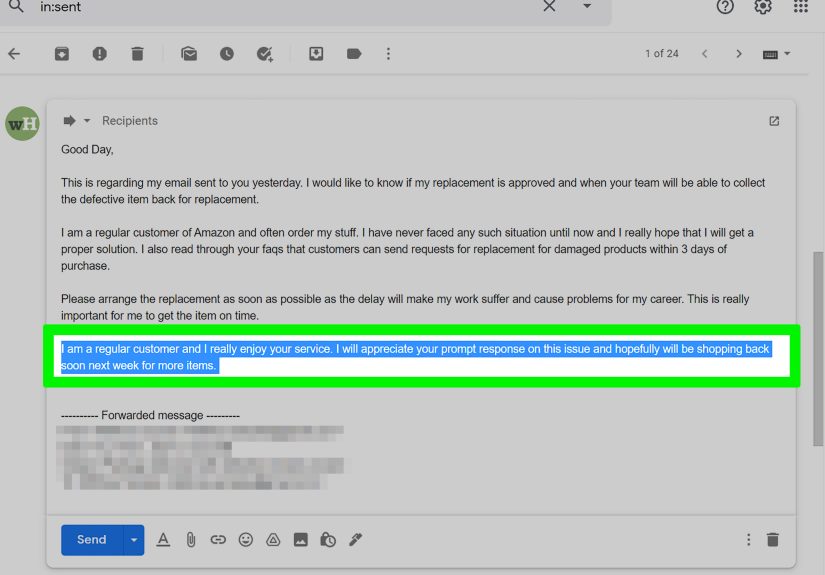
Sample Email to Customer Service (Copy/Paste)
Here’s a complete sample email you can customize. It’s designed to work for many situations (damaged item, wrong item,
missing parts, poor service, etc.).
More Quick Templates for Common Scenarios
If your issue is more specific, these mini-templates will save you time. Keep them short and plug in your details.
Billing Error / Unknown Charge
Cancel Subscription (and Get Written Confirmation)
Late Delivery / Missing Package
Follow-Up Without Becoming “That Email Thread”
If you don’t hear back, follow up politely. Many support teams have 24–72 hour response windows (sometimes longer during holidays).
A good follow-up is short and includes your original case details.
When to follow up
- After 2 business days for normal issues
- After 24 hours if the problem is time-sensitive and you stated that clearly
Follow-up email example
If They Don’t Resolve It: Escalation Options That Aren’t Just “Angry Tweet”
Most companies will resolve reasonable requests when the issue is clear and documented. If they don’t, escalate in a structured way:
- Ask for a supervisor or escalation team and include your case number.
- Use the company’s official complaint process (many have a dedicated escalation form).
- File with a third-party channel when appropriate (for example, BBB for dispute assistance, or relevant government complaint pathways for specific industries like financial products).
- Consider your payment protections (credit card dispute windows may apply depending on the situation).
The secret weapon here isn’t angerit’s organization. Your timeline, proof, and clear request matter more than dramatic adjectives.
Common Mistakes That Slow Everything Down
- Being vague: “Your product is bad” doesn’t tell anyone what to do next.
- Writing a novel: Long emails bury the actual issue.
- Skipping identifiers: No order number = slow search = slow fix.
- Threatening immediately: Escalation is a tool, not an opening line.
- Sending sensitive info: Never email passwords or verification codes.
- Not stating the desired outcome: Make your ask explicit.
Customer Service Email Checklist (Fast Mode)
- Clear subject line with order/account number
- One-sentence summary of the issue
- Key facts in bullets (dates, product, amount, tracking)
- Evidence attached and referenced
- Specific resolution requested
- Polite closing + contact info
- Reasonable deadline for a response
of Real-World “Been There” Experiences (So You Don’t Have To)
In real customer service situations, the difference between “resolved in one email” and “three-week email tennis”
usually comes down to tiny choices that feel boring in the momentuntil they save you.
One common experience: people bury their order number halfway down the email, like it’s an Easter egg.
Then the support agent has to hunt for it, ask for it, or (worst-case) reply with the dreaded
“Can you provide your order number?” That’s not a failure of customer serviceit’s a predictable outcome of
an email that didn’t make the agent’s job easy. When you put the order number in the subject line and again in
the first few lines, your message gets routed faster and handled with fewer questions.
Another pattern: emotions spike, emails get spicy, and suddenly you’ve written a message that sounds like you’re
auditioning for a courtroom drama. Totally understandableproblems are annoying. But in practice, overly heated
emails often slow things down. Support agents still want to help, yet harsh language can trigger policy-heavy responses,
extra approvals, or a supervisor handoff that takes longer. The emails that tend to get the quickest resolutions are
the “calm and specific” ones: what happened, what you want, and what proof you have.
People also learn (sometimes the hard way) that screenshots are the MVP of customer support. A confirmation page,
a cancellation message, a tracking status, a billing line itemthese can instantly settle misunderstandings.
It’s not about “gotcha”; it’s about clarity. When your evidence is attached and labeled (“Screenshot 1: renewal email
dated Dec 22”), you reduce back-and-forth and keep the conversation factual.
Then there’s the experience of “I followed up too soon” versus “I waited too long.” Following up five minutes later
usually doesn’t help (unless it’s a true emergency). But waiting weeks can push you past return windows or dispute timelines.
A steady approach works best: give a reasonable response window, then send one polite follow-up that restates the essentials.
If you still get silence, you escalate with the same calm documentation. Think of it as building a neat paper trail that
tells the story without you having to retell it every time.
Finally, many customers discover that a friendly closing isn’t just mannersit’s strategy. “Thanks for your help” and
“I appreciate your time” keep the tone collaborative. You’re still asking for a real fix, but you’re not making the person
on the other side regret opening your email. The best outcomes tend to happen when you treat customer service like a joint
problem-solving mission: you provide clean information; they provide the solution. Everybody wins, including Future You,
who would like to spend less time refreshing an inbox.
Conclusion
Writing an email to customer service doesn’t have to be painful. If you keep it clear, factual, and structuredand you make
your request easy to understandyou dramatically increase the odds of a quick, satisfying resolution. Use a strong subject line,
include the key details and proof, ask for a specific outcome, and follow up like a professional (not a pirate threatening to
“take this to the highest authorities of the sea”).
Copy the sample email above, personalize it, and hit send. With the right approach, your “customer service problem” can turn into
a “customer service solved” storyideally with minimal drama and maximum refund.