Table of Contents >> Show >> Hide
- Why Players Change Their RuneScape Display Name
- Before You Change Your RuneScape Name, Know These Rules
- How to Change Your Display Name on RuneScape: 9 Steps
- RuneScape vs. Old School RuneScape: Is the Process Different?
- What If the Name You Want Is Taken?
- Tips for Choosing a Better RuneScape Display Name
- Common Mistakes to Avoid
- Final Thoughts
- Player Experience: What Changing Your RuneScape Display Name Actually Feels Like
- SEO Tags
Maybe you made your RuneScape display name in 2009 during a phase involving too much Mountain Dew and not enough good judgment. Maybe your Old School RuneScape identity now reads like a dare gone wrong. Or maybe you simply want something cleaner, cooler, or less likely to make your clan roast you in public chat. Whatever the reason, changing your display name on RuneScape is absolutely doable.
The tricky part is that RuneScape naming is not just a “click here and boom, new identity” situation. There are account settings, character names, Jagex account names, membership timing, Bonds, availability checks, and the all-important truth that your dream name may already belong to someone who logged in once during the Obama administration and vanished into the void. Fun!
This guide breaks the whole process down in plain American English, with zero fluff and just enough humor to keep the account-management goblins away. You will learn how to change your RuneScape display name in nine clear steps, what rules matter, what mistakes to avoid, and what to expect if the name you want is taken, blocked, or resting peacefully in someone else’s digital attic.
Why Players Change Their RuneScape Display Name
A RuneScape display name does more than sit above your character’s head looking pretty. It is part of your in-game identity. Friends know you by it. Clanmates recognize it. Your reputation can quietly hitch a ride on it. In many ways, it becomes your brand in Gielinor, which is a weird sentence but still true.
Players usually change their RuneScape name for a few common reasons. Some want a more mature username after outgrowing their original one. Some return after years away and want a fresh start. Others rebrand for streaming, PvM, skilling, roleplay, or clan life. And yes, some simply want to stop explaining why they once thought a name like “xX_BassCannonDad_Xx” was timeless art.
Whatever your reason, the best new display name usually checks three boxes: it is easy to remember, easy to type, and not likely to age like milk in a backpack.
Before You Change Your RuneScape Name, Know These Rules
1. Character name and Jagex account name are not the same thing
This is the first place many players get mixed up. Your Jagex account name is separate from your RuneScape or Old School RuneScape character name. If your goal is to change what other players see in game, you want to change the character name, not just the Jagex account name.
2. Membership matters
RuneScape members can change their character name once every 28 days. That means name changes are not unlimited on demand through the normal route. If you are planning a full rebrand every other Tuesday, RuneScape would like a word.
3. A Bond can speed things up
If you do not want to wait for the normal timer, a RuneScape Bond can be redeemed for an immediate character name change. This is especially handy if inspiration strikes late at night and you suddenly realize your old name belongs in witness protection.
4. Your old name does not vanish immediately
RuneScape generally reserves your previous name to your character for at least 35 days and sometimes up to 6 months, depending on how long you had it. That is good news if you panic and want to go back. It is less good news for anyone hoping to swoop in and grab your former name right away.
5. Your login does not change
Changing your display name does not change your login name or login email. This is important because plenty of players assume a new display name means new login credentials. It does not. Your login stays the same, even if your character name gets a makeover.
How to Change Your Display Name on RuneScape: 9 Steps
Here is the clean, practical version of the process. These steps work as a universal guide for RuneScape and Old School RuneScape players, with notes where the experience may differ slightly by version or interface.
- Decide what you actually want to change.
Make sure you are changing your character display name rather than your Jagex account name. If your goal is the name other players see in RuneScape or OSRS, you want the character-name option. - Check whether you are eligible to change it right now.
If you are a member, you normally get one character name change every 28 days. If you are not ready to wait or want an extra name change, prepare a Bond that can be redeemed for that purpose. - Come up with two or three backup names before you begin.
This step saves time and protects your sanity. If your first choice is unavailable, already taken, or flagged as inappropriate, you do not want to sit there blinking at the screen like a stunned goblin. Have alternatives ready. - Log in to the correct account-management area.
Sign in to your RuneScape or Jagex account through the official account settings flow. If you are using a Jagex account, you may be routed through its account-management page. If you are changing a Jagex account name instead, that happens in the Jagex account management area, but again, that is separate from your in-game character name. - Find the name-change option for your character.
Depending on your setup and game version, this may appear in account settings as a character-name option, or through an in-game Bond redemption flow, especially in Old School RuneScape. In RuneScape, players may also see account or hero-related settings tied to name changing. - Enter your preferred new display name carefully.
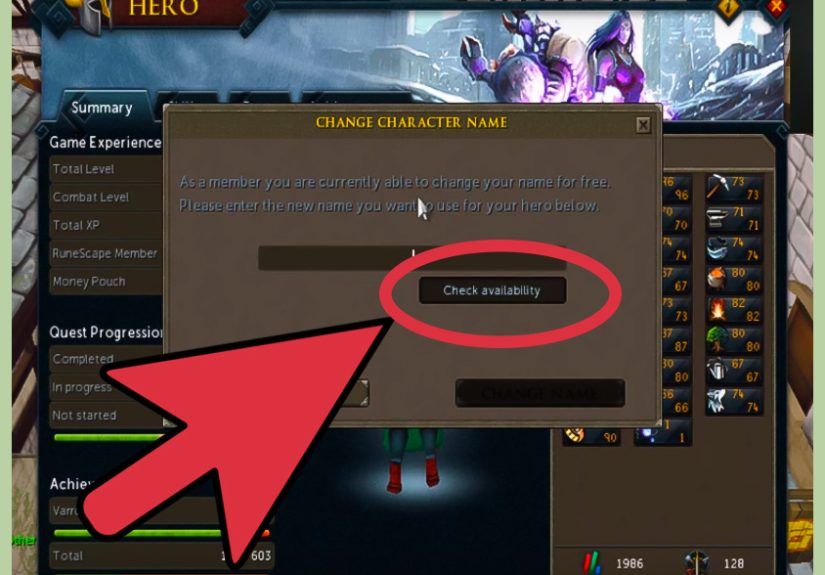
Type the name exactly as you want it to appear. Double-check spelling, spacing, and readability. Clever is great. So is being understandable without a decoder ring. - Check availability and watch for restrictions.
If the name is unavailable, it is usually because another player already has it or because the name is considered inappropriate or misleading. RuneScape will not manually free up taken names for you, so if your dream name is gone, it is time to move to your backup list. - Confirm the change or redeem a Bond if needed.
If the normal change window is available, confirm the new name. If you are doing an immediate name change through a Bond, redeem the Bond and follow the prompts to apply the character-name change package. - Log back in and verify everything.
Once the change goes through, re-enter the game and make sure your new display name appears correctly. Update friends, clanmates, and any linked social or community profiles if you use RuneScape under a consistent online identity.
RuneScape vs. Old School RuneScape: Is the Process Different?
Yes, a little, but not enough to require a PhD in medieval menu navigation.
In modern RuneScape, players often manage account-related settings through official account pages, and some name-related functions may also appear through in-game settings depending on interface flow. In Old School RuneScape, Bond-based name changing is especially relevant, and the Bond pouch route is commonly part of the process.
The safest approach is simple: use official account management for account-level changes, use the official character-name tools for display-name changes, and do not confuse either one with your login credentials. That confusion is the digital equivalent of trying to bank with a fishing rod.
What If the Name You Want Is Taken?
Welcome to the club. The line forms to the left.
RuneScape names are old, competitive, and often snapped up fast. If your preferred display name is unavailable, it may be because another player already uses it, the name is reserved, or the system will not allow it for policy reasons. Jagex does not manually hand out unavailable names just because you ask nicely with your best customer-service voice.
Your best move is to adapt intelligently. Add a subtle variation. Use a cleaner two-word version. Try a naming style that fits your playstyle, such as skilling, bossing, lore, humor, or clan branding. Just avoid making it so complicated that even you forget it after lunch.
Tips for Choosing a Better RuneScape Display Name
- Keep it readable: Easy-to-read names are easier for friends, clanmates, and viewers to remember.
- Avoid trend clutter: Too many random symbols or edgy flourishes can age badly.
- Think long term: Pick something you will still like six months from now, not just five minutes from now.
- Match your play identity: A PvM main, skiller, ironman, or content creator may want different naming styles.
- Stay rule-friendly: If a name is offensive, misleading, or inappropriate, you are just creating future paperwork for yourself.
Common Mistakes to Avoid
Confusing your login with your display name
This is the classic blunder. Your login name or email does not magically update when your character name changes.
Forgetting the 28-day cycle
If you change your mind immediately after confirming the new name, RuneScape may politely remind you that impulsive branding has consequences.
Not preparing backup options
The best names are often taken. Walking into the name changer with one single idea is like going to the Grand Exchange with one coin and big dreams.
Changing the wrong name
Some players update the Jagex account name and then wonder why their in-game identity is untouched. Different name, different purpose, different menu.
Final Thoughts
Changing your display name on RuneScape is not hard, but it does reward a little planning. Once you understand the difference between a character name and a Jagex account name, the rest becomes much easier. Check your eligibility, prepare backup names, use the official tools, and confirm everything before you lock it in.
A good RuneScape name should feel like it belongs to the player you are now, not the one who thought “UltraHamsterMage42” sounded immortal. Whether you are returning to Gielinor after years away, building a cleaner brand for your clan, or simply trying to escape a username that now feels like evidence, the right name change can make your account feel fresh again.
And that, honestly, is one of the small joys of MMOs: sometimes a tiny update to your identity makes the whole world feel new.
Player Experience: What Changing Your RuneScape Display Name Actually Feels Like
There is also a very human side to changing your RuneScape display name, and it is not talked about enough. On paper, it is an account setting. In practice, it can feel weirdly emotional. That old name may be attached to years of quests, boss kills, dumb jokes, friendships, and the occasional absolutely cursed bank tab. Even if the name is objectively terrible, it may still carry history.
For returning players, the experience is often part cleanup, part time travel. You log in after a long break, see your old display name, and instantly remember the era when you created it. Sometimes that is nostalgic. Sometimes it feels like reading your middle-school poetry aloud in a crowded room. Either way, changing it can mark a fresh chapter. It says, “Yes, I still play RuneScape, but no, I no longer wish to be known as something invented during a sugar crash.”
For active players, the experience is usually more strategic. Maybe you want a name that matches your current account build, your clan identity, your streaming brand, or the kind of content you create. A skiller might want something clean and polished. A PvMer may prefer something sharp and memorable. An Ironman may want a name with personality but not too much chaos. The best name changes often feel less like random reinvention and more like finally putting the right label on a character you already know well.
Then there is the availability drama, which is its own mini-game. You type the perfect name. You are ready. You can practically hear the triumphant music. And then the system says no. Maybe it is taken. Maybe it is reserved. Maybe RuneScape simply looked at your masterpiece and decided it belonged in the penalty box. That moment is deeply humbling. But it is also why backup names matter so much. Veteran players learn quickly that flexibility wins.
Once the change goes through, there is usually a small adjustment period. Friends may not recognize you right away. Clanmates may ask who you are. Someone in chat will absolutely say, “Wait, weren’t you called something else?” This is normal. In a surprisingly short time, though, the new name starts to feel natural. It shows up in familiar places, and suddenly it is just you.
That is why changing your RuneScape display name can be more satisfying than expected. It is not just cosmetic. It is a reset button for how you present yourself in a world you may have inhabited for years. And in a game as long-lived as RuneScape, that kind of fresh start can feel pretty great.