Table of Contents >> Show >> Hide
- Why Players Remove Villagers in Minecraft
- Important Warning: Iron Golems and Reputation
- 1. Use the /kill Command in Creative or With Cheats
- 2. Let Zombies Do the Work
- 3. Use Lava Carefully
- 4. Use Fall Damage
- 5. Use Suffocation Damage
- 6. Use Cactus, Sweet Berry Bushes, or Environmental Hazards
- 7. Use TNT or Explosions
- Best Alternatives to Killing Villagers
- Which Method Is Best?
- Common Mistakes When Removing Villagers
- Extra Experience: Lessons From Managing Villagers in Minecraft
- Conclusion
Minecraft villagers are useful, noisy, stubborn, and somehow always standing exactly where you need to place a block. They trade emeralds, unlock powerful enchanted books, help support iron farms, and fill villages with life. They also open doors at the worst possible time, trap themselves in corners, and make that classic “hrrm” sound like they are personally judging your base design.
So, why would anyone search for 7 ways to kill villagers easily in Minecraft? Usually, it is not because players wake up and choose blocky chaos. Most of the time, players want to clear useless villagers, remove nitwits, reset a messy trading hall, fix an overcrowded breeder, or redesign a village without thirty pixelated accountants wandering into the construction zone.
This guide explains several common in-game ways to remove villagers in Minecraft while also covering the consequences. Villagers are passive mobs, but Minecraft’s systems around them are surprisingly deep. Killing them directly can affect reputation, trigger iron golem problems, and make future trading less convenient. In other words, the game may let you do it, but the village may remember. Minecraft villagers are basically small-town gossip with eyebrows.
Before you start, remember this guide is about gameplay in your own world. On multiplayer servers, always follow the server rules and avoid griefing someone else’s village, trading hall, breeder, or iron farm. What is funny in a solo survival world can be an instant ban on a server faster than you can say “emerald discount.”
Why Players Remove Villagers in Minecraft
Villagers are among the most valuable passive mobs in Minecraft. A good librarian can sell Mending, a farmer can turn crops into emeralds, and armorers, toolsmiths, and weaponsmiths can help players gear up without constantly mining. That is why many experienced players build trading halls and carefully organize villagers by profession.
Still, not every villager is useful. Nitwits cannot trade. Some villagers roll disappointing trades. Others get stuck in breeders, crowd workstations, break pathfinding setups, or cause lag when a village population grows too large. In older or messy worlds, removing villagers can be part of cleanup, optimization, or rebuilding.
The important part is understanding the difference between “quick” and “smart.” The easiest method is not always the best method. Directly attacking a villager may lower popularity and can make village-spawned iron golems angry. Indirect methods may avoid some immediate problems, but they still come with moral baggage, at least if you have grown attached to the little traders who sold you glass for one emerald.
Important Warning: Iron Golems and Reputation
Before choosing any method, look for iron golems. In villages, golems protect villagers and can become hostile if the player attacks villagers or has very low popularity. If you hit a villager in front of a golem, you may suddenly become the main character in a very short action movie.
If you care about your trading economy, avoid harming valuable villagers directly. A better approach is to separate important traders, lock in good trades, protect them from mobs, and only remove villagers that are genuinely unwanted. If the goal is simply to reset trades, you may not need to kill the villager at all. For unemployed villagers who have not been traded with, breaking and replacing job site blocks can refresh available trades.
1. Use the /kill Command in Creative or With Cheats
The fastest method for controlled worlds
The quickest way to kill villagers in Minecraft is with commands. If cheats are enabled, you can remove a nearby villager instantly using a command. This is especially useful in Creative mode, test worlds, map-making, or private worlds where you are cleaning up entities.
A simple command can target villagers, but be careful with broad selectors. Removing every villager in loaded chunks can wipe out trading halls, breeders, and natural villages before you realize what happened. A command is powerful, which is great when you know exactly what you are doing and terrifying when your keyboard decides to freestyle.
For safer use, stand near the villager you want to remove and use a limited selector. In a personal testing world, commands are clean, fast, and do not require building a trap. On survival servers, however, only use commands if you have permission. Admin tools are not a license to become the mayor of disappearing people.
2. Let Zombies Do the Work
A classic survival method
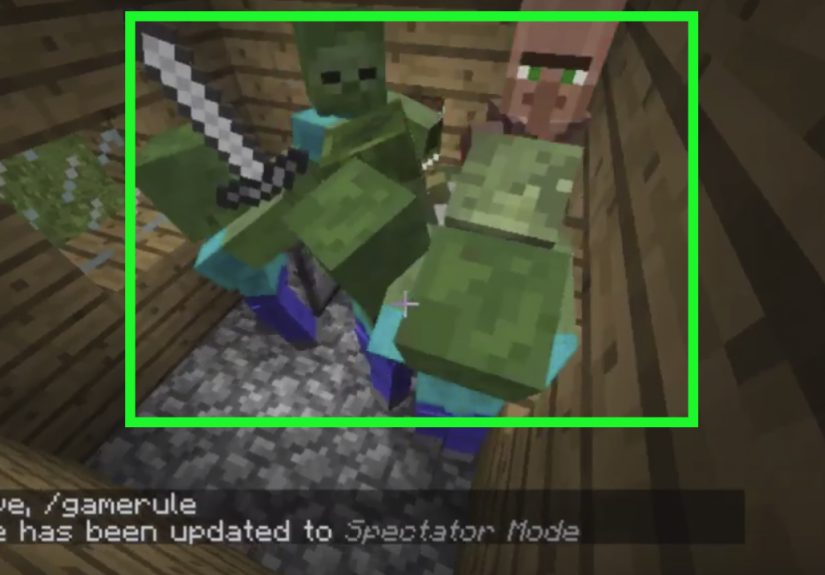
Zombies naturally target villagers, which makes them one of the most common ways villagers die in survival gameplay. If a village is poorly lit, has open doors, or lacks walls, zombies can enter at night and attack villagers. This is why many players accidentally lose entire villages before they understand lighting and defense.
To remove unwanted villagers, some players isolate them in a controlled area and allow a zombie to reach them. This method feels very “Minecraft survival documentary,” especially when the villager walks directly toward danger as if pathfinding was designed by a sleepy potato.
There is an important twist: depending on difficulty and edition behavior, villagers may become zombie villagers instead of simply disappearing. This can actually be useful. Zombie villagers can be cured with the right items, and cured villagers may offer better trades. So, if you accidentally create a zombie villager, do not panic. You may have just created a future discount salesman with dramatic backstory energy.
3. Use Lava Carefully
Effective, but risky near builds
Lava is one of the most reliable hazards in Minecraft. It damages mobs quickly, provides light, and destroys many dropped items. For removing villagers, players sometimes use a small contained lava setup so the villager walks or is pushed into the hazard.
The key word is contained. Lava can spread, ignite flammable blocks, damage nearby mobs, and turn a simple cleanup task into a village barbecue nobody ordered. If your village has wooden houses, fences, wool decorations, or a trading hall made from “aesthetic but extremely burnable” materials, lava can ruin your day.
This method works best in stone, deepslate, cobblestone, or other nonflammable enclosures. Keep water nearby, block off the area, and avoid placing lava where villagers, pets, iron golems, or your own boots can wander into it. Minecraft has a proud tradition of players designing traps and then immediately falling into them.
4. Use Fall Damage
Simple physics, blocky results
Fall damage is another straightforward way to kill villagers in Minecraft. Like many mobs, villagers can take damage after falling from enough height. Players may use holes, drop shafts, trapdoors, rails, water flow, or piston systems to move unwanted villagers into a controlled drop.
The advantage of fall damage is that it does not require rare items. You mainly need height, a way to move the villager, and a safe place to build. The downside is that villagers are not always cooperative. They may stop at the edge, stare into space, or choose the exact wrong path because Minecraft villagers treat common sense like an optional resource pack.
Fall methods are best used away from important areas. If you build a drop shaft inside a village, other villagers may wander near it. Cover entrances, use gates, and make sure your system only affects the villager you intend to remove. Good Minecraft engineering is basically chaos management with blocks.
5. Use Suffocation Damage
Compact and easy to control
Suffocation happens when a mob is trapped inside solid blocks. In Minecraft, this can occur through pistons, moving blocks, sand, gravel, or careful block placement. For villagers, suffocation can be a compact removal method because it does not require fire, lava, or hostile mobs.
Players sometimes use piston setups to push a solid block into the villager’s space. Sand and gravel can also fall and occupy space if placed above correctly. This method is more technical than simply using lava, but it is also easier to contain. There is no fire spread, no zombie escape, and no surprise lava lake under your trading hall.
The main drawback is setup time. You need to position the villager correctly, and villagers are professional experts at standing slightly out of alignment. Minecarts and boats can help move villagers into position, but even then, expect a little comedy. No Minecraft project involving villagers is complete without at least one moment where you ask, “Why are you like this?”
6. Use Cactus, Sweet Berry Bushes, or Environmental Hazards
Slow but low-maintenance
Environmental hazards can damage villagers over time. Cactus damages entities that touch it, while sweet berry bushes can hurt mobs that move through them. These methods are slower than commands, lava, or fall damage, but they are easy to set up and use common survival items.
A cactus-based method needs enough space because cactus cannot be placed directly beside most blocks. It also breaks items that touch it, which may matter if you care about drops in other situations. Sweet berry bushes are easier to place in many builds, though they require access to taiga biome resources or existing berry bushes.
This approach works best for players who want a simple, passive hazard. It is not the fastest option, but it has fewer explosive side effects than TNT and fewer fiery side effects than lava. Think of it as the “budget landscaping” method, except the landscaping is extremely unfriendly.
7. Use TNT or Explosions
Fast, loud, and usually a bad idea indoors
TNT can kill villagers easily, but it is one of the messiest options. Explosions damage mobs, destroy blocks, break decorations, and can ruin nearby builds. If your goal is to remove one villager from a finished trading hall, TNT is like using a dragon to open a jar of pickles. Technically effective, but please explain yourself.
That said, TNT can be useful in Creative testing, controlled demolition, or worlds where you are clearing an abandoned village. It is also simple: place explosive, trigger explosive, regret explosive if you stood too close. In survival, TNT requires sand and gunpowder, so it is not always the cheapest method unless you already have a creeper farm.
If you use explosions, move the target far away from valuable builds. Protect chests, beds, job blocks, farms, and rails. Also check for nearby iron golems, pets, and villagers you actually want to keep. Explosions do not care about your spreadsheet of “good villagers” and “villagers who gave me beetroot trades again.”
Best Alternatives to Killing Villagers
Even though this guide focuses on how to kill villagers easily in Minecraft, removing them permanently is not always the smartest choice. Sometimes, you can solve the problem without harming your village economy.
Move unwanted villagers somewhere else
Boats and minecarts are popular tools for moving villagers. Boats work on land in a slow but reliable way, while minecarts are excellent for longer transport systems. If a villager is blocking your build, relocating them may be better than killing them.
Reset trades before locking them
If you have not traded with a villager yet, you can often change their profession or trade offers by changing their job site block. This is especially useful for librarians. Many players repeatedly place and break a lectern until the villager offers a desired enchanted book.
Separate valuable villagers
Before cleaning up a village, identify important traders. Farmers, librarians, armorers, toolsmiths, weaponsmiths, clerics, and fletchers can all become very useful depending on your world goals. Lock valuable villagers in safe trading stalls before making big changes.
Use name tags for special villagers
If you have a villager with rare trades or sentimental value, give them a name. It will not make them invincible, but it helps you remember who matters. “Mending Mike” deserves better than being confused with “Random Compost Guy Number Four.”
Which Method Is Best?
The best method depends on your game mode and goal. For Creative mode and testing, commands are the cleanest. For survival, lava, fall damage, suffocation, and environmental hazards are common options. Zombies are useful if you might want zombie villagers for curing later. TNT is fast, but usually too destructive for anything near a serious base.
If you are managing a trading hall, the safest strategy is to avoid chaos. Move the unwanted villager into a separate area first. Keep iron golems away. Do not use explosive or fire-based methods near builds. Most importantly, double-check that the villager is not one you already traded with or planned to keep.
Nothing hurts quite like realizing you removed the librarian with Mending because they were standing next to a nitwit. That is not strategy. That is a tragedy in square pants.
Common Mistakes When Removing Villagers
Attacking villagers in front of iron golems
This is the classic mistake. The player swings once, hears heavy footsteps, and suddenly learns that iron golems have excellent customer service for villagers and terrible customer service for you.
Using lava near wood
Lava near wooden village houses is a disaster waiting patiently. Always use nonflammable blocks and test the setup away from anything valuable.
Removing the wrong villager
Villagers can look similar, especially if several have the same profession. Check trades first. If a villager has valuable offers, move them to safety before doing village cleanup.
Forgetting multiplayer rules
On servers, villagers often belong to someone’s base, farm, or community trading hall. Removing them without permission is usually griefing. Do not be that player.
Extra Experience: Lessons From Managing Villagers in Minecraft
After enough time playing Minecraft, most players learn that villagers are both amazing and deeply inconvenient. They are the backbone of powerful survival worlds, but they can also turn a clean base into a crowded hallway full of confused noses. Managing them well takes patience, planning, and a healthy respect for how weird their pathfinding can be.
One useful habit is to build a sorting area before creating a full trading hall. Bring new villagers into a temporary room, assign job blocks one at a time, check their trades, and only move the good ones into permanent stalls. This prevents overcrowding and reduces the need to remove villagers later. It also saves you from the emotional roller coaster of discovering that the villager you ignored for three hours was actually offering an excellent trade.
Another lesson is to label everything. Use signs, item frames, colored blocks, or named villagers to mark professions and important trades. A trading hall with fifteen librarians may look efficient until you need one specific enchantment and every villager is simply staring at you with identical forehead confidence. Labeling turns chaos into a system.
Lighting is also critical. Many players lose villagers not because they wanted to remove them, but because they forgot to protect them. A dark corner, open fence gate, or missing wall can let zombies reach villagers at night. If you are building a serious village, light every path, roof, and nearby cave entrance. Villagers may not thank you, but their continued existence is basically applause.
Boats and minecarts are your best friends. Villagers do not follow players like animals, so moving them can feel like trying to guide a shopping cart with opinions. Boats are cheap and reliable for short distances. Minecarts are better for long routes, vertical transport, and organized trading hall designs. A good rail line can save hours of frustration.
It is also smart to keep backup villagers. If you rely on one perfect librarian, one creeper, zombie, or accidental lava bucket can ruin your plans. A breeder or spare village population gives you a safety net. Minecraft rewards preparation, especially when your most valuable merchant has the survival instincts of wet cardboard.
Finally, do not rush village cleanup. Decide which villagers matter, move them first, and then handle the unwanted ones. The best players treat villagers like resources, not random background decoration. Whether you remove them, move them, cure them, or turn them into the foundation of an emerald empire, the goal is control. A well-managed village can supply gear, food, enchantments, tools, and emeralds for the entire game.
So yes, there are several easy ways to kill villagers in Minecraft. But the smartest approach is knowing when not to. Sometimes the villager making annoying noises in the corner is useless. Other times, that same villager is one lectern away from becoming the most important merchant in your world. In Minecraft, even a blocky eyebrow guy deserves a quick trade check before judgment day.
Conclusion
Knowing how to kill villagers easily in Minecraft can be useful for cleaning up a messy village, fixing overcrowded breeders, removing nitwits, or redesigning a trading system. The easiest options include commands, zombies, lava, fall damage, suffocation, environmental hazards, and TNT. Each method has advantages, risks, and possible side effects.
For most players, the best method is the one that is controlled, safe, and far away from valuable builds. Avoid direct attacks near iron golems, protect your best traders, and think twice before using destructive methods like lava or TNT. Villagers may be awkward, noisy, and deeply committed to standing in doorways, but they are also one of the most useful parts of Minecraft survival.