Table of Contents >> Show >> Hide
- 1. Choice, Glorious Choice: A Windows Laptop for Every Personality
- 2. The Value Equation: Performance Without the “Luxury Tax”
- 3. Windows 11: Surprisingly Great for Getting Things Done
- 4. Gaming, Creativity, and “Do-It-All” Versatility
- 5. Upgradability and Repairability (on the Right Models)
- 6. The Ecosystem That Fits Real Life
- 7. Market Share Isn’t Everything, but It Tells a Story
- 8. Everyday Life With a Windows Laptop
- 9. So… Why Am I in Love With a Windows Laptop?
- 10. of Real-Life Windows Laptop Experiences
- Conclusion
I didn’t mean to fall in love with a Windows laptop. It started as a practical decision:
I needed something that could juggle work, casual gaming, a million browser tabs, and the occasional
“let’s try video editing at 1 a.m.” impulse. What I ended up with was less a tool and more a
daily companion that fits my weird mix of productivity and procrastination perfectly.
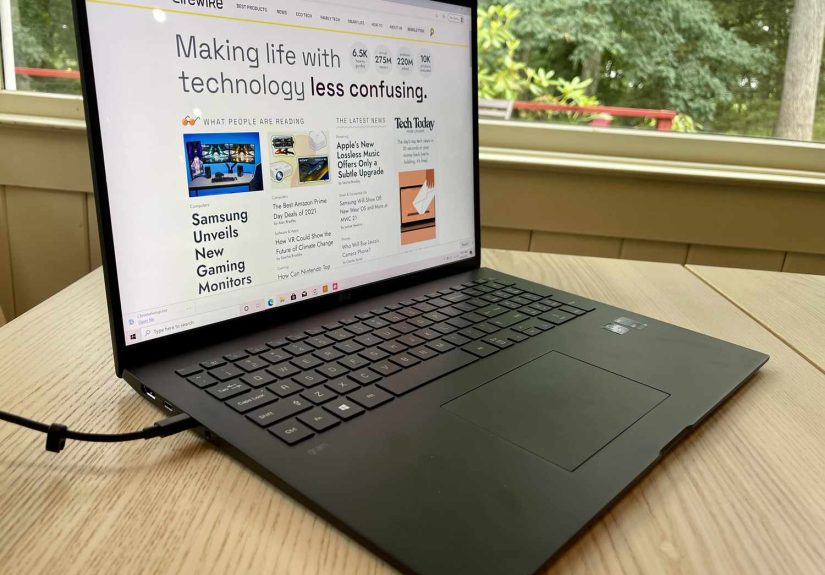
In a world where sleek MacBooks dominate coffee-shop tables, it’s easy to forget that Windows laptops
still quietly rule the global PC market and offer a huge range of options for almost every budget,
hobby, and job. From ultra-slim AI-powered ultrabooks to beastly gaming rigs that sound like they
might achieve liftoff, there’s a Windows laptop for pretty much everyone.
So this isn’t a sterile “Mac vs. PC” showdown. This is a slightly biased, fully caffeinated love letter
to the humble Windows laptopwhy I chose it, why I’m sticking with it, and why I think a lot of people
secretly love theirs too.
1. Choice, Glorious Choice: A Windows Laptop for Every Personality
One of the biggest reasons I’m attached to my Windows laptop is simple: choice. I’m not locked into
a single design language or a small lineup of models. Instead, I get a buffet:
- Featherweight ultrabooks for travelers and commuters
- 2-in-1 convertibles that turn into tablets for note-taking or creative sketching
- Massive workstations that laugh in the face of 4K video timelines
- Gaming laptops with RGB keyboards bright enough to land planes
- Business-focused ThinkPads that can probably survive mild natural disasters
This variety isn’t just nice to look atit’s practical. Need more ports? Prefer a specific keyboard
feel? Want a 14-inch OLED screen instead of a 13-inch LCD? On the Windows side, you can shop by your
actual preferences, not just “small, medium, large.”
And it’s not just low-end hardware any more. Premium Windows laptops from brands like HP, Asus,
Lenovo, Dell, and Microsoft compete directly with high-end MacBooks on display quality, thinness,
and battery life. Many newer models are also AI PCs, packed with dedicated NPUs (neural processing units)
to handle on-device AI tasks, which feels like a glimpse into the future of everyday computing.
2. The Value Equation: Performance Without the “Luxury Tax”
Another reason I’m smitten with my Windows laptop: my wallet didn’t cry as hard as it could have.
Windows machines cover the entire price spectrum, and that matters.
In the midrange, you can get:
- Plenty of RAM (16GB is increasingly common even on affordable models)
- Solid-state storage that boots in seconds
- High-refresh-rate displays for smooth scrolling and gaming
- Battery life that comfortably lasts through work or school days
If you have more to spend, you don’t just get prettier hardwareyou often get more of everything:
more storage, more ports, better GPUs, higher-resolution screens, and sometimes the ability to upgrade
RAM or SSDs later to extend the laptop’s lifespan.
The value proposition is what really hooked me. For the price of one high-end MacBook configuration,
I could often choose between:
- A powerful Windows ultrabook plus an external monitor, or
- A gaming laptop with a dedicated GPU that handles work by day and games by night
For anyone who wants maximum performance per dollarstudents, freelancers, small business owners,
families sharing a computerWindows laptops hit a very sweet spot.
3. Windows 11: Surprisingly Great for Getting Things Done
I’ll admit it: I wasn’t instantly sold on Windows 11. But after actually living with it, I’ve learned
to appreciate how much it quietly boosts my productivity.
Snap Layouts and Snap Groups
One of my favorite features is Snap Layouts. Hover over the maximize button and Windows offers neat,
pre-made layoutstwo, three, or four windows arranged so you’re not endlessly dragging and resizing.
It takes about three seconds to set up a perfect multitasking workspace.
Snap Groups remembers those layouts, so when I minimize everything to check something else, I can
restore my full “work mode” in one click. No more “Where did my research tab go?” chaos while I’m on a deadline.
Built-In Search and Voice Tools
Taskbar search has also grown up. Being able to tap the Windows key, type a few letters, and jump straight
into files, apps, or web results saves more time than I like to admit. Add optional voice typing and built-in
dictation, and your laptop becomes a surprisingly capable writing partner when your hands are busy or tired.
AI and Copilot-Style Features
Many newer Windows laptops ship as “AI PCs” with dedicated NPUs designed for tasks like live transcription,
background noise removal, and smart photo or document processing. That means:
- Video calls that look and sound better, even in less-than-ideal lighting
- Faster on-device summarization and content creation in supported apps
- More efficient performance, since AI tasks don’t always hit the main CPU and battery as hard
I didn’t buy my laptop for AI, but having these tools built in feels like a bonus that keeps
getting better as software catches up.
4. Gaming, Creativity, and “Do-It-All” Versatility
Here’s where my love story gets real: my Windows laptop doesn’t just work hardit plays hard too.
Casual to Serious Gaming
If your idea of gaming is cozy indie titles and The Sims, integrated graphics on many modern
Windows laptops are more than enough. If you’re into AAA titles, eSports, or VR, you can opt for
a dedicated GPU from Nvidia or AMD and turn the same machine into a portable gaming rig.
A gaming-focused Windows laptop isn’t only about games; it’s also a productivity monster:
- Fast CPUs make multitasking and compiling code feel snappy
- High-refresh displays make scrolling, drawing, and editing smoother
- Extra cooling and better components can extend overall lifespan
Creative Workflows
For creative workphoto editing, illustration, music, or videoWindows laptops offer a ton of flexibility:
- Support for a huge ecosystem of creative software, from Adobe CC to niche tools
- Touchscreens and 2-in-1 hinges for sketching directly on the display
- Wide-gamut OLED panels on many mid- and high-end models
My own Windows laptop pulls double duty: spreadsheets and documents by day, light Photoshop and video edits
by night. I don’t need a separate “work laptop” and “fun laptop.” One machine does it all.
5. Upgradability and Repairability (on the Right Models)
Not every Windows laptop is upgrade-friendlythin and light designs sometimes solder everything downbut
the fact that many models still let you upgrade RAM or storage is a huge plus.
Being able to:
- Swap a 512GB SSD for a 2TB one when your game library explodes
- Upgrade from 8GB to 16GB or 32GB of RAM to keep up with heavier workloads
- Replace a dead battery instead of replacing the whole laptop
gives your device a second (or third) life. It’s better for your budget and better for the planet.
And while some ultra-thin designs limit this flexibility, Windows users still have far more hardware
configurations and upgrade paths to choose from compared to more locked-down ecosystems.
6. The Ecosystem That Fits Real Life
Ecosystems are a big deal. And yes, Apple’s ecosystem is polished and impressively integrated. But the
Windows ecosystem feels more “real world” to me because it meets me where I actually am.
My Windows laptop happily connects to:
- Budget monitors and high-end ultrawide gaming displays
- USB-C hubs, docks, and random projectors in conference rooms
- All kinds of keyboards, mice, and game controllersno drama, no special cables
- Printers and scanners that have been around longer than some social networks
When I plug something in, it usually just works. No special dongle tax, no “this accessory is not supported”
messages. That kind of compatibility sounds boring, but after years of wrestling with cables and ports,
boring is beautiful.
7. Market Share Isn’t Everything, but It Tells a Story
If you look at global market share, Windows still powers the clear majority of desktop and laptop computers
worldwide. That means:
- Most enterprise environments are built around Windows
- Many schools and universities rely on Windows devices
- Most niche or specialized software (engineering, scientific tools, legacy business apps) still targets Windows first
For users, that translates into:
- Better support for obscure software you might need for work or study
- More help articles, forum threads, and YouTube tutorials when you run into a problem
- A healthy, competitive hardware market where multiple manufacturers are trying to win your attention
My love for Windows laptops isn’t just sentimental; it’s backed by the reality that this platform has
scale, history, and momentum behind it.
8. Everyday Life With a Windows Laptop
On paper, all of this sounds very technical. In real life, here’s what my day with a Windows laptop
actually looks like:
- Morning: Docked at my desk, driving an external monitor, answering emails, juggling documents, and hopping into video calls.
- Afternoon: Unplugged, working from a café. Snap Layouts keep my research, draft, and reference windows organized while I write.
- Evening: Plugged into the TV for a movie, or booting up a game to blow off steam.
- Late Night: A random burst of creativityediting photos, sketching on a touch display, or testing a new app.
My laptop doesn’t complain. It just shifts gears along with me, from serious productivity to chaotic multitasking
to entertainment, without needing a different device for each role.
9. So… Why Am I in Love With a Windows Laptop?
It’s not perfection that makes me love my Windows laptop. It still needs updates at the worst possible time,
occasionally freezes when I have 47 tabs open, and sometimes decides a restart is “highly recommended” during
lunch. But overall, the experience is exactly what I need:
- Enough power and flexibility to grow with my needs
- An operating system that supports real-world work and play
- Hardware options that let me choose what matters most: price, power, portability, or all three
- A huge software library and broad compatibility with the tools and gear I already own
In short, my Windows laptop isn’t just a computer. It’s a customizable, adaptable, occasionally chaotic
sidekick that fits my lifemessy browser tabs, unfinished edits, random late-night projects and all.
10. of Real-Life Windows Laptop Experiences
Let me get a little more personal here, because “love” is a strong word to use about a metal rectangle
that hums and occasionally overheats.
The first time I realized I was genuinely attached to my Windows laptop was on a trip. I tossed it into
my backpack with barely any padding (sorry, laptop), sat through a long flight, and opened it in a
hotel lobby on terrible Wi-Fi. Within minutes, I was:
- Connected to my cloud storage
- Working through a presentation in PowerPoint
- Editing a few photos from my phone on a proper screen
- Streaming music in the background
Nothing felt compromised. I didn’t have to think about “Can this app run here?” or “Is this compatible
with that?” I just clicked, installed, opened, and got on with my day.
Another time, a friend asked if they could use my laptop to test a piece of niche software for a research
project. Their Mac simply wasn’t supported. On my Windows machine? Download, install, done. No workarounds,
no virtual machines, no jumping through hoops. It reminded me how often Windows is still the default for
specialized tools behind the scenes in labs, offices, and classrooms.
Then there’s gaming night. I’m not a hardcore gamer, but a few times a month, my laptop transforms into
a little entertainment hub. I plug in a controller, prop the laptop on a stand, and connect it to the TV.
Suddenly I’ve got a console-style experienceonly it’s still my work machine. The same device that handled
boring spreadsheets earlier in the day is now rendering gorgeous environments and fast-paced gameplay.
I’ve also grown to appreciate how forgiving the Windows ecosystem can be. I’ve swapped out SSDs to get
more space. I’ve upgraded RAM in older machines to give them a second life. I’ve connected my laptop to
budget monitors, old printers, random office projectors, and weird USB gadgets I probably shouldn’t
have trusted. Most of the time, everything just works with a driver update or two.
And honestly, there’s something comforting about knowing that if I ever decide to move on to a different
model, I’m not starting from scratch. My apps, my workflow, my keyboard shortcuts, my gamesit all carries
over from one Windows laptop to the next. I can choose a new design, new brand, or new CPU, but my habits
don’t have to change overnight.
Do I admire MacBooks? Absolutely. They’re beautiful machines with incredible performance and battery life.
But my love for Windows laptops is about fit, not fashion. It’s the feeling that this platform is built
for real lifewith all its competing priorities, legacy software, random peripherals, and half-finished
projects. It’s not perfect, but it’s flexible, familiar, and endlessly adaptable.
That’s why, after years of trying different systems, I’ve settled into something that just works
for me. My Windows laptop may not be the prettiest device on every café table, but it’s the one I trust
to get things done, handle my hobbies, and still have battery left when I finally close the lid at midnight.
Conclusion
Loving a Windows laptop isn’t about blind loyalty to a brand or operating system. It’s about appreciating
a platform that offers genuine choice, strong value, and enough flexibility to adapt to almost any lifestyle.
From productivity features in Windows 11 and AI-powered hardware to broad software support and hardware variety,
Windows laptops make it easy to find a device that’s truly yours.
Whether you’re a student trying to stretch a budget, a professional juggling complex workflows, a gamer
looking for a portable rig, or a creative experimenting with new tools, the odds are good there’s a Windows
laptop that fits you perfectly. And once you find the right one, don’t be surprised if you catch yourself
feeling just a little bit attached.
meta_title: Why I’m in Love With a Windows Laptop
meta_description: Discover why a Windows laptop wins on choice, value, and versatility for work, gaming, and everyday life.
sapo: Windows laptops don’t just dominate market sharethey quietly power real life.
From affordable student machines to AI-powered ultrabooks and gaming rigs, the Windows ecosystem offers
more choice, better value, and serious flexibility for work, play, and everything in between. In this
in-depth, first-person guide, I break down why I’m in love with my Windows laptop, how Windows 11 helps
me stay productive, and what makes this platform such a good fit for students, professionals, creatives,
and casual gamers alike.
keywords: Windows laptop, Windows laptops, Windows 11 features, PC vs Mac, gaming laptop, AI PC, laptop for work and gaming