Table of Contents >> Show >> Hide
- What “Wireless” Actually Means (Spoiler: Not 100% Wireless)
- How Wireless Audio Actually Works
- Wireless vs. Wired: Sound Quality Showdown
- The Pros of Wireless Speakers for Home Theaters
- The Cons: Where Wireless Speakers Still Struggle
- Wi-Fi vs. Bluetooth: Which Is Better for Home Theater?
- Real-World Use: Who Are Wireless Home Theater Speakers Best For?
- How to Get the Best Results from Wireless Home Theater Speakers
- The Truth, in One Sentence
- Extra: Real-World Experiences with Wireless Home Theater Speakers
- Lesson 1: The First Week Feels Like Magic
- Lesson 2: Outlets Matter More Than You Think
- Lesson 3: Your Wi-Fi Habits Show Up in Your Sound
- Lesson 4: Surround Speakers Don’t Need to Be Perfect to Be Awesome
- Lesson 5: Calibration Is Your Secret Weapon
- Lesson 6: Once You Go Surround, It’s Hard to Go Back
If you’ve ever stared at a bundle of speaker wires behind your TV and thought,
“There has to be a better way,” you’re exactly the person wireless home theater
systems are marketed to. Slick ads promise cinema-quality surround sound with
zero mess, zero cables, and zero stress. Just unbox, plug in, and boominstant
movie magic.
The reality? Wireless speakers for home theaters are awesome… but not magic.
They solve some problems and create a few new ones. The good news is that once
you understand what “wireless” really means, what these systems can and can’t
do, and how to set them up correctly, you’ll know whether they’re right for
your spaceor whether you should stick with good old-fashioned copper.
What “Wireless” Actually Means (Spoiler: Not 100% Wireless)
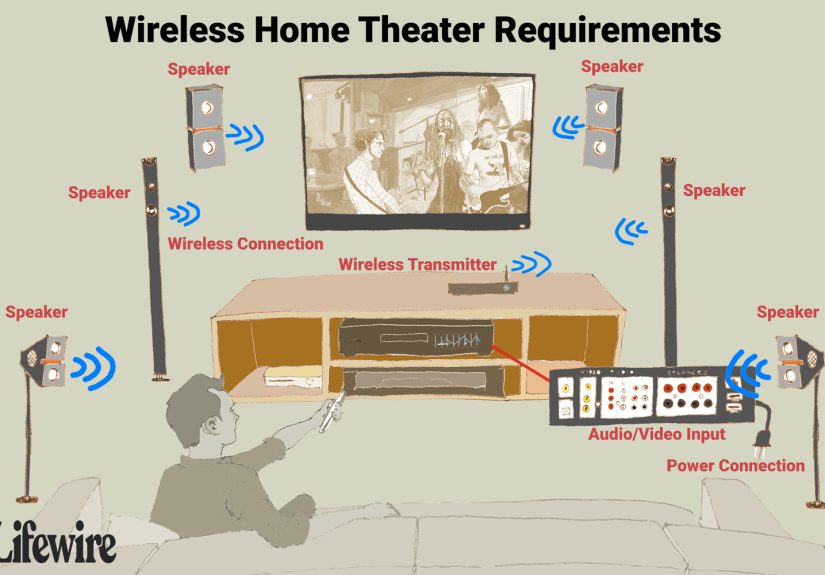
Let’s clear up the biggest misconception right away: in most “wireless”
home theater setups, only the audio signal is wireless. The speakers
themselves still need power. That means every wireless surround speaker and
subwoofer still plugs into an electrical outlet.
In a typical wireless home theater:
-
Your TV connects to a soundbar or base unit via HDMI eARC
or optical cable. -
The soundbar or hub sends audio wirelessly to the rear
speakers and subwoofer. - Each wireless speaker still needs a power cord and outlet.
In other words, you’re getting rid of long speaker cables running across your
roomnot electricity. That’s still a win for aesthetics and tripping hazards,
just not the cable-free fantasy many people picture when they hear “cordless
home theater.”
How Wireless Audio Actually Works
Wireless speakers for home theaters usually rely on one of three methods:
- Wi-Fi–based systems that send audio over your home network.
- Bluetooth for simpler, shorter-range connections.
-
Proprietary 2.4 GHz or 5 GHz links built into specific soundbars
and speakers (like many Samsung, LG, Sonos, or Bose systems).
Wi-Fi and proprietary wireless links typically offer more bandwidth and stability
than Bluetooth, which is why they’re usually preferred for home theater use.
They can handle multi-channel surround sound, support higher-quality audio, and
maintain a connection over a larger area of your home.
Behind the scenes, the system compresses the audio just enough to send it over
the air, then decompresses it at the speaker end. With a good system, this
process is fast and transparentyou hear smooth, synchronized sound, not glitches
and echoes.
Wireless vs. Wired: Sound Quality Showdown
Time for the question everyone secretly cares about:
Do wireless speakers sound as good as wired ones?
The honest answer: it depends who you are and what you’re listening for.
Where Wired Still Wins
Traditional wired speakers send audio as an electrical signal directly over a
physical cable. There’s no radio transmission, no compression, and almost no
chance of interference if the cables are decent and connections are solid.
For serious audiophiles or very high-end systems, wired setups still tend to:
- Deliver the most consistent, uncompressed sound.
- Handle reference-level volumes and big rooms more reliably.
- Be less vulnerable to network congestion or wireless dropouts.
If you’re the type of person who does A/B listening tests and debates DACs
with strangers on forums, there’s a good chance a well-built wired system
will still be your happy place.
Where Wireless Is “Good Enough” (Or Better)
For most people, modern wireless home theater speakers sound fantastic.
Premium soundbars with wireless rears and subs now support:
- Dolby Atmos and DTS:X with up-firing drivers.
- 11.1.4-channel setups that bounce sound around your walls and ceiling.
- Room calibration features that tune audio to your exact seating position.
In real-world living rooms, the difference between a good wireless system and
a mid-range wired setup is often tinyespecially for surround channels. Many
users can’t reliably tell the difference between high-bitrate Wi-Fi audio and
more compressed streams during normal viewing. Your room’s acoustics, seating
position, and speaker placement will matter more than the wire vs. wireless debate.
The Pros of Wireless Speakers for Home Theaters
1. Cleaner Aesthetics and Less Clutter
No more draping speaker cables along baseboards or hiding them under rugs.
Wireless rear speakers and subs give you a much cleaner look, which matters
if your home theater is also your living room and not a dedicated bat cave
painted black with movie posters on every wall.
For renters, people with open-plan spaces, or households with pets and kids,
reducing cable clutter isn’t just about looksit’s about safety and sanity.
2. Easier Setup and Flexibility
With wireless systems, installation is usually:
- Plug in the soundbar or hub.
- Plug in the wireless speakers and sub.
- Run the pairing or calibration on the TV or app.
That’s it. No stripping wires, no guessing polarity, no crawling behind furniture
with a flashlight clamped between your teeth. You can also move speakers around
more easily as you rearrange furniture or upgrade your TV.
3. Smart Features and Multi-Room Audio
Many wireless home theater speakers double as smart speakers.
You can:
- Stream music directly from services like Spotify or Apple Music.
- Control playback via voice assistants like Alexa or Google Assistant.
- Sync audio across multiple rooms with compatible speakers.
A wired 7.1 speaker set driven by an AV receiver can sound incredible, but
it usually won’t read your text messages aloud, join your smart home routines,
or play jazz in the kitchen at the same time as your movie room.
The Cons: Where Wireless Speakers Still Struggle
1. Latency and Lip-Sync Issues
One of the biggest technical challenges with wireless audio is keeping sound
perfectly in sync with the video. If the wireless signal adds even a small delay,
you can end up with lip-sync issuesactors talking a split-second
before or after you hear them.
Many modern systems have built-in audio delay settings or automatic sync
correction, but cheaper setups and crowded Wi-Fi environments can still show
their weaknesses. Gamers, in particular, are sensitive to latency; if you play
fast-paced shooters, you want the sound of that explosion right when you see it.
2. Interference and Dropouts
Wireless speakers share airspace with everything else in your home:
phones, laptops, tablets, smart thermostats, game consoles, security cameras,
and your neighbors’ Wi-Fi.
Common problems include:
- Random dropouts where the rear speakers cut out briefly.
- Static, glitches, or pops when wireless channels are congested.
- Range issues when speakers are too far from the hub or router.
A properly configured 5 GHz network, decent router placement, and avoiding
major obstructions (like thick concrete walls) can dramatically improve reliability.
3. Compression and Bandwidth Limits
Not all wireless systems handle audio the same way. Some:
- Use higher-bandwidth links that support hi-res, multi-channel audio.
- Use more aggressive compression that technically lowers quality.
In practice, most people won’t notice a difference during Netflix binges or
Sunday football. But if you’re feeding a system high-resolution audio tracks
and you have a finely tuned ear (and a quiet room), a wired setup still gives
you the most headroom and purity.
Wi-Fi vs. Bluetooth: Which Is Better for Home Theater?
Here’s the quick breakdown:
Wi-Fi–Based Systems
- More bandwidth → better suited for multi-channel and high-quality audio.
- Longer range across your home, as long as Wi-Fi coverage is decent.
- Can stream directly from the internet without your phone acting as a middleman.
Wi-Fi (or proprietary Wi-Fi–style systems) is usually the best choice for
full-blown home theater setups with surround sound, Atmos, and multiple speakers.
Bluetooth-Based Setups
- Best for simple TV + soundbar or small-room setups.
- More prone to compression and latency.
- Relies heavily on your phone or TV as the source device.
Bluetooth is perfectly fine for quick music streaming or a casual movie night,
but if you’re serious about surround sound, look for systems that lean on
Wi-Fi or their own dedicated wireless link instead of basic Bluetooth.
Real-World Use: Who Are Wireless Home Theater Speakers Best For?
Great Candidates for Wireless Speakers
- Renters who can’t drill holes or run cables through walls.
-
Busy families who want great sound without a weekend-long
installation project. -
Design-conscious homeowners who hate visible wires more than
they love microscopic audio improvements. -
Smart home users who want tight integration with voice control
and multi-room audio.
Might Prefer Wired (Or Hybrid) Setups
- Serious audiophiles with treated rooms and high-end gear.
- Gamers who want the lowest possible audio latency.
-
Dedicated home theater builders planning in-wall or in-ceiling
speakers and concealed wiring.
For many people, the sweet spot is actually a hybrid system:
a soundbar or front speakers connected via wires, and rear surrounds or subwoofers
connected wirelessly. That way, the most critical front channels are rock-solid,
and you still avoid long cable runs to the back of your room.
How to Get the Best Results from Wireless Home Theater Speakers
1. Treat Your Network Like Part of the System
Think of your router as another component in your home theater stack.
If your Wi-Fi struggles when your kids are gaming and your partner is on
a video call, you can bet your wireless speakers will feel it too.
Practical tips:
- Use a newer router that supports dual-band or Wi-Fi 6/6E.
-
Place the router in a central, elevated location, not buried
in a cabinet. -
If possible, create a separate 5 GHz network for your home
theater gear.
2. Nail the Speaker Placement
“Wireless” doesn’t mean “put speakers anywhere and hope for the best.”
Placement still matters a lot:
-
Aim to form a listening triangle between your main seating
position and the front speakers. -
Place rears slightly behind and above ear level, angled
toward the seating area. -
Avoid jamming speakers directly against walls or into corners if you can;
this can muddy the bass and overall clarity.
Many modern systems include built-in room correction. Run itdon’t skip it.
It can compensate for less-than-ideal rooms, weird furniture layouts, or
asymmetrical seating positions.
3. Use HDMI eARC When Possible
If your TV and soundbar or hub support HDMI eARC, use it.
eARC can pass through high-bitrate audio formats and keeps everything
synchronized more reliably than older optical connections or Bluetooth.
You’ll also typically get better controllike TV remotes automatically
adjusting soundbar volume and power.
The Truth, in One Sentence
Wireless speakers for home theaters aren’t a scam, and they aren’t magic;
they’re a smart compromise between great sound, modern features,
and real-world living rooms where running speaker wire through the walls isn’t
happening anytime soon.
If you understand their limits, choose a reputable system, and set it up
thoughtfully, wireless home theater speakers can make movie night, game day,
and late-night binge sessions sound dramatically betterwithout turning your
living room into a cable jungle.
Extra: Real-World Experiences with Wireless Home Theater Speakers
Theory is nice, but what does living with wireless speakers actually feel like?
Here are some common experiences and “lessons learned” from real-world usage
that can help you set expectations.
Lesson 1: The First Week Feels Like Magic
The most common reaction after installing a wireless surround system is,
“Why didn’t I do this earlier?” You fire up a big action movie, a car explodes
behind you, and for a moment you forget you’re in your living room and not in
a theater.
That initial jump in immersion is huge if you’re upgrading from basic TV
speakers or a simple stereo soundbar. Dialogue becomes clearer, effects have
direction, and background soundscapes (rain, crowds, city noise) suddenly feel
alive around you.
Lesson 2: Outlets Matter More Than You Think
Many people realize too late that “wireless” still means every speaker needs
an outlet. If you don’t have plugs behind your couch or along the back wall,
you might end up with extension cords sneaking along the baseboardsthe exact
thing you were trying to avoid.
Before you buy, it’s smart to:
- Look at where your outlets are.
- Plan where each wireless speaker will sit.
-
Decide whether you’ll need low-profile power strips, cable covers, or even
an electrician to add a discreet outlet.
Lesson 3: Your Wi-Fi Habits Show Up in Your Sound
Have you ever noticed streaming video glitch when everyone in the house is
online at once? Wireless speakers can behave the same way. If your home network
is already working hard, audio may occasionally stutter or drop.
People who’ve had the best experience with wireless home theaters are usually
those who:
- Upgraded to a modern router or mesh system.
- Placed the router in a central, open location.
- Separated their home theater gear onto a dedicated Wi-Fi band when possible.
The takeaway: if your Wi-Fi is barely surviving day-to-day use, budget for a
router upgrade along with your speaker purchase. Treat it as part of the
system, not an afterthought.
Lesson 4: Surround Speakers Don’t Need to Be Perfect to Be Awesome
A lot of people worry that wireless rear speakers “aren’t as good” as wired
ones. In practice, surrounds mostly handle directional effectsfootsteps,
rain, crowd noise, bullets whizzing bynot delicate high-fidelity details in
the same way as front left/right channels.
That means wireless rears are often a great compromise: they add drama,
direction, and immersion without demanding the same level of perfection as
your front speakers. Even if the wireless link adds a tiny bit of compression,
very few people notice in the middle of a movie car chase.
Lesson 5: Calibration Is Your Secret Weapon
Many users report that out-of-the-box sound is “good,” but running the system’s
room correction or calibration takes it from “good” to “wow.” That’s especially
true in irregular roomsopen floor plans, one side open to a hallway, or a sofa
pushed against the wall.
If your system offers:
- Automatic calibration using a built-in mic or your phone.
- Manual level and distance settings for each speaker.
- Dialogue enhancement or “center focus” modes.
Take the time to experiment. A few minutes of tweaking can fix issues like
voices getting lost in explosions, rears sounding too loud or too quiet, or
bass overwhelming the room.
Lesson 6: Once You Go Surround, It’s Hard to Go Back
Finally, one of the most consistent “reviews” from wireless home theater users:
once you get used to real surround sound, it’s very hard to return to TV
speakers or a barebones soundbar.
You start to notice how flat and thin everything used to sound. Big blockbusters,
sports, even simple sitcoms feel more alive with a proper soundstage. Wireless
speakers make that upgrade far easier to live withand that, ultimately, is
the real truth: they’re not perfect, but they’re often the most practical path
to truly cinematic sound in an everyday home.