Table of Contents >> Show >> Hide
- What the Pixel 10 Camera Coach Actually Does
- Why I Expected to Roll My Eyes and Why I Didn’t
- Where Camera Coach Genuinely Earns Its Keep
- Where the Pixel 10 Camera Coach Still Falls Short
- Why This Is Actually the Kind of AI Phones Need
- Experience: What It Feels Like to Live With Camera Coach
- Final Verdict
- SEO Tags
There are very few phrases in consumer tech more dangerous than AI-powered camera feature. Usually, that means one of two things: a flashy keynote demo that falls apart in real life, or a button that turns your normal photo into something that looks like it was painted by a caffeinated raccoon. So when Google introduced Camera Coach for the Pixel 10, my skepticism arrived right on schedule.
An AI assistant inside the camera app? Telling me how to frame my photo? Advising me on lighting? Suggesting modes before I even hit the shutter? That sounded like the kind of idea that could either be genuinely helpful or deeply annoying. Thankfully, Google’s new AI camera feature lands much closer to the helpful end of the spectrum. Not perfect, not magical, and definitely not something I would use for every shot. But surprisingly good. Good enough that I walked away thinking, “Well, that was less gimmick and more tiny photography teacher.”
And that is why the Pixel 10’s Camera Coach matters. In a smartphone world full of AI tools that mostly clean up mistakes after the fact, this one tries to help you make fewer mistakes in the first place. For once, the AI is not barging into the photo after you take it and saying, “Don’t worry, I fixed your sunset.” It is stepping in beforehand and whispering, “Maybe don’t chop off your friend’s forehead.” Honestly, that is progress.
What the Pixel 10 Camera Coach Actually Does
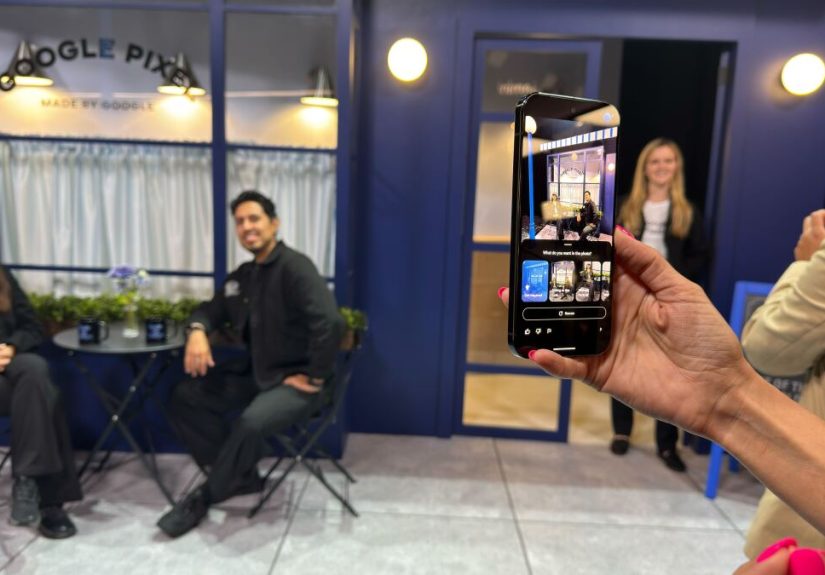
The idea behind Google Pixel 10 Camera Coach is simple: open the camera, activate the feature, scan the scene, and let the phone suggest ways to improve the image before you take it. Depending on what is in front of you, it might recommend adjusting your angle, moving closer, changing the framing, using a different lens, switching to Portrait mode, or rethinking the whole composition. In some cases, it can even show visual inspiration for the kind of shot it thinks you are trying to capture.
That last part is what makes the feature more interesting than a generic “hold steady” prompt. Camera Coach is not just checking for blur or shouting “more light!” like a stressed-out substitute teacher. It is trying to understand the type of photo you want and guide you toward a better version of it. That makes it feel less like a warning system and more like a creative assistant inside the Pixel camera app.
Why that matters more than another editing trick
Google already has plenty of AI photo tools. Pixels have spent years getting smarter after the shutter click, with features that erase distractions, merge better faces, rescue zoom shots, or clean up messy backgrounds. Camera Coach flips that logic. Instead of treating composition like a problem to be repaired later, it treats composition like a skill worth improving in the moment.
That is a smarter direction for mobile photography. Editing tools can be fun, but they also teach bad habits. If your phone can always remove a random trash can, blur a background, or reframe the shot later, you stop thinking carefully before you tap. Camera Coach nudges you back toward intentional photography. It says, in effect, “Hey, maybe the best workflow is still getting the shot right in the first place.” What a radical concept.
Why I Expected to Roll My Eyes and Why I Didn’t
I expected Camera Coach to be one of those features that sounds brilliant in a press release and annoying in daily life. The fear was obvious: too many prompts, too much waiting, too much AI theater. Nobody wants to line up a quick photo of their coffee and then sit through a mini TED Talk from their phone about leading lines and emotional contrast.
But the reason I ended up liking it is that the feature seems most effective when it stays practical. Reports around the Pixel 10 consistently point to the same strength: Camera Coach offers suggestions that are often concrete, visual, and easy to act on. Rotate the phone. Step back. Move lower. Use a different mode. Reposition the subject. That is useful. It does not require a photography degree, and it does not pretend the phone is Annie Leibovitz.
In other words, it helps without trying to become the star of the show. That is rare for AI in 2025 and 2026, a period when every gadget seems legally required to introduce itself like it is about to save civilization. Camera Coach is refreshingly humble by comparison. Its job is not to dazzle you. Its job is to make your photo less mediocre.
Where Camera Coach Genuinely Earns Its Keep
1. Portraits and casual people shots
This is probably the most obvious use case, and also the most compelling. Most people do not need help opening a camera app. They need help making other humans look good in photos. That means better framing, more flattering angles, smarter subject placement, and the occasional reminder that maybe the window behind your friend is not doing them any favors.
For portraits, AI photography can be useful when it nudges the photographer toward easy wins. Turn the phone vertically. Back up a little. Let the subject fill the frame differently. Try Portrait mode. Get the background working for you instead of against you. Those are not glamorous instructions, but they are often the difference between “nice pic” and “Wait, send me that one.”
2. Food, products, and other stationary subjects
Camera Coach also seems particularly well suited to slower, more intentional scenes. Food photography is a perfect example. Nobody is sprinting away with your pasta. You have a few seconds to let the phone assess the setup, and the suggestions can help you avoid the classic mistakes: shooting from too high, flattening the image, crowding the frame, or using a perspective that makes a beautiful dish look like a beige mystery.
The same logic applies to pets that are briefly calm, small objects, flowers, café tables, desk setups, shoes, plants, and every other thing people politely describe as “content.” In these moments, Camera Coach becomes a useful composition assistant rather than an interruption. If the subject is cooperative and the scene is stable, the feature has room to shine.
3. Landscapes, landmarks, and travel photos
Travel photography is another sweet spot. Many people know when a place looks amazing in person but struggle to translate that into a photo. The mountain feels grand, the skyline feels dramatic, the street feels cinematic, and then somehow the finished image looks like evidence from a parking dispute. Camera Coach can help bridge that gap by suggesting when to go wider, when to reposition, and how to place a person in the scene for scale.
That makes the feature especially appealing for casual travelers who want better photos without learning the entire vocabulary of photography. You do not need to memorize composition theory to benefit from a well-timed suggestion. Sometimes the difference between a forgettable vacation photo and a keeper is simply taking three steps left and holding the phone a little lower.
Where the Pixel 10 Camera Coach Still Falls Short
It is not built for chaos
The biggest limitation is speed. Camera Coach appears to work best when you have time to breathe. That is fine for posed shots, scenery, or carefully arranged moments. It is not ideal for toddlers, sports, surprise expressions, or anything else that disappears in the time it takes your phone to think deeply about composition.
If your dog is about to leap into a pile of leaves, the correct move is not “consult AI.” The correct move is “take the photo immediately and worry about your masterpiece later.” This is why Camera Coach feels less like a universal feature and more like a specialized tool. Great for planned images, weak for fleeting ones.
It may slow down the natural flow of shooting
There is also a philosophical tradeoff. Photography can be intuitive. Sometimes you see something, react instinctively, and capture it before your rational brain has time to interfere. Camera Coach, by design, inserts a layer of analysis between the eye and the shutter. That can be useful, but it can also make the act of photographing feel less fluid.
For some users, that friction will be worth it. For others, it will feel like asking a friend for dinner recommendations and getting a slideshow. Helpful? Maybe. Timely? Not always.
Privacy questions are not optional anymore
Another issue is privacy. Google positions Camera Coach as a guidance tool, but the feature’s convenience comes with the usual modern AI caveat: scene analysis is not entirely a local, private event. That means users should think carefully before pointing it at sensitive documents, private spaces, or anything else they would rather not send off for processing.
That does not make Camera Coach uniquely sinister. It does make it a reminder that AI convenience is often powered by infrastructure you do not see. The tool may be smart, but users still deserve clear explanations about what is happening, when it is happening, and what data leaves the phone.
Why This Is Actually the Kind of AI Phones Need
What I like most about Camera Coach is not that it is futuristic. It is that it is modest. It does not promise to reinvent photography. It does not try to replace taste. It does not insist that software can do all the creative work for you while you stand there like a decorative tripod. Instead, it tries to teach. It nudges. It coaches. Imagine that: an AI feature whose name is a clue to its purpose.
This is where smartphone AI starts to make sense. The best AI tools are not always the flashiest ones. They are the ones that quietly reduce friction, lower the skill barrier, and help regular people do something a little better than before. Camera Coach does that. It gives less confident photographers a path to improvement without burying them in settings or jargon.
It also points toward an interesting future for smartphone photography. If Google keeps refining the system, Camera Coach could evolve from a clever add-on into a genuinely sticky part of the Pixel experience. Think faster response times, more tailored suggestions, better awareness of different photography styles, and stronger privacy controls. If that happens, the feature could become more than a novelty. It could become part tutor, part creative partner, and part confidence boost for anyone who has ever said, “Why do my photos never look as good as what I’m seeing?”
Experience: What It Feels Like to Live With Camera Coach
The most interesting thing about Camera Coach is not the first time you use it. The first time is always a little theatrical. You open the feature, watch the phone analyze the scene, and wait to see whether it will say something profound or just politely suggest that you stop taking photos like a raccoon standing on a chair. The real test is what happens after that, when the novelty wears off and the feature has to earn its spot in the camera app.
In practice, the experience seems to be at its best when you are already in the mood to slow down. Picture a weekend walk, a city street with good afternoon light, a coffee shop table that accidentally looks stylish, or a friend standing in front of a mural that is begging to be photographed. In those moments, Camera Coach feels less like an interruption and more like a second pair of eyes. It notices little things casual shooters often miss: an angle that flattens the subject, a composition that wastes the background, a framing choice that makes the shot feel cramped. The advice is usually simple, and that simplicity is exactly why it works.
What I appreciate most is that the feature appears to reward curiosity. If you are the kind of person who already takes two or three versions of the same shot, Camera Coach gives you a few new ideas without making photography feel like homework. It can push you to try a lower angle, a more dramatic crop, or a different mode that you might have ignored. Over time, that changes how you shoot even when the feature is off. You start to recognize better composition on your own. That is the quiet win here. A good coach should not make you dependent; it should make you sharper.
Of course, the experience is not universally smooth. If you are chasing a kid across a playground, trying to catch a joke at dinner, or photographing anything that moves faster than a sleepy housecat, the feature can feel like it is asking for a committee meeting when what you really need is a shutter button. That tension never fully disappears. Camera Coach is best when the scene is stable and the photographer is willing to collaborate. It is worst when life is being life and refusing to hold still for machine intelligence.
Still, that does not make the experience disappointing. It makes it specific. And specific is good. Too many AI tools try to be everything for everyone. Camera Coach works because it knows what it is: a guide for deliberate photos, not an all-seeing robot cinematographer. If you treat it like a quick lesson instead of a miracle cure, it becomes surprisingly enjoyable. It adds just enough structure to improve a shot without draining all the spontaneity out of the process.
That is why I actually liked it. Not because it made me believe AI had solved photography, but because it made a familiar task feel a little smarter and a little less random. The Pixel 10 still needs your eye, your taste, and your timing. Camera Coach just helps those things show up on the screen a bit more often. And in a market full of noisy AI promises, that kind of grounded usefulness feels almost rebellious.
Final Verdict
The Pixel 10 does not need Camera Coach to be a strong camera phone. Google’s phones already have an excellent reputation for image quality, clever processing, and approachable photography. But Camera Coach gives the device something more interesting than another editing shortcut: it gives it a teaching instinct.
That is why this feature stuck with me. It is not the fastest tool in the world, and it is absolutely not something I would enable for every photo. But when used in the right situations, it delivers something rare in modern AI: practical help that respects the craft instead of bulldozing it. The result is an AI-powered Camera Coach that feels less like a gimmick and more like a gentle upgrade to how everyday people take photos.
So yes, I actually liked it. I know. I am surprised too.