Table of Contents >> Show >> Hide
- What This “Mega-Post” Really Is (And Why It’s So Useful)
- Magnetic Bubble Memory, Explained Like a Human (Not a 400-Page Datasheet)
- Why the Intel 7110 Is the Star of Baker’s Story
- What Baker’s Mega-Post Covers: Boards, Modules, Cassettes, and Clones
- Real-World Bubble Memory: Where This Tech Actually Showed Up
- So… Why Did Bubble Memory Lose?
- How to Read Baker’s Mega-Post Without Getting Lost in the Bubbles
- Conclusion: The Mega-Post as a Love Letter to Practical History
- Experiences Related to Scott Baker’s Magnetic Bubble Memory Mega-Post (Extra Field Notes)
Some people collect stamps. Some people collect vinyl. And then there are the folks who look at a
1970s-era memory module and think, “Yes. This tiny slab of magnetic wizardry is the hill I will
happily nerd out on.”
If you’ve landed here because you saw the phrase “Magnetic Bubble Memory” and your brain made the
dial-up modem sound, welcome. This article is an in-depth, easy-to-follow tour of Scott Baker’s
“Magnetic Bubble Memory Mega-Post”a lovingly obsessive hub that rounds up his real-world bubble
memory projects, boards, modules, and the practical oddities you only learn after you’ve actually
handled the hardware.
What This “Mega-Post” Really Is (And Why It’s So Useful)
Scott Baker’s Mega-Post is less “single blog entry” and more “field guide with receipts.”
Instead of repeating the same background every time he builds something new, he created one
place to collect what he’s learned over several years of working with magnetic bubble memory:
what parts exist, which boards show up in the wild, what works, what doesn’t, and what you can
realistically build today if you’re determined (and slightly unhinged in the best way).
The post is anchored around one superstar component: Intel’s 7110 magnetic bubble memory module.
From there, Baker fans out into an ecosystem of Multibus boards, piggyback “Multimodules,”
bubble-memory cassettes, and homebrew clonesplus a few “I can’t believe this is real” surprises,
like a BASIC computer with bubble memory baked in.
The result is a map of a forgotten technologytold by someone who’s actually soldered it,
booted systems from it, and stared long enough at defect maps to start seeing hexadecimal in
their dreams.
Magnetic Bubble Memory, Explained Like a Human (Not a 400-Page Datasheet)
The “bubble” is a physical thing
Magnetic bubble memory stores data as tiny magnetized regions“bubbles”inside a thin magnetic
film. Think of each bubble as a microscopic, stable magnetic “dot” that can represent a 1
(bubble present) or a 0 (no bubble). The film is typically a magnetic garnet material engineered
so these bubbles can exist reliably when the magnetic fields are just right.
It behaves like a racetrack, not a bookshelf
Here’s the key mental model: bubble memory is closer to a circular conveyor belt
than a random-access spreadsheet. Bits move along defined pathways under the influence of magnetic
fields. If you want the bit that’s “three miles down the belt,” you rotate the belt until it
comes around to the read circuitry.
That sequential nature is both the magic trick and the Achilles’ heel. It’s rugged and
non-volatile, with no moving mechanical parts, but it can be slow to access specific data
because the bits have to “arrive” at the read/write point.
How do the bits move?
The device uses patterned structures (often permalloy patterns and conductors) to guide bubbles
along specific paths. A rotating in-plane magnetic field “nudges” the bubbles step-by-step.
In real implementations, you’ll see an architecture with loopsoften described as
major/minor loop designsso the system can circulate bubbles and transfer data
in and out of controlled pathways.
If you’re thinking, “So it’s like a shift register made of magnets?”yes, and that’s why it’s
so fun. It’s a memory technology where physics is doing the marching-band routine.
Why the Intel 7110 Is the Star of Baker’s Story
The Intel 7110 sits at the heart of Baker’s Mega-Post for a practical reason: it’s one of the
best-documented, most commonly encountered bubble memory modules in the hobbyist world, and it
shows up across multiple product styles (industrial boards, plug-in modules, cassette systems).
1 megabit sounds tinyuntil you time travel to 1979
Intel positioned the 7110 as a commercially available 1-megabit, non-volatile memory device.
In late-1970s terms, that was big news. It’s also the era where “non-volatile solid-state”
sounded like the futurebecause it was, just not the future anyone ended up buying.
The defect map: the most honest label you’ll ever see on a chip
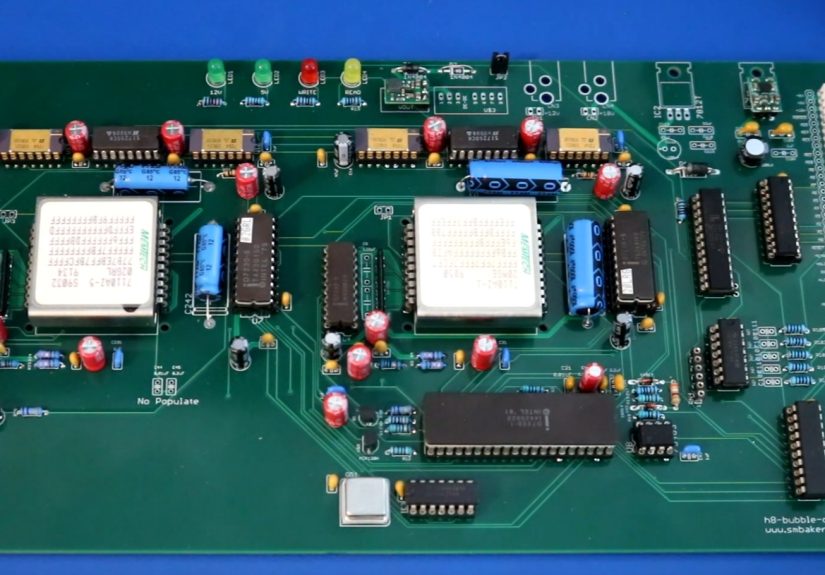
One of the most charmingly strange details in Baker’s write-up is the way 7110 modules advertise
their imperfections. Many modules have hex digits printed on the package that relate to defects
in the memory loops. Baker explains that the module has a difference between “gross capacity”
and “usable” capacitymeaning the device can tolerate some bad areas and still meet a guaranteed
usable storage number.
Baker also notes that some engineering samples display “FF” patterns in the map. In discussion
around the Mega-Post, “FF” is interpreted as “all loops good” for that entrysuggesting some
samples were never fully initialized for production, even if they’re physically real modules.
If you like your nostalgia with a side of mystery, bubble memory delivers.
What Baker’s Mega-Post Covers: Boards, Modules, Cassettes, and Clones
The Mega-Post is at its best when it turns bubble memory from “Wikipedia trivia” into
“here is the exact board, here is what it does, and here is what happens when you try to use it.”
Below are the biggest categories Baker explores.
Multibus boards: bubble memory in the industrial world
Baker highlights Intel Multibus boards such as the iSBC-254S, which can appear with different
numbers of bubble memory modules populatedscaling capacity depending on configuration. He frames
these boards as fitting naturally into industrial settings (including PLC-style environments),
where ruggedness mattered and mechanical storage wasn’t always a good match.
He also mentions another board class that uses higher-capacity bubble memories (like Intel 7114
modules) alongside different controller chipsetsan important reminder that “bubble memory”
isn’t one uniform plug-and-play standard. Controllers and timing matter, and compatibility can
get spicy.
Multimodules: piggyback bubble storage
A highlight for retro-hardware fans is the iSBX-251 “Multimodule”a compact board designed to
plug piggyback-style into Multibus systems. Baker describes it as a common format, featuring a
single 7110 module for about 128 KB of storage.
Even better: Baker doesn’t stop at describing it. He builds a clone, documents how it mates with
connectors, and shows it working as a practical storage option in systems that originally relied
on floppies for everyday tasks.
Booting from bubble memory: quieter than a floppy, and that’s a vibe
One of the most relatable “retrocomputing joys” in Baker’s write-up is using bubble memory in an
Intel development system (the iPDS family) as a storage/boot option. The appeal is simple:
bubble storage can be faster and quieter than the clunky soundtrack of vintage floppy drives.
It’s the rare retro upgrade that also reduces the noise in your life. (Imagine technology
doing that now.)
The Memtech bubble cassette system: storage you can physically swap
Baker also dives into a bubble memory cassette system that uses a holder plus removable
“cassettes,” each housing a bubble module (often a 7110). What makes this fascinating is the
system design tradeoff: where does the supporting chipset live?
In one approach, the cassette is relatively simple, and the heavy lifting happens on the holder
board. In another approachlike an Allen-Bradley industrial cassette Baker showsthe cassette
itself contains the bubble memory and the supporting chipset inside a more robust enclosure.
Two design philosophies: “cheap and swappable” versus “shield it like it’s going to war.”
Homebrew builds: the “because I can” category
The Mega-Post gets extra fun when Baker turns bubble memory into a personal platform:
-
A BASIC bubble computer: a single-board setup where bubble memory isn’t just
attachedit’s part of the personality, with BASIC save/load support. -
RC2014 bubble memory board: a modern-ish retro ecosystem meets vintage storage,
resulting in a board that can look hilariously oversized next to the rest of the system. -
Heathkit H8 bubble boards: Baker designs bubble memory boards for the H8, adds
boot support, and even explores a “double bubble” variant for higher capacity.
These projects show why his Mega-Post resonates: it’s not just history, it’s
applied archaeology.
Real-World Bubble Memory: Where This Tech Actually Showed Up
Rugged portable computing
Bubble memory’s best niche was environments where moving parts were a liability. That’s why it
appeared in early rugged portable machinesfamously the GRiD Compass linewhere non-volatile
storage without spinning disks made sense for field work. Durability was a selling point, even
demonstrated (allegedly) by dramatic “drop it in front of the customer” sales stunts.
Space and aerospace-adjacent thinking
Because bubble memory is solid-state and can retain data without power, it naturally attracted
interest for harsh environments and specialized applications. Technical literature and legacy
engineering discussions around bubble memory also emphasize the physical construction details
(thin films, patterned materials, and detector structures) that make it a truly different beast
from typical semiconductor RAM.
Industrial control and removable “program packs”
In industrial settings, removable storage can be valuable when it’s used as a program/data pack
that survives vibration and dust better than tape or disk. Baker’s examplesespecially the
cassette-style systems and PLC-oriented hardwarefit this story well.
Arcades: the “Bubble System” era
Bubble memory even showed up in arcade hardware via Konami’s Bubble System conceptone of those
historical side quests where the storage format became part of the platform identity. It’s a
reminder that bubble memory wasn’t just a lab curiosity; it briefly had “product strategy”
energy.
So… Why Did Bubble Memory Lose?
Bubble memory had a real pitch: non-volatile, solid-state, durable, and relatively dense for its
era. But the market is not a museumit’s a street fight.
1) Sequential access is a performance tax
If you have to wait for bits to circulate to the read point, latency becomes part of life.
That’s workable for some use cases, but it’s hard to compete against technologies that can grab
data more directly.
2) Semiconductor memory improved brutally fast
As DRAM and other semiconductor memories scaled up, they got faster, denser, and cheaper. Bubble
memory struggled to stay competitive outside niches where ruggedness mattered more than speed
and cost.
3) Storage improved on the other side too
Meanwhile, hard drives increased capacity and lowered cost per bit, squeezing bubble memory’s
“maybe it replaces disks” dream. Later, flash memory and modern solid-state storage claimed the
non-volatile niche with far better economics.
4) Manufacturing and system complexity
Bubble memory isn’t a simple “chip on a board” story. Supporting fields, timing, shielding, and
layout constraints matter. Even Baker points out how some products appear to bend “rules” about
trace length and shieldingsuggesting that engineering bubble memory into a real system could be
a balancing act, not a plug-in fantasy.
How to Read Baker’s Mega-Post Without Getting Lost in the Bubbles
Baker’s post is richso here’s a practical way to use it:
-
Start with the Intel 7110 section. Get comfortable with module variants,
the defect map idea, and the usable vs gross capacity concept. -
Move to Multibus boards and Multimodules. This is where bubble memory becomes
“a thing you can install and boot.” -
Read the cassette sections next. They reveal real product design decisions:
what gets placed in the cartridge vs in the chassis. -
Finish with the homebrew builds. That’s where you’ll steal ideas, learn what’s
realistic, and probably start planning a project you don’t have shelf space for.
The Mega-Post works best as a reference you revisit. It’s not a one-sip espresso; it’s a
bottomless mug of “wait, that existed?”
Conclusion: The Mega-Post as a Love Letter to Practical History
Scott Baker’s “Magnetic Bubble Memory Mega-Post” matters because it turns a half-forgotten
technology into something tactile and understandable. It connects the physics (bubbles marching
through garnet film), the products (modules, boards, cassettes), and the lived reality (defect
maps, compatibility gotchas, bootable systems) into one coherent story.
Bubble memory didn’t become the universal storage of the futurebut it did leave behind
hardware that still teaches. It teaches that “non-volatile” can mean many things, that physical
constraints shape design, and that yesterday’s dead ends can become today’s best hobbies.
If you want a single takeaway: Baker’s Mega-Post isn’t just nostalgia. It’s documentation that
keeps a weird, wonderful branch of computing history from evaporating into trivia.
Experiences Related to Scott Baker’s Magnetic Bubble Memory Mega-Post (Extra Field Notes)
You don’t really “learn bubble memory” the way you learn a programming language. You learn it
the way you learn a vintage car: by staring at parts, reading old documentation, trying one
thing, listening for the weird sound, and then realizing the weird sound is actually you.
Hobbyists who follow paths like Scott Baker’s often describe the first bubble-memory experience
as a mix of excitement and confusionbecause the tech feels both familiar (it stores bits) and
alien (the bits are literally marching around a loop). You’ll read about “major/minor loops,”
controllers, timing generators, and shielding, and think, “Sure, that’s normal,” until
you remember your last project was a USB thumb drive you didn’t even have to format.
One common “starter moment” is getting your hands on a 7110 module and noticing the printed
hex digits. That’s when the Mega-Post becomes your translator. Instead of seeing random
markings, you begin to see a story about defects and yieldhow manufacturers promised a usable
capacity while quietly acknowledging that parts of the silicon-and-garnet universe were
imperfect. The labels feel refreshingly honest in a modern world where everything is marketed
as flawless.
The next experience tends to be the “system hunt.” People look for a Multibus board, a
Multimodule, or a cassette system because a loose memory module by itself is like a VHS tape
without a VCR. Baker’s Mega-Post helps you recognize what you’re looking at in auction photos:
board families, module footprints, connector styles, and the difference between “this looks
right” and “this will actually talk to the controller chipset.”
Then comes the part that separates casual curiosity from full retrocomputing commitment:
making it do something useful. In Baker’s world, that often means booting a
vintage system from bubble memory or using it as fast, quiet storage compared to floppies.
People who replicate that vibe describe a special satisfaction: the machine powers up, the
storage is there, and nothing spins. No whir. No clunk. Just the silent confidence of magnetic
domains doing their laps.
Debugging is its own rite of passage. Bubble memory projects can involve chasing issues that
feel almost poetic: timing that’s “almost right,” signal integrity that depends on layout,
and failures that show up only under certain temperatures or field conditions. That’s why
practical noteslike Baker’s comparisons of different cassette designs and his comments about
trace-length “rules”matter so much. They remind you that bubble memory isn’t just about logic;
it’s about physics behaving politely.
There’s also the creative experience: cloning boards, adapting them to newer hobby platforms,
or building something delightfully unnecessarylike a BASIC computer that saves programs to
bubble memory. Makers often describe these builds as “overkill” and “totally worth it” in the
same sentence. The boards can be physically large, the part sourcing can be odd, and the payoff
is mostly joy… but it’s a very specific kind of joy: touching a technology that was once pitched
as the future and making it work again on your own bench.
Finally, there’s the community experience. Mega-posts like Baker’s spark comment threads,
cross-links, and shared detective worklike interpreting defect-map patterns or comparing which
modules still behave “nicely” decades later. The best part is that the curiosity spreads:
someone reads the Mega-Post, recognizes a bubble board in a stash they forgot they had, and a
new restoration story begins.
In other words: the Mega-Post doesn’t just document bubble memory. It creates a trail that
modern tinkerers can actually followone module, one board, and one “wait, that booted?!” moment
at a time.