Table of Contents >> Show >> Hide
- Why Pascal on Arduino Isn’t as Wild as It Sounds
- What “Pascal on Arduino” Usually Means in Real Life
- Toolchains and Options People Actually Use
- How Uploading Works (and Why Pascal Fits Right In)
- What You Gain by Writing Arduino-Class Projects in Pascal
- The Tradeoffs (Because Reality Always Collects Its Fee)
- Practical Examples: Where Pascal on Arduino Can Shine
- When Pascal on Arduino Is a Great Idea (and When It Isn’t)
- of Real-World “Pascal on Arduino” Experience (a.k.a. The Part Where Your Future Self Thanks You)
- Conclusion
Somewhere in a drawer, your Arduino Uno is quietly judging you. Not because you haven’t finished that “smart plant pot” project,
but because you’re still writing everything in C/C++ like it’s a permanent requirement carved into silicon tablets.
Here’s the twist: you can absolutely bring Pascal to the Arduino worldand it’s not just a weird stunt for internet points.
It’s a surprisingly practical way to write readable embedded code, especially if you like strong structure, clear intent, and fewer
curly-brace acrobatics.
In this article, we’ll unpack how Pascal fits into Arduino-class microcontrollers, what toolchains people actually use,
why it can feel refreshingly “clean” for embedded work, and where the sharp edges live (because yes, there are sharp edges).
By the end, you’ll know what “Pascal on Arduino” really means, which approaches are legit, and how to decide whether it’s a fun experiment
or your next go-to workflow.
Why Pascal on Arduino Isn’t as Wild as It Sounds
Arduino is a board… the chip is the real destination
When people say “Arduino,” they usually mean the friendly ecosystem: the IDE, the libraries, the “upload” button, and the culture of
making hardware feel approachable. But under the hood, a classic Arduino Uno is essentially an ATmega328P microcontroller
plus some supporting circuitry. Once you realize the true target is “an AVR microcontroller that runs machine code,” the language becomes
less of a religion and more of a tool choice.
If a compiler can generate AVR-compatible binaries (and you can flash them onto the chip), you’re in business.
That’s why Pascal is on the menu: there are Pascal compilers and workflows that target AVR chips and can produce the same kind of output
the Arduino toolchain doesjust from a different language front-end.
Pascal’s “secret weapon” for embedded: structure
Pascal was designed to encourage readable, structured programming. In embedded systems, that matters more than people admit.
Microcontroller projects often outlive your memory of what you were doing at 2:00 a.m. the night before a demo.
Clear procedures, explicit types, and disciplined modules can make tiny-device code feel less like a haunted house of macros.
Also: if you learned programming through Delphi, Turbo Pascal, or structured coursework, Pascal can feel like coming home
except now your “Hello World” blinks an LED and makes your desk lamp flicker in sympathy.
What “Pascal on Arduino” Usually Means in Real Life
There are a few common interpretations, and choosing the right one is half the battle:
1) “I’m using Free Pascal to target AVR and upload with AVRDUDE”
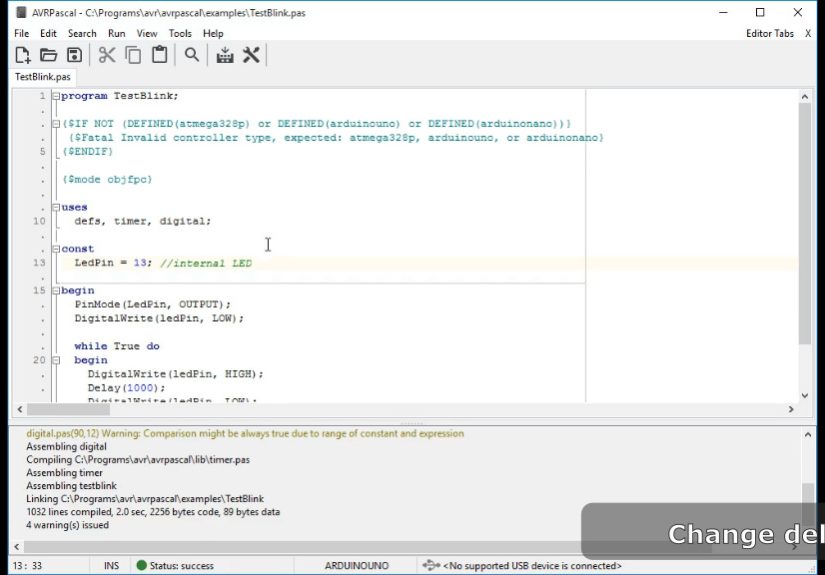
This is the most “open toolchain” approach: write Pascal, compile for AVR, then upload the resulting HEX file using the same kind of
uploader Arduino relies on behind the scenes. This can be done with Free Pascal’s AVR port (often discussed as FPC-AVR),
sometimes paired with a lightweight IDE or helper tooling built around it.
2) “I’m using a Pascal IDE/compiler made for AVR-family microcontrollers”
Commercial or specialized environments exist that support Pascal on AVR devices. These can be friendlier out of the box for certain tasks,
with libraries and chip definitions ready to go. The tradeoff is that you’re often working slightly outside “Arduino land,” so you may
write more bare-metal code or use vendor-specific abstractions.
3) “I want Arduino libraries, but the language front-end to be Pascal”
This is the dream scenario: keep the cozy Arduino APIs (digitalWrite(), delay(), Serial helpers),
but write your logic in Pascal. Achieving this ranges from “pretty doable with the right units/wrappers” to “a weekend of mapping headers
and learning why build systems have feelings.” It’s possible, but it depends heavily on the exact toolchain and board family.
Toolchains and Options People Actually Use
Free Pascal (FPC) for AVR: the open-source route
Free Pascal is a mature Pascal compiler with cross-compilation capabilities, and it has an AVR port used by embedded enthusiasts.
The core idea is simple: compile Pascal to AVR machine code, generate a HEX, and flash it.
Some setups rely on the GCC AVR toolchain conventions to stay compatible with low-level expectations on the platform.
Practically speaking, “FPC for AVR” tends to shine when you’re comfortable thinking in terms of microcontroller registers,
peripheral configuration, interrupts, and timingbecause you may be writing closer to the metal than typical Arduino sketches.
Many people treat it like “AVR development in Pascal,” with Arduino boards serving as convenient hardware targets.
AVR-focused Pascal IDEs and helper projects
There are community projects that bundle or streamline the experience (editing, compiling, and uploading),
making it feel less like you’re assembling a toolchain from spare parts.
Some even include Arduino-oriented libraries or starter packs that reduce friction for common boards like the Uno/Nano family.
If you’re allergic to spending your Saturday debugging a PATH variable, a “Pascal-to-AVR” environment with upload tooling integrated
can be the difference between “this is fun” and “I have become a cautionary tale.”
Commercial Pascal compilers that support AVR-class MCUs
Commercial offerings exist that support large sets of AVR microcontrollers and provide integrated workflows.
These environments can be attractive in classroom or prototyping settings, where time-to-first-blink matters.
The tradeoff is cost, licensing, and sometimes a library ecosystem that differs from mainstream Arduino patterns.
How Uploading Works (and Why Pascal Fits Right In)
The Arduino IDE compiles code and uploads itso it can feel like a single magical act. But conceptually, it’s two steps:
(1) compile to a firmware image, then (2) upload it to the microcontroller.
The upload piece is frequently handled by AVRDUDE or a closely related mechanism, depending on the board and programmer.
That means if your Pascal compiler can generate a valid HEX for the AVR chip, the uploading step can be essentially the same.
Your firmware doesn’t care what language created itjust whether the resulting machine code is correct, linked properly,
and placed in memory where the chip expects it.
Bootloader vs programmer: two common paths
-
Bootloader upload: Many Arduino boards ship with a bootloader that accepts new firmware over serial/USB.
This is the “hit Upload” experience. -
ISP/programmer upload: You can also flash directly using an in-circuit programmer, which is common in
more traditional AVR workflows.
Either way, Pascal can participate as long as the output artifact is right for the chip and upload method.
What You Gain by Writing Arduino-Class Projects in Pascal
Readable code that stays readable
Pascal nudges you toward clarity. It’s not that C++ can’t be clean; it’s that embedded C++ frequently turns into a blender of macros,
headers, and “helpful” abstractions that hide important details. Pascal’s style can reduce that temptation, especially in small-to-medium
firmware where you want straightforward control flow.
Type discipline that helps you catch mistakes early
Microcontrollers are unforgiving. Accidentally mixing signed/unsigned values or assuming the wrong size for an integer can break timing
or overflow memory in subtle ways. Pascal’s emphasis on explicit types and well-defined structures can make these problems easier to spot,
especially when you’re juggling buffers, state machines, and interrupt-driven code.
A nice fit for state machines and “real firmware” patterns
Many Arduino sketches grow into firmware without realizing they’ve crossed the line. Suddenly you have multiple modes, a communication
protocol, debounce logic, watchdog behavior, and timing constraints. Pascal’s procedural and modular style fits well with state machines,
layered modules, and disciplined separation of hardware access from application logic.
The Tradeoffs (Because Reality Always Collects Its Fee)
Arduino libraries are written for C/C++
The Arduino ecosystem’s biggest advantage is its library universe. Most of that universe assumes you’re compiling C/C++ with the Arduino build system.
If you go Pascal-first, you may need:
- Pascal “units” that wrap common Arduino functions
- Bindings for peripheral libraries (SPI, I2C, UART, etc.)
- Or a willingness to configure peripherals directly via registers
None of these are deal-breakers, but they change the vibe. You might be closer to “embedded developer” than “Arduino hobbyist,”
even if the board is the same.
Tooling maturity varies by board family
Classic AVR boards (Uno, Nano, Mega 2560) are a common focus because the target is well understood.
Once you move into newer Arduino families (ARM Cortex-M, ESP-based boards, etc.), Pascal support may exist but becomes more toolchain-dependent.
Cross-compiling is possible, but the “just works” factor can drop if you’re mixing ecosystems.
Debugging can be different than what Arduino beginners expect
Arduino debugging is often “print to Serial and hope.” Pascal toolchains may push you toward more traditional embedded debugging:
map files, linker scripts, programmer tools, and careful memory awareness. That’s powerfulbut it can feel like switching from a scooter
to a small airplane. (Both are fun. One comes with checklists.)
Practical Examples: Where Pascal on Arduino Can Shine
Example 1: A cleanly-structured sensor polling loop
Imagine a data logger reading a temperature sensor every second, smoothing readings, and triggering an alert when thresholds are exceeded.
In Arduino C++, this often becomes a long loop with scattered globals. In Pascal, it’s natural to define:
- A record/type for sensor state
- A module (unit) for hardware access
- A module for filtering logic
- A main program that orchestrates timing and state transitions
The result is firmware that reads like a plan, not like a series of dares.
Example 2: State machines for devices with modes
Anything with “modes” benefits from explicit state handling: a thermostat, a controller with buttons and a display,
a simple motor driver with safety conditions. Pascal makes it straightforward to define enumerated states and centralize transitions.
That reduces “spooky action at a distance,” where one flag changes somewhere and your device suddenly thinks it’s in a different universe.
Example 3: Teaching and learning embedded concepts
Pascal can be a strong teaching language because it’s explicit and readable. If a student is learning interrupts, timers,
and low-level I/O, Pascal can help them focus on the concept instead of wrestling with template-heavy code or implicit type conversions.
The Arduino board becomes a cheap and accessible lab platform for real embedded principles.
When Pascal on Arduino Is a Great Idea (and When It Isn’t)
It’s a great idea if you:
- Enjoy structured, readable firmware more than library hunting
- Want to learn embedded fundamentals beyond the Arduino IDE
- Have Pascal experience (Delphi/Lazarus/Turbo Pascal nostalgia is welcome here)
- Prefer designing clean modules and state machines over copy-pasting sketches
It might not be the best choice if you:
- Depend on many Arduino libraries that don’t have Pascal-friendly wrappers
- Need a quick weekend build with lots of pre-made examples
- Want the simplest possible onboarding path for a beginner team
The honest truth: Pascal on Arduino is less about “replacing Arduino” and more about choosing a different front door.
You can still land on the same chip, the same board, the same blinking LEDjust with code that looks like you meant it.
of Real-World “Pascal on Arduino” Experience (a.k.a. The Part Where Your Future Self Thanks You)
The first time you try Pascal on an Arduino-class board, it’s equal parts delightful and confusinglike discovering your microwave has a
“bread proofing” mode. You’ll blink an LED and think, “Okay, the universe still works,” and then immediately run into the question:
“Where are all my Arduino functions?” That’s the moment the experience becomes valuable.
In the Arduino IDE, you can get away with not knowing much about what the microcontroller is actually doing. With Pascal toolchains,
you’re gently (or not-so-gently) encouraged to understand the pipeline: compile, link, generate HEX, upload. At first, it feels like extra steps.
Then, one day, your project stops being a “sketch” and starts being firmware with real complexitytimers, interrupts, power statesand you realize
those “extra steps” are the same steps professionals use to keep projects stable.
One surprisingly fun part is how Pascal nudges you into better habits. It’s harder to casually toss everything into a giant global soup when
you’re naturally reaching for units, records, and clean procedure boundaries. Your code starts looking like a small system rather than a pile of
“just this one more thing.” When you come back after a week, you can actually read it without bargaining with your own brain.
The flip side is library culture shock. If your Arduino life depends on five third-party libraries and a mysterious GitHub repo from 2014,
Pascal will force you to decide what you really need. Sometimes you’ll wrap a few functions yourself. Sometimes you’ll configure a peripheral
directly and discovergaspthat the hardware is not, in fact, magical. That moment can be frustrating, but it’s also empowering.
You stop being limited by whether a library exists, and you start being limited by whether you understand the chip. That’s a better limit.
The biggest “aha” usually comes when something goes wrong and you debug it properly: reading a map file, watching memory usage,
verifying fuse/bootloader assumptions, checking timing, and realizing the bug isn’t “Arduino being weird,” it’s a very specific interaction
you can reason about. Pascal doesn’t grant you superpowersbut it can make the reasoning process calmer because the code tends to be explicit.
And yes, there’s joy in the reaction you get when someone sees your project and asks, “What language is that?” and you say,
“Pascal.” There’s a beat of silence. Then: “On an Arduino?” And you get to respond with the only correct answer:
“It’s more likely than you think.”
Conclusion
Pascal on Arduino isn’t a gimmickit’s a reminder that the microcontroller doesn’t care about trends, only about correct binaries and good design.
If you value readable structure, disciplined modules, and learning embedded fundamentals, Pascal can be a genuinely satisfying way to build
Arduino-class projects. Just go in with open eyes: the further you lean into Pascal, the more you’re stepping into “real embedded” territory
which is exactly why it’s so rewarding.