Table of Contents >> Show >> Hide
- So… Is This Actually Java Running on an N64?
- A Quick Tour of the Nintendo 64’s Hardware (A.K.A. “Why This Is Hard”)
- Java Grinder: The Secret Sauce Behind “Java on N64”
- What Can It Do? Real Demos, Real Output
- Why This Approach Beats “Just Port a JVM” (Most of the Time)
- What This Means for Nintendo 64 Homebrew
- If You Want to Try “Java on N64,” Here’s the High-Level Roadmap
- FAQ: The Questions Everyone Asks
- Conclusion: Java, Retro Style
- Developer Experiences: What It Feels Like When Java Meets a 1996 Console (Extra )
Picture this: a chunky gray console from 1996, a controller shaped like a trident, and a TV that still thinks “HD” stands for “Hope & Dreams.” Now picture that same Nintendo 64 running Java.
Before anyone yells “Write once, run anywhere!” and tries to deploy Spring Boot to a cartridge, let’s set expectations the fun way: this isn’t a full-blown desktop JVM living inside your N64 like it pays rent. It’s something arguably cooler for retro hardware Java code compiled ahead of time into native Nintendo 64 machine code, using a toolchain built for the job.
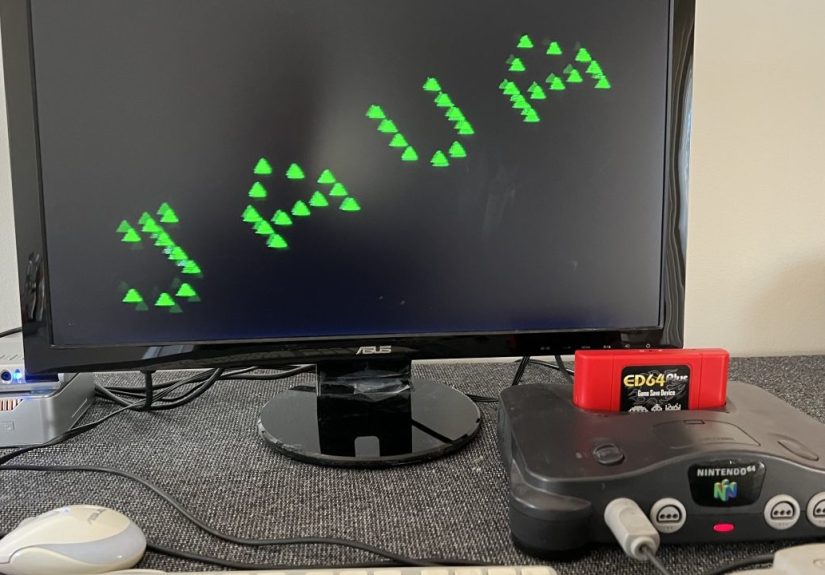
The headline “Java is now on the Nintendo 64!” comes from a real, working homebrew effort built around Java Grinder, a project by developer Michael Kohn that compiles Java bytecode into native assembly for a bunch of platformsincluding the N64. The result? Real demos running on real hardware: graphics, audio, and the kind of “how is this even happening?” energy that makes retro computing feel alive.
So… Is This Actually Java Running on an N64?
Yesand also no, in the same way a “pizza bagel” is both pizza and a bagel and yet will still disappoint an Italian grandmother. The core idea is this:
- You write code in Java.
- You compile it with a regular Java compiler into
.classfiles (Java bytecode). - A specialized tool (Java Grinder) translates that bytecode into MIPS assembly that the Nintendo 64’s CPU understands.
- The assembled output gets linked into a Nintendo 64 ROM that can run on hardware or accurate emulators.
That means the Nintendo 64 isn’t interpreting bytecode at runtime the way a typical Java Virtual Machine would. There’s no big, general-purpose JVM doing dynamic class loading, JIT compilation, and garbage collection behind the scenes. Instead, think of it as Java-to-native: Java as the language you write, native code as what the console executes.
This distinction matters because it explains why the project is both feasible and impressive. A full Java runtime (especially a modern one) is a lot of software and expects a lot of operating-system-like support. The Nintendo 64… does not come with that kind of luxury. It comes with vibes, silicon, and a tight memory budget.
A Quick Tour of the Nintendo 64’s Hardware (A.K.A. “Why This Is Hard”)
The Nintendo 64 isn’t just “a console.” It’s a specific kind of 90s engineering: powerful for its time, weird in delightful ways, and absolutely unforgiving if you waste cycles or memory.
The CPU: MIPS, 64-bit… with a big asterisk
The N64’s main CPU is a MIPS-based chip (commonly described as the NEC VR4300), clocked at about 93.75 MHz. It’s often labeled “64-bit,” but many games leaned heavily on 32-bit operations for speed and smaller data footprints. In other words: yes, 64-bit registers existbut the practical reality is tighter and more nuanced than the marketing stickers.
The Memory: 4 MB by default (yes, megabytes)
Standard Nintendo 64 units shipped with 4 MB of Rambus RDRAM. With the Expansion Pak, that doubled to 8 MB. If you grew up in the era of browser tabs that eat 8 GB before breakfast, please take a moment to hydrate.
The Reality Coprocessor: where the magic (and pain) lives
The N64’s graphics pipeline revolves around the Reality Coprocessor (RCP), which includes two famous components: the RSP (Reality Signal Processor) and the RDP (Reality Display Processor). The RSP can run microcode and handle math-heavy tasks (including vector-style operations), while the RDP is responsible for turning commands into pixels.
This is a big reason N64 homebrew feels different than writing a simple program for a PC. You’re not just “drawing triangles.” You’re cooperating with specialized hardware, feeding it the right data in the right format, and trying not to trip over decades-old assumptions baked into documentation and tooling.
Java Grinder: The Secret Sauce Behind “Java on N64”
Java Grinder is best described as an ahead-of-time (AOT) compiler for Java bytecodebuilt for systems that don’t (and can’t) host a traditional JVM. Instead of translating Java bytecode at runtime (JIT), it translates it earlier, producing native assembly for the target CPU.
Java Grinder has supported a surprising range of retro and embedded targetsmicrocontrollers, classic computers, and game consoles. The Nintendo 64 became one of the most attention-grabbing additions because it sits at the intersection of nostalgia and “this hardware is secretly wild.”
What “Java” features do you get?
You’re writing Java, but you’re not dragging the entire Java ecosystem into a cartridge. In practice, Java-on-N64 is a curated, pragmatic subset:
- Core language syntax (classes, methods, loops, conditionals) works as expected.
- Low-level control is enabled through platform-specific APIs (graphics, audio, input).
- High-level runtime features common on desktops may be limited or absent (dynamic loading, big standard library features, heavy reflection, etc.).
This is not a bug. It’s the point. The goal is to let you use Java as a productive language while still producing code that behaves like a lean, purpose-built N64 program.
What Can It Do? Real Demos, Real Output
The most convincing proof is always the same: show me the pixels. The Nintendo 64 Java demos built around Java Grinder aren’t just “Hello World” text on a blank screen. They include animated graphics and musicexactly the kind of thing that forces a toolchain to prove it’s not bluffing.
Graphics: from rotating logos to triangle swarms
Demos include classic scene-building blocks: textured rectangles, moving shapes, spinning objects, and swarms of triangles forming letters. One especially on-brand touch is a “Java Grinder” style screen referencing Java’s famously over-quoted “billions of devices” era.
Under the hood, this isn’t simply “Java draws a triangle.” The N64’s graphics approach often involves preparing data and handing work to the RSP/RDP pipeline. In the Java Grinder Nintendo 64 work, custom routines and low-level support code make those features accessible from Java.
Audio: yes, it can play music
Audio support is part of what makes the project feel like a real platform and not a novelty. When you can push both visuals and sound through a tight memory and timing budget, you’ve built something meaningful a foundation for interactive demos and potentially small games.
The “hard part” isn’t the Java syntax
The hardest work here lives in the translation layer and the platform plumbing: mapping Java bytecode operations to efficient MIPS code, building platform APIs, and dealing with the N64’s coprocessors and graphics command flow. That’s where the hours goso the Java can feel “easy.”
Why This Approach Beats “Just Port a JVM” (Most of the Time)
If you’re wondering why someone didn’t simply drop a tiny JVM onto the Nintendo 64 and call it a day, the short answer is: constraints.
A JVM implementation needs: memory for runtime structures, a standard library surface area, a predictable execution environment, and (often) OS-like services. Even “small” runtime systems can feel huge when your baseline memory is measured in single-digit megabytes and your CPU is busy feeding a 3D pipeline.
The Java Grinder path sidesteps those problems by eliminating the heavyweight runtime and producing code the N64 can execute directly. It’s more like cross-compiling Cexcept you get to write Java.
What This Means for Nintendo 64 Homebrew
Nintendo 64 homebrew has steadily grown thanks to open-source SDKs, better emulators, and modern cross-compilers. Adding Java to the mix is exciting for a few reasons:
- Accessibility: many developers already know Java, and it’s a comfortable language for learning graphics and game logic.
- Rapid iteration: Java’s readability and tooling culture can make experimentation faster (even if the final output is native code).
- Education: this is a living example of compilers, bytecode, CPU architectures, and retro hardware all collidingin a good way.
- Community crossover: it invites Java folks to try retro dev, and it invites retro devs to explore new language pipelines.
It also underlines something bigger: retro hardware isn’t “dead,” it’s just waiting for someone to bring modern curiosity to it. Once you have a toolchain, a few APIs, and a way to render and play audio, an entire playground opens up.
If You Want to Try “Java on N64,” Here’s the High-Level Roadmap
You don’t need to be a wizard, but you do need to be comfortable with the idea that retro development is part software engineering, part archaeology. A typical workflow looks like this:
- Write Java code using the supported subset and the N64-specific API surface.
- Compile to bytecode (
.classfiles) with a standard Java compiler. - Run the Java Grinder toolchain to translate bytecode into MIPS assembly and produce objects suitable for linking.
- Link into a ROM using an N64-capable build setup (often with modern cross-compilers and homebrew tooling).
- Test in an accurate emulator and then (optionally) on real hardware using legitimate homebrew methods.
Many homebrew developers build and test using open-source SDKs (like libdragon) and modern emulators, then move to flash carts and real consoles for final verification. The important part: stay on the right side of legality by using open tooling and your own homebrew code and assets.
FAQ: The Questions Everyone Asks
Does this run standard Java libraries?
Not in the “install any random Java app and go” sense. The goal is to support Java as a language and compile it into native code, not to reproduce the entire desktop Java runtime ecosystem.
Is performance good?
It can bebecause what runs on the N64 is native code. But you’re still limited by N64 hardware, and graphics/audio pipelines require careful planning. “Fast” on N64 often means “you respected the pipeline and didn’t waste memory.”
Why is this such a big deal?
Because it’s a real example of bridging eras: modern language ergonomics + retro hardware constraints + serious compiler work. It’s not just nostalgiait’s engineering.
Conclusion: Java, Retro Style
“Java is now on the Nintendo 64” sounds like a joke you’d find on a tech forum at 2 a.m.right next to someone insisting they can run Doom on a toaster. But in this case, it’s real: Java code can be authored, compiled, and turned into native Nintendo 64 programs through a carefully built toolchain.
And maybe that’s the best part. The Nintendo 64 is old enough to rent a car, but it’s still a fascinating machine for learning, experimenting, and building. When projects like Java Grinder make that machine more approachable, they’re not just porting a language they’re expanding the playground.
Developer Experiences: What It Feels Like When Java Meets a 1996 Console (Extra )
The first “experience” you have with Java on the Nintendo 64 is emotional, not technical: you feel slightly ridiculousand then suddenly very proud. There’s a special kind of joy in writing something in a modern editor, compiling it on a machine that has more CPU power in a single core than an entire 90s office, and then watching the output appear on a console that was built when people thought translucent plastic was peak futuristic design.
Then reality shows up wearing steel-toed boots labeled constraints. On a desktop, you can be a little sloppy and still get away with it. On an N64, sloppiness is instantly visible. A texture that’s too big, a buffer you forgot to reuse, a math routine that spills into slow pathseverything becomes a budget conversation. Even if your Java compiles into native MIPS code, you still have to think like a console developer. That mindset shift is the real learning curve: you stop asking “Can I do this?” and start asking “Can I do this in 4 MB?”
Debugging also feels different. Modern Java developers are used to stack traces, debuggers, profilers, and logs you can grep like a detective. With retro hardware, feedback can be… more interpretive. Sometimes your “log output” is a frozen frame and the faint hum of your TV quietly judging your choices. You learn to celebrate tiny wins: a triangle draws in the right place, the controller input reads correctly, the audio doesn’t sound like a robot chewing aluminum foil.
One of the coolest moments is when you realize how much the platform shapes your code style. You naturally start writing tighter loops, fewer allocations, and more predictable data structuresnot because a blog post told you to, but because the console makes it obvious when you’ve made a messy decision. You discover why older game code often looks “weird” to modern eyes: it’s optimized for hardware realities, not aesthetics. Java on N64 becomes a hands-on class in performance thinkingwithout needing a lecture, because the screen is the lecture.
And when it finally workswhen you see a rotating logo, a field of triangles forming letters, or a small scene with music playing it feels less like “I ran Java on a Nintendo 64” and more like “I built a bridge between worlds.” You’re looking at your own code executing through an entirely different pipeline than a JVM on a laptop. You can practically sense the steps: bytecode translated, assembly generated, linked into a ROM, then fed into hardware that was never meant to host anything called “Java.” That’s the magic: not that Java is “everywhere,” but that someone made it fit somewhere it didn’t belong.
If you’re the type of developer who enjoys learning by doingand enjoys a little delightful suffering along the way Java on the Nintendo 64 is a perfect project rabbit hole. It’s part compiler theory, part retro graphics, part build-system adventure, and part “how did anyone ship games like this in the 90s?” respect. The N64 will humble you, then reward you. And the reward is unforgettable: your modern code, running on classic silicon, like it was always meant to be there.