Table of Contents >> Show >> Hide
- Major vs. Minor Release Notes: What’s the Difference (and Why It Matters)?
- What High-Adoption Release Notes Always Do
- The Anatomy of a Major Release Note That Drives Adoption
- Major Release Notes Example 1: A New Workflow Feature (Outcome-First)
- Major Release Notes Example 2: A “Breaking Change” Without Panic
- The Anatomy of Minor Release Notes People Actually Read
- Minor Release Notes Example 1: A Power-User Enhancement
- Minor Release Notes Example 2: Bug Fixes Without the “Bug Fixes” Shrug
- Where to Publish Release Notes for Maximum Adoption
- How to Turn Release Notes into Adoption (Not Just Awareness)
- Common Release Notes Mistakes (and the Fix)
- Bonus: Fast Formats You Can Reuse (Without Sounding Copy-Pasted)
- Field Notes: What Actually Drives Adoption (Real-World Experiences)
Release notes are supposed to be a celebration. Instead, they often read like a grocery receipt written by a robot:
“Fixed bug. Improved performance. Updated dependencies.” Cool. I’m thrilled. I’m also asleep.
Here’s the truth: release notes are product adoption tools. They’re one of the few places where you can
(1) explain what changed, (2) teach people how to use it, and (3) nudge them to do the thing you builtwithout needing a full-blown
marketing campaign or a 37-slide enablement deck that nobody opens.
In this guide, you’ll get a clear, practical approach to writing major and minor release notes that people actually read,
plus real-world-inspired examples you can adapt for your own productwithout sounding like a press release trying too hard to be “delightful.”
Major vs. Minor Release Notes: What’s the Difference (and Why It Matters)?
You don’t write release notes the same way for a tiny UI polish as you do for a feature that changes how customers run their business.
The best teams treat release notes like a menu: the bigger the dish, the more context you need.
Major release notes
- Big impact: new workflows, new core features, breaking changes, pricing/plan shifts, major redesigns.
- High “change cost”: users need guidance, reassurance, and a reason to care.
- Often needs a rollout plan: in-app announcements, docs, videos, migration steps, and support readiness.
Minor release notes
- Small improvements: enhancements, quality-of-life updates, small new options, bug fixes, performance tweaks.
- Low learning curve: users just need a quick “what + why” (and occasionally “where”).
- Better as a habit: consistent cadence builds trust: “They ship, they listen, they improve.”
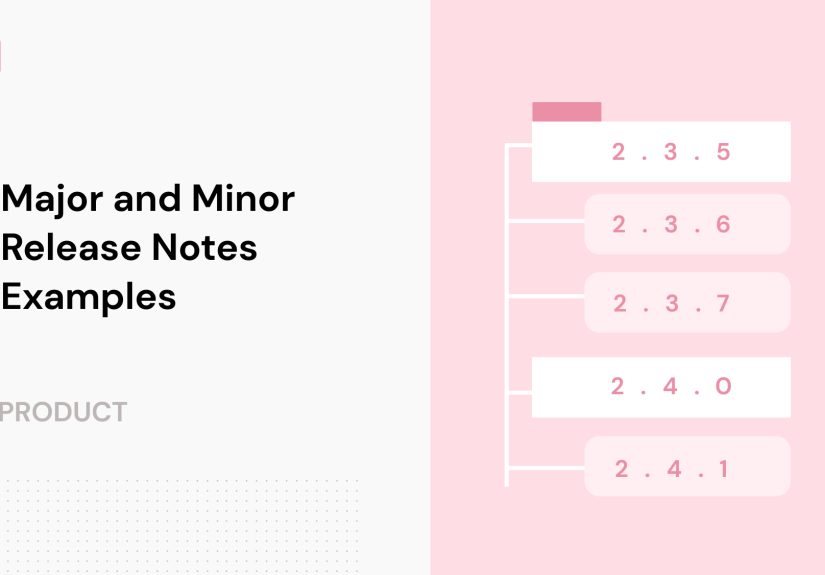
If you’re using semantic versioning language in your product (major/minor/patch), the takeaway is simple:
the “size” of the note isn’t about word countit’s about behavior change. A “minor” change can still be a big deal if it changes
a daily workflow. Your release note should match the user impact, not just the engineering label.
What High-Adoption Release Notes Always Do
The fastest way to get ignored is to describe your update like a developer talking to another developer. (No offense, developers. Please keep shipping.)
High-adoption release notes translate shipping into outcomes.
1) Lead with the benefit, not the build
Users don’t wake up craving “refactored query caching.” They want “Dashboards load faster” or “Less manual work every Monday.”
2) Say who it’s for
“This is for admins.” “This is for anyone who exports reports weekly.” “This is for mobile users.” It helps readers self-select.
3) Include a next step (a real one)
- “Try it now” is greatif it points to a place inside the product.
- “Learn more” is fineif it answers “how do I use this?” in under 60 seconds.
- “Contact support” is… a last resort. Your release note should reduce tickets, not create them.
4) Respect scanning behavior
Use headings, bullets, and short paragraphs. Most readers skim. You’re writing for skimmers who can become power users.
5) Be honest about limitations
If something has a rollout schedule, a known issue, or a plan-based restriction, say it. Hidden rules turn excitement into distrust in record time.
The Anatomy of a Major Release Note That Drives Adoption
Major releases need more than “what changed.” They need a mini narrative:
problem → solution → how to use it → how to win with it.
Recommended structure for major release notes
- One-sentence headline: the outcome users get.
- Why it matters: what pain it reduces or what opportunity it unlocks.
- What’s included: the key components (bulleted).
- How to start: steps, setup, permissions, or where to click.
- What changes for existing users: migrations, deprecations, defaults.
- FAQ / gotchas: the top 3–5 “Wait, does this mean…?” questions.
- Call to action: one clear next step.
Major Release Notes Example 1: A New Workflow Feature (Outcome-First)
Scenario: A B2B SaaS app launches “Automations 2.0,” letting admins trigger actions based on events.
Release note example (major)
Automations 2.0: Turn repetitive tasks into “done already”
You told us the same three steps happen every time a deal moves stages. So we taught your workspace to do them for you.
Automations 2.0 lets you trigger actions based on real eventslike stage changes, form submissions, or SLA risk.
What you can do now
- Create multi-step rules: trigger, conditions, then actions (yes, plural).
- Use new triggers: “Deal moved,” “Task overdue,” “Customer health dropped,” and more.
- Add safeguards: test mode, run logs, and “only once per record” protections.
How to start in 60 seconds
- Go to Settings → Automations.
- Click Create rule.
- Pick a trigger, add conditions, choose actions, then run a test.
Important notes for existing users
- Your current automations still work. No surprise breakups.
- New rules use the Automation Builder (you’ll see a “2.0” badge).
- If you used legacy “webhook-only” rules, you can migrate them with one click from the rule list.
Try this first
Start with one rule that saves you time weekly: When a deal hits “Contract Sent,” assign Legal + send the template email.
You’ll feel the impact immediatelyand your future self will thank you like it’s Thanksgiving.
Why this works: it’s benefit-led, it shows scope without dumping every detail, and it tells users what to do first.
It also includes reassurance (“current automations still work”), which reduces adoption anxiety.
Major Release Notes Example 2: A “Breaking Change” Without Panic
Scenario: An API or integration changes behavior. Users need clarity, timelines, and migration steps.
Release note example (major, change management style)
Upcoming change: New permissions model for shared dashboards
We’re updating how dashboard permissions work to give admins tighter control and reduce accidental oversharing.
This is a permissions model changeso we’re rolling it out gradually with clear opt-in and support.
What’s changing
- “Viewer” access will no longer allow exporting by default.
- Admins can set export rules at the workspace level.
- Existing dashboards will keep current access until you review settings.
Timeline
- Now: New model available to opt in (recommended for regulated teams).
- In 30 days: New workspaces default to the new model.
- In 90 days: We’ll prompt existing workspaces to switch after review.
How to prepare
- Open Admin → Permissions.
- Review the “Export Access” section.
- Save settings and notify dashboard owners (we provide a prewritten message).
Heads up: If your team uses exports for weekly reporting, set an “Export Allowed” group before enabling the new model.
Notice the tone: calm, specific, and action-oriented. No drama. No vague “improvements.” Just clarity.
Breaking changes don’t have to break trust.
The Anatomy of Minor Release Notes People Actually Read
Minor release notes should feel like a quick, satisfying scrollnot a literature assignment.
The goal: help users notice improvements and adopt small wins without needing a meeting.
Recommended structure for minor releases
- Top 1–3 highlights (most valuable first)
- Short “what changed” bullets
- Optional “Fixed” section (keep it brief and user-facing)
- Optional “Known issues” (only if relevant)
Minor Release Notes Example 1: A Power-User Enhancement
Release note example (minor)
Smarter filters in Reports (save views, share with your team)
- You can now save report filters as named views (e.g., “Q1 Pipeline” or “At-Risk Accounts”).
- Saved views can be shared with your workspaceso everyone stops rebuilding the same filter like it’s Groundhog Day.
- Views remember columns, sorting, and date ranges.
Fixed
- Resolved an issue where exports sometimes dropped custom fields.
- Improved load time for large reports (especially on older laptopswe see you, brave spreadsheet warriors).
Why this works: it’s short, it highlights real value, it’s written in human language, and the humor stays light.
It also avoids dumping internal ticket numbers, which users don’t care about (and shouldn’t have to decode).
Minor Release Notes Example 2: Bug Fixes Without the “Bug Fixes” Shrug
“Bug fixes and performance improvements” is sometimes acceptable (especially in app store notes). But inside your product,
you can do better with two extra sentences.
Release note example (minor, fixes-focused)
Polish & stability: fewer hiccups, smoother handoffs
- Faster page switching in the customer timeline (less waiting, more doing).
- Fewer duplicate notifications when multiple teammates comment at once.
- Cleaner exports: CSVs now keep your selected column order consistently.
The trick is to name the problem users felt. If you can say “duplicate notifications,” users instantly think, “YES, that was annoying,”
and your credibility goes up.
Where to Publish Release Notes for Maximum Adoption
If release notes live on a forgotten webpage, they’re basically a tree falling in a forestexcept the tree is your feature
and the forest is your churn report.
1) In-product “What’s New”
The best moment to announce a feature is when users are already in the product and close to the place they’ll use it.
Pair release notes with contextual nudges (banners, modals, tooltips) so discovery doesn’t rely on hope.
2) A public changelog page
Public changelogs build trust and reduce support questions. They also help prospects see momentum.
Bonus: a well-structured changelog can become an SEO asset for “product updates” and “release notes” searches.
3) Email (but make it segmented)
Don’t blast “New admin feature!” to every end user. Send the right update to the right role.
A short email with one clear CTA beats a “here’s everything we shipped this month” wall of text.
4) App stores (if you have a mobile app)
App store “What’s New” sections can have field limits and review expectations. Treat them like a condensed version:
highlight what matters most and keep the rest in your in-app changelog.
How to Turn Release Notes into Adoption (Not Just Awareness)
Adoption isn’t “users saw it.” Adoption is “users did it, liked it, and kept doing it.”
Release notes help you bridge that gap if you design them like a micro-onboarding flow.
Add a “first success” recipe
For major features, include a suggested first use casesomething simple that creates an immediate win.
You’re not just announcing; you’re coaching.
Pair notes with lightweight guidance
- A 20-second GIF
- A 3-step checklist
- A link to the exact screen (deep link)
- A short tooltip pointing to the new button
Measure what matters
- Activation rate: how many eligible users tried it at least once?
- Time-to-first-value: how long until they get the “win” the feature promises?
- Repeat usage: are they coming back next week?
- Support impact: did tickets go up (confusion) or down (clarity)?
Common Release Notes Mistakes (and the Fix)
Mistake: Writing for internal teams
Fix: Translate into user outcomes. If the sentence makes sense only to your engineers, rewrite it.
Mistake: Listing everything equally
Fix: Rank by value. Your best improvement goes first, even if it took the least effort. Users don’t bill by engineering hours.
Mistake: No CTA
Fix: Add one next step. One. Not eight. Your release note isn’t a buffet.
Mistake: Surprise restrictions
Fix: Call out plan limits, permissions, and rollout timing upfront. People hate “gotcha” moments.
Bonus: Fast Formats You Can Reuse (Without Sounding Copy-Pasted)
For major releases: “The Story” format
- Headline: the benefit
- Why: the problem users had
- What’s new: 3–5 bullets
- How to start: steps
- First win: recommended use case
For minor releases: “The Snackable Scroll” format
- Top highlight (1–2 bullets)
- More improvements (3–7 bullets)
- Fixed (optional)
Field Notes: What Actually Drives Adoption (Real-World Experiences)
Let’s talk about what teams learn the hard wayusually after shipping something brilliant and then watching usage stay flatter than a pancake.
(A tragic pancake. A pancake with feelings.)
Experience #1: “Users didn’t adopt it” often means “users didn’t notice it.”
A release note posted on a changelog page is passive discovery. Teams that see real adoption usually add one more layer:
a small in-app announcement right where the feature lives. Not a pop-up carnival. Just a gentle nudge when the user is already in context.
When that message includes a direct path“Try it now” that lands on the exact screenactivation typically jumps because you removed the scavenger hunt.
Experience #2: Feature names don’t selljobs-to-be-done does.
Internally, a feature might be called “Workflow Orchestration Engine.” Externally, nobody wants to orchestrate anything.
They want “Approvals that don’t get lost in Slack.” Release notes that lead with the user job (“Approve faster,” “Reduce manual follow-ups,”
“Avoid double data entry”) consistently outperform notes that lead with the internal label. It’s not marketing fluffit’s translation.
Experience #3: The first-use moment needs training wheels.
Many teams assume users will explore. Some will. Most won’t.
Adoption improves when release notes include a tiny “first success recipe,” like:
“Start by automating one weekly task,” or “Try saving your most-used filter as a shared view.”
That single suggestion reduces cognitive load and gives users permission to start small instead of waiting for a perfect setup session that never happens.
Experience #4: Minor release notes build trust if they’re consistent.
Big launches are exciting, but consistent minor notes create the feeling that a product is actively maintained and responsive.
Teams that publish on a predictable cadence (weekly or biweekly) often see fewer “Is this product still improving?” questions,
because the answer is visible. Even better: when minor notes mention fixes that users actually felt (“duplicate notifications,” “slow exports”),
customers feel heardbecause you named their annoyance and removed it.
Experience #5: Release notes can reduce supportif you write them like support would.
The best notes quietly answer the questions support will get:
“Where is it?” “Who can access it?” “What changed?” “Do I have to do anything?”
When teams add a short “What you need to know” sectionpermissions, rollout timing, and one gotchaticket spikes soften dramatically.
The goal isn’t to write a manual. It’s to remove the top reasons users get stuck.
Experience #6: Your tone matters more than you think.
A little personality can make release notes more readableespecially when your updates are routine.
The teams that do this well keep humor as seasoning, not the meal: clear first, fun second.
If a joke ever makes a user unsure what changed, the joke loses. If it makes a user smile and understand, it wins.
Bottom line: adoption is rarely blocked by “lack of features.” It’s blocked by frictiondiscovery friction, learning friction, and motivation friction.
Major and minor release notes help remove that friction when they’re written as guided next steps, not as a shipping diary.