Table of Contents >> Show >> Hide
- What Cozyla Calendar+ 2 Actually Is
- So, What Is the AI Upgrade?
- Why the Upgrade Matters in Real Life
- What the AI Upgrade Does Not Mean
- The Hardware Still Matters
- How Cozyla Positions Itself Against Other Family Calendars
- Who Should Care About This Upgrade?
- Experience Section: What Living With the Cozyla Calendar+ 2 AI Upgrade Feels Like
- Final Verdict
- SEO Tags
If your kitchen wall has been auditioning for the role of “household command center,” Cozyla Calendar+ 2 is probably already on your radar. At a glance, it looks like a big digital calendar. Spend five minutes with it, though, and it starts acting like a family manager, meal planner, chore referee, reminder board, and occasional peace treaty between people arguing about what happens on Thursday at 4 p.m.
The reason people are suddenly talking about it again is the AI upgrade. Cozyla didn’t just toss the letters “A” and “I” onto the box like confetti and call it innovation. The newer Calendar+ 2 software adds an AI assistant called Cozy, along with voice-based scheduling, smarter meal planning, easier chore creation, and faster grocery-list building. In plain English: it is trying to turn a lot of annoying tapping, typing, and “Wait, who was supposed to do that?” into simple spoken requests and cleaner workflows.
This matters because the modern family calendar is not really a calendar anymore. It is a traffic-control system for school pickups, hybrid work, dentist appointments, basketball practice, recurring chores, dinner plans, and that one birthday party invitation that somehow only one parent ever sees. The Cozyla Calendar+ 2 AI upgrade is best understood as a layer of convenience on top of an already feature-packed display, not a totally different product. That distinction matters. It helps explain both why the update is useful and why it is not magic.
What Cozyla Calendar+ 2 Actually Is
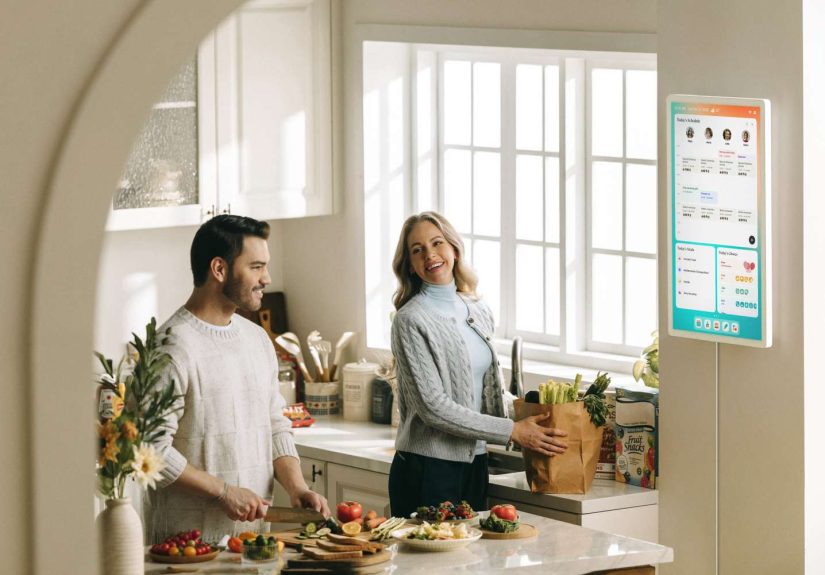
Before we talk AI, we need to talk about the device itself. Cozyla Calendar+ 2 is a wall-mountable digital family hub that syncs shared calendars into one screen, supports up to eight profiles, and combines scheduling with chores, routines, notes, meal planning, grocery tools, screensavers, and companion-app access. It is sold in multiple sizes, including 15.6-inch, 24-inch, and 32-inch models, with pricing that starts in the mid-hundreds and climbs depending on size and configuration.
That already sets it apart from a plain tablet nailed to the wall. The whole pitch is that everyone in the house gets a single visual dashboard with color-coded schedules and family-specific tools. Cozyla also leans hard into two-way sync, so edits made on the device can sync back to supported calendar systems. That makes Calendar+ 2 more than a passive display. In theory, and often in practice, it becomes a place where planning happens, not just where planning gets displayed.
Another important piece: the product is not trying to be calendar-only purism. Reviews and listings repeatedly describe it as an Android-based smart display with access to additional apps, streaming features, and smart-home flexibility. That means the hardware is broader than a one-trick pony, even if the family-calendar use case remains the star of the show.
So, What Is the AI Upgrade?
The short version is this: Cozyla added a branded AI assistant called Cozy and built it into the flows people use most often. Instead of manually building every event, chore, or meal plan step by step, users can now speak or type requests and let the system create structured entries for them. That is the core upgrade. No smoke machine, no sci-fi soundtrack, just less friction.
1. Voice-Based Event Creation
The biggest headline feature is voice-enabled scheduling. Cozyla’s launch materials say users can add events to the calendar with a simple spoken command. Support documentation for the upgraded experience shows “smart addition” workflows where you tap the AI control, speak your schedule, review the result, and approve it. That means the AI is functioning as a translator between normal human language and tidy calendar entries.
That may sound small until you picture real life. Your hands are full. A child is looking for a shoe that seems to have joined witness protection. Dinner is burning. In that moment, “Add parent-teacher conference next Wednesday at 3:30” is a whole lot easier than opening multiple menus and pecking away on a wall-sized touchscreen like a stressed-out woodpecker.
2. AI for Chores and Routines
The second major piece of the upgrade is chores. Cozyla already had a chore-and-rewards system, which was one of its more family-friendly differentiators. The AI layer now makes that system faster to set up. Support pages show that users can create chores by voice, telling Cozy what the chore is, who it is for, and when it should begin.
This is a smart move because chores are one of those things families love in theory and abandon in practice. Not because chores are hard, but because maintaining the system is annoying. The faster it is to create and adjust tasks, the more likely people are to keep using the feature after the new-gadget honeymoon phase ends. And yes, the built-in points, stars, and reward mechanics still do some heavy lifting here. Nobody suddenly loves taking out the trash, but earning progress toward a reward is better than earning absolutely nothing except the smell of old pizza boxes.
3. Smarter Meal Planning
The meal-planning side is where the AI upgrade gets more ambitious. Cozyla describes the new experience as seamless meal planning, and app listings add more detail: AI meal suggestions, recipe import by URL, grocery-list generation, and even photo-based recipe discovery in some flows. The point is not merely to store recipes. The point is to reduce the dreaded evening question of, “What are we eating?” from a household crisis into a process.
That matters more than it sounds. Most families do not fail at dinner because they cannot cook. They fail because decision fatigue is undefeated. Cozyla’s AI tools try to compress the gap between idea, plan, and shopping list. If a recipe can become a planned meal and then a grocery list with minimal effort, the product stops being “a screen with recipes” and starts becoming a workflow tool.
4. Grocery and Pantry Support
The AI upgrade also strengthens the shopping side of the equation. Cozyla says recipe URLs can be parsed into ingredients, and the device can generate grocery lists from meal plans. The broader product also includes pantry tracking, which nudges the experience away from being just a calendar and toward being a lightweight home-management system. In other words, Cozyla is clearly betting that family organization is one giant connected mess, not a set of separate apps politely staying in their lanes.
Why the Upgrade Matters in Real Life
The best way to understand the Cozyla Calendar+ 2 AI upgrade is to ask what problem it removes. The answer is not “having no calendar.” The answer is friction. Too many family tools fail because they require too much setup, too much consistency, or too much enthusiasm from people who are already busy.
Cozy reduces that friction in a few practical ways. First, it makes the system easier for adults to maintain. Second, it lowers the learning curve for less tech-forward household members, because talking to a device is often simpler than mastering a new interface. Third, it helps the product feel more immediate. A shared screen in the kitchen is useful, but a shared screen that can capture information the moment someone says it is significantly more useful.
That is why the upgrade feels meaningful. It is not about replacing family planning with robots. It is about making the family planning system less annoying to keep alive.
What the AI Upgrade Does Not Mean
Now for the part that marketing pages tend to skip while they are busy looking heroic in soft kitchen lighting: the AI upgrade does not turn Cozyla into an all-knowing household genius. It still depends on your calendars being connected correctly. It still depends on people actually using it. And it still depends on the AI correctly understanding what you mean.
That last point matters because some reviews praise the feature set while also noting limitations. Good Housekeeping liked the device overall but specifically flagged that the AI assistant could be better. Other reviewers found syncing hiccups or setup annoyances. App feedback also shows that some users have had questions around syncing events back to the correct calendar owner, which suggests the software is powerful but not always foolproof.
So if you are hoping the upgrade means Cozyla will run your household while you recline on the couch and eat chips in a state of perfect administrative enlightenment, let us gently lower expectations. It is helpful AI, not miracle AI.
The Hardware Still Matters
One reason the Calendar+ 2 conversation keeps going is that the hardware is part of the appeal. The 32-inch model, especially in 4K, is not subtle. It is a statement piece. It is the kind of device that says, “Yes, this kitchen now has operations management.” That visual presence matters because family organization works better when the information is actually visible.
But bigger hardware also brings bigger real-world considerations. Several reviewers mention that the device is heavy, and wall mounting may require drilling. Tom’s Guide even devoted a whole piece to solving the cable-management problem that can come with wall-mounted smart displays like Cozyla. Translation: if you want the futuristic family-hub look, plan your placement before you pretend this is a casual little gadget purchase.
That said, the size is part of the value proposition. A giant shared calendar is easier for the whole household to notice than a phone app buried under eighty-seven other notifications and one accidental tap on a weather alert.
How Cozyla Positions Itself Against Other Family Calendars
Cozyla’s advantage is not just that it has AI. Plenty of products are racing to say that now. Its real advantage is that the AI is layered onto a broader system that already includes chores, rewards, routines, meals, notes, mobile access, and app flexibility. It is trying to be the Swiss Army knife of digital family hubs, not just a prettier Google Calendar on your wall.
It also benefits from not positioning every useful feature behind an ongoing subscription, which reviewers and users have mentioned as a plus. For buyers comparing digital family displays, that matters. A device that feels expensive up front can look more reasonable when the feature list is wide and the ongoing fees are lower or nonexistent.
The tradeoff, of course, is complexity. More capabilities mean more settings, more things to customize, and more opportunities for sync weirdness. If you are the kind of user who loves flexibility, that is exciting. If you want something dead simple and locked down, it may feel like a little too much machine.
Who Should Care About This Upgrade?
The Cozyla Calendar+ 2 AI upgrade makes the most sense for busy families, couples with overlapping schedules, households trying to keep kids engaged with routines, or anyone who wants meal planning and task management to live closer together. It is especially appealing for people who already like the idea of a central home screen but hate the admin work required to keep it updated.
It makes less sense for solo users with simple schedules, minimal need for shared planning, or a strong devotion to existing phone-based workflows. If your whole organizational universe fits inside one neat Google Calendar and a grocery note on your phone, this may be overkill. Beautiful, wall-mounted, futuristic overkill, but overkill nonetheless.
Experience Section: What Living With the Cozyla Calendar+ 2 AI Upgrade Feels Like
Based on current reviews, app feedback, support flows, and product documentation, the day-to-day experience with the AI upgrade looks less like a dramatic tech revolution and more like a series of small household wins that add up. That is actually a compliment.
Picture a normal week. Monday morning starts with the wall display showing everyone’s color-coded schedule instead of three separate phones and one mystery sticky note on the counter. Someone remembers a dentist appointment that never made it to the master plan, so instead of digging through menus, they use Cozy to add it. That is the first place the AI upgrade earns its keep: it shortens the distance between remembering something and actually recording it.
By Tuesday, the chores system starts doing its thing. The family can see who has what task, what is overdue, and who is racking up reward points. The AI angle is not that it somehow makes unloading the dishwasher thrilling. It is that creating and adjusting chores becomes easier, so parents are less likely to abandon the system after a hectic week. Reviews and app listings repeatedly point to chores, rewards, and family routines as core strengths, and the upgrade seems designed to make those strengths easier to maintain.
Wednesday is where meal planning usually turns into a staring contest with the refrigerator. This is another place the AI features seem genuinely useful. The updated Cozyla experience can pull in recipes, suggest meals, build a grocery list, and keep the plan visible for the whole house. That does not make dinner cook itself, sadly, but it does reduce the mental overhead. A lot of “organization” products fail because they add another place to manage information. Cozyla’s better moments happen when it removes a step instead.
Thursday and Friday expose the flip side. If syncing is not configured correctly, or if a calendar account is not selected the way it should be, the illusion of effortless coordination can wobble. Some reviews and user comments suggest that setup and sync can still be imperfect. That means the best experience probably belongs to households willing to spend a little upfront time getting profiles, calendars, and permissions set properly. Once that is done, the system appears far more helpful. If it is not done, the AI cannot save sloppy setup all by itself.
By the weekend, though, the product’s real appeal shows up: the household has one visual source of truth. Plans, chores, meals, lists, and reminders live in one place, and the AI upgrade makes feeding that system easier. That is why the update matters. It is not flashy because it shoots lasers out of the bezel. It is useful because it makes the existing ecosystem faster, more human, and more likely to be used by actual families with actual chaos.
Final Verdict
The best way to describe the Cozyla Calendar+ 2 AI upgrade is this: it turns an already ambitious digital family hub into a more conversational one. Cozy is not replacing the product’s foundation. It is smoothing it out. Voice-based event entry, easier chore creation, smarter meal planning, and linked grocery workflows all serve the same goal: helping families spend less time managing the management system.
That is the real win. Cozyla Calendar+ 2 was already trying to be the wall-mounted answer to modern household chaos. The AI upgrade does not make it perfect, and it definitely does not make it cheap. But it does make the system easier to use in the moments when real life is loud, messy, and not remotely interested in clean UI demos. And honestly, that is exactly where smart home tech should prove itself.