Table of Contents >> Show >> Hide
- What a 3-tool Selector Box Actually Does
- Why JBC Users Are So Interested in This Idea
- The Smart Part: It Solves More Than One Problem
- Why the T245, NT115, and AN115 Are Such a Strong Combo
- How This Compares With Official JBC Multi-tool Options
- Why the Design Feels So Practical
- The Cartridge and Tip-Life Angle Matters Too
- Things to Think About Before You Fall in Love With the Idea
- Practical Bench Experience: What Living With a 3-tool Selector Box Feels Like
- Conclusion
Every electronics bench eventually runs into the same annoying truth: the more precise your work gets, the more you want different soldering tools within arm’s reach. One minute you need a general-purpose handpiece for connectors and ground tabs. The next minute you want a tiny nano handle for microscope work. Five seconds later, you’re wishing your tweezers were already plugged in so you could lift a stubborn chip without doing the awkward “unplug this, replug that, hope the station behaves” dance.
That is exactly why the idea of a 3-tool selector box for a JBC soldering station is so appealing. It is not just a clever bench hack. It is a practical answer to a very real workflow problem: how do you get more flexibility from a premium JBC setup without buying multiple full stations, giving up desk space, or turning your workbench into a cable jungle that looks like it lost a fight with an octopus?
In simple terms, a selector box lets one compatible JBC station work with three different tools by choosing which handle is active at a given moment. It does not magically turn a compact station into a giant production rework platform, but it can make a single-station setup feel far more versatile. For hobbyists, repair technicians, and small-lab users, that is a big deal.
What a 3-tool Selector Box Actually Does
A selector box sits between the station and the tools. Instead of swapping handpieces manually every time the job changes, the user picks the active tool from the front panel. In the best versions of the concept, the station still behaves like a proper JBC system: the correct tool is recognized, standby behavior still matters, and the whole setup stays compact enough to fit neatly under or beside the station.
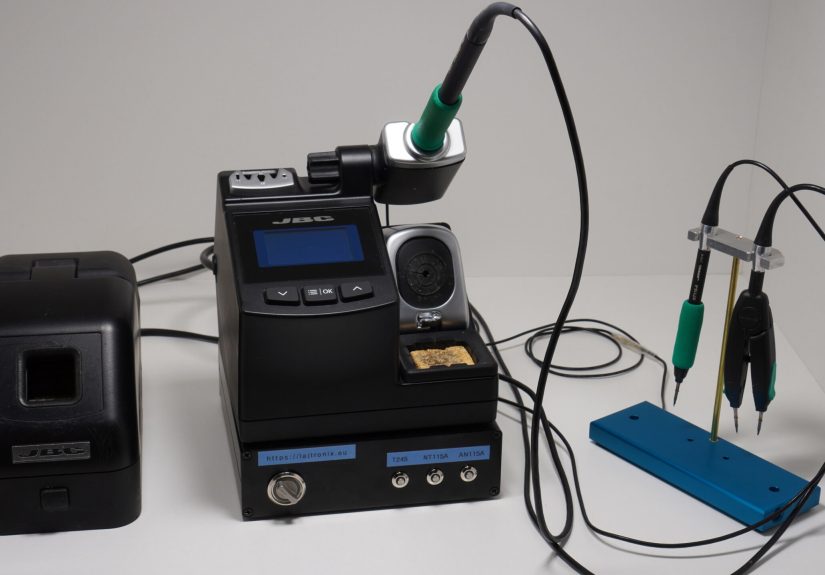
The version that drew attention in the maker world became popular because it focused on three especially useful tools in one footprint: a T245 general-purpose handle, an NT115 nano handle, and AN115 nano tweezers. That trio makes a lot of sense. The T245 handles everyday soldering work, the NT115 is built for tiny SMD tasks under magnification, and the AN115 tweezers make two-sided component handling much less frustrating. That is not tool hoarding. That is just good bench manners.
The beauty of the idea is that it respects the reality of how people actually work. Most soldering jobs are not one-size-fits-all. A chunky connector pin, a 0402 component, and a heat-sensitive two-pad device do not all want the same handle, tip geometry, or grip style. A selector box acknowledges that without demanding three separate stations and a desk the size of a bowling lane.
Why JBC Users Are So Interested in This Idea
1. JBC tools are fast, but swapping tools breaks momentum
JBC stations are popular because they recover heat quickly, support a wide cartridge ecosystem, and build speed into the soldering process. Their stands, cartridge exchanger system, and sleep and hibernation features are all designed to keep work flowing. But even with that efficiency, repeatedly unplugging and reconnecting different handles can interrupt the rhythm of a repair or assembly session. A selector box reduces that friction.
2. Bench space is always in short supply
Many users do not need a full modular production setup. They just want one excellent station that can cover several common tasks. A compact selector box is attractive because it expands function without demanding another power brick, another stand, another outlet, or another section of precious desktop real estate. On a crowded electronics bench, saving even a little space feels like finding an extra parking spot in Manhattan.
3. It can be cheaper than buying a second or third station
JBC equipment earns its reputation, but it is not budget-bin gear. That is exactly why the selector box concept resonates. People who already own a JBC station often want to keep using original JBC handles and original connectors while getting more capability from the station they already paid for. In that context, a selector box is not just a fun project. It is a value argument.
The Smart Part: It Solves More Than One Problem
A good 3-tool selector box is not merely a fancy extension cable with delusions of grandeur. The cleverness is in handling tool selection without confusing the station. That matters because a JBC station does more than dump heat into a tip. It monitors tool behavior, uses stand detection, and manages sleep and hibernation to protect cartridge life and improve consistency.
That means the box has to preserve the logic that makes the system worth owning in the first place. If the station thinks the wrong tool is attached, or if standby sensing is lost, the setup becomes less useful and a lot more annoying. The better DIY concept gained praise because it accounted for these issues instead of pretending they did not exist.
Part of the design’s appeal is that it does not try to overpower the station. It works with the station’s expectations. The active tool is selected cleanly, and the bench workflow becomes simpler: reach, click, solder. Reach, click, rework. Reach, click, remove that tiny part before it launches itself into a parallel dimension.
Why the T245, NT115, and AN115 Are Such a Strong Combo
T245: the everyday workhorse
The T245 handle is the tool you want for broad bench work. It is comfortable, versatile, and well suited to general electronics tasks, from connectors and wires to through-hole joints and medium-size pads. If your station is your daily driver, the T245 is usually the handle that stays busiest.
NT115: the microscope-friendly specialist
The NT115 nano handle is aimed at precision work. When you are soldering tiny SMD parts, working close to delicate neighboring components, or operating under magnification, a smaller handle and smaller cartridge family make a real difference. This is where a selector box stops being a novelty and starts becoming a productivity tool.
AN115: the tweezers that save time and patience
The AN115 adjustable nano tweezers shine when you need to remove or place small chip components cleanly. Anyone who has ever tried to “convince” a tiny two-terminal part off a board with a standard iron knows the routine: one side melts, the other side cools, and your patience quietly exits the building. Tweezers are simply the better tool for that job.
Put those three together and you cover a surprising amount of real-world electronics work with one station. That is why the concept has such strong bench appeal.
How This Compares With Official JBC Multi-tool Options
JBC already sells official multi-tool and modular systems for users who need broader compatibility, multiple simultaneous tools, or production-grade rework capability. Those systems are the right answer for labs, manufacturing, training environments, and heavy-duty rework stations. They are built for scale, flexibility, and documentation.
A 3-tool selector box belongs in a different lane. It is not trying to replace a dedicated multi-tool control unit. It is aimed at compact-station users who mostly want quicker switching among a few favorite tools on a small bench. In other words, it is the difference between converting a spare room into a professional kitchen and buying a really good chef’s cart. Both make sense. They just solve different problems.
Why the Design Feels So Practical
One of the nicest parts of the concept is its focus on everyday convenience. A front-panel switch arrangement is far more accessible than a station power switch hidden on the back. A compact footprint means the box can live under the station instead of colonizing half the bench. Keeping original handles and connectors preserves the feel and quality that JBC users paid for in the first place.
There is also a subtle ergonomic win here. When the right tool is available faster, you are more likely to choose the right tool instead of forcing one handle to do everything. That often leads to better joints, less stress on pads, less tip abuse, and less operator fatigue. In soldering, convenience and quality are not enemies. Often, convenience is what allows quality to happen consistently.
The Cartridge and Tip-Life Angle Matters Too
JBC’s system is built around fast cartridge changes, smart stands, and heat-management features that lower tip temperature when the tool is not in use. That is not marketing fluff. It is one reason people like these stations. A selector box fits naturally into that philosophy because it reduces unnecessary tool swapping while still letting the user pick the right geometry for the job.
If your workflow involves jumping between a larger C245-style job and ultra-fine C115-style work, the selector box can be more efficient than constant unplugging. It supports the larger idea behind a professional soldering bench: less fiddling, more actual soldering, and fewer moments where you stare at a connector and mutter, “This tip is wrong, but I’m already here.”
Things to Think About Before You Fall in Love With the Idea
The concept is excellent, but it is not magic. Compatibility matters. Station behavior matters. Standby sensing matters. And because you are dealing with professional soldering equipment, this is not the kind of project that should be treated like a casual weekend decoration made from leftover drawer junk and unreasonable optimism.
The smartest way to evaluate a selector-box concept is to ask a few practical questions. Does it preserve proper tool recognition? Does it respect the station’s sleep and standby logic? Does it keep the bench safer and cleaner rather than more chaotic? Does it actually save time in your workflow, or are you building it just because the idea is cool? The honest answer can be “both,” but it should still improve the bench.
If the answer to those questions is yes, then the selector box becomes more than a neat hack. It becomes a serious workflow upgrade for a compact JBC setup.
Practical Bench Experience: What Living With a 3-tool Selector Box Feels Like
In real bench use, the biggest difference is not raw soldering performance. JBC tools were already good at that. The real difference is mental flow. With a selector box, the bench feels calmer. You stop planning around tool changes and start planning around the work itself. That sounds small until you spend an afternoon moving between connector repair, microscope touch-up, and chip removal. Then it becomes obvious.
A typical session might begin with the T245 for a connector shield, a large ground pad, or a wire repair. A few minutes later, the job shifts to fine-pitch cleanup or a tiny passive near plastic housing, and the NT115 becomes the better choice. Then a failed chip resistor or a small two-sided component needs to come off cleanly, and the AN115 tweezers suddenly look like the hero of the story. Without a selector box, that sequence means cable swapping, tool recognition delays, and at least one muttered complaint. With a selector box, it becomes a fast series of deliberate choices.
There is also a surprising comfort factor. When three tools are ready to go, you stop trying to force one handle into every role. That alone can improve soldering quality. The large handle does large-handle work. The nano tool handles delicate tasks. The tweezers take over when the part geometry calls for two points of heat. Instead of improvising around inconvenience, the setup encourages better habits. And better habits are the quiet superheroes of electronics repair.
Another practical benefit is how neatly the concept fits a small bench. Many compact workstations suffer from accessory creep. First comes the main station. Then the extra stand. Then the second stand. Then the tip holder. Then the cleaner. Suddenly the bench looks less like a precision workstation and more like a desk where gadgets came to retire. A selector box helps keep that sprawl under control. When it is designed to sit beneath or beside the station, the whole arrangement feels intentional rather than improvised.
Even the small touches matter in daily use. A front power switch is more useful than it sounds, especially when the original station switch is on the back. Indicator lights help confirm what is active at a glance. And once the station’s standby behavior is preserved properly, the system still feels like a JBC setup instead of a weird aftermarket science project. That last point matters more than enthusiasts sometimes admit. People buy JBC because they like how it behaves. Any add-on has to respect that.
Of course, no setup is perfect. A selector box will not replace a true multi-tool production station for users who need simultaneous tools, traceability-heavy workflows, or broader factory-style rework capability. But for the individual technician, repair bench, or serious hobby lab, it can feel like the sweet spot between compact simplicity and premium flexibility. It gives one station more range without making the bench more chaotic.
That is why this idea sticks in people’s minds. It is clever, yes, but it is also deeply practical. It solves a real irritation with a compact, thoughtful answer. And in electronics, the best projects are often not the flashy ones. They are the ones that remove friction from the everyday jobs you do over and over again. A 3-tool selector box for a JBC soldering station does exactly that. It makes a good bench better, a crowded bench smarter, and a premium station a lot more adaptable. For many users, that is more valuable than yet another shiny gadget promising revolution while mostly delivering extra clutter.
Conclusion
A 3-tool selector box for a JBC soldering station is a smart example of bench optimization done right. It solves a real-world problem, keeps original JBC tools relevant in a compact setup, and gives users faster access to the three kinds of capability they most often need: general soldering, ultra-fine SMD work, and tweezer-based rework. It is not a replacement for JBC’s official multi-tool platforms, but it is an elegant middle ground for users who want more flexibility without buying a full second system.
In other words, it is the kind of upgrade that makes you wonder why your bench did not work this way sooner. And that is usually a sign of a very good idea.